Site Links
|
 |
 |
 |
Coming Of Age A Professional Photographer Wins Clients With Digital Photography
By Jay Abend July, 1999
| |
Red
shoes.
Photos © 1999, Jay Abend, All Rights Reserved
|
|
If you have been reading
Shutterbug for some time, you’re no doubt aware of the constant
drumbeat of the digital photography industry. The products used to fall
into two categories--expensive cameras that take frightfully bad pictures,
or frightfully expensive cameras that take excellent pictures. It may
seem like a no-win situation for the old school film guys, but the scene
is changing fast.
With the recent release of the highly acclaimed and tough to find Nikon
CoolPix 950, Canon Powershot Pro 70, and Olympus C-2000 Z, the casual
snapshooter and the quick and dirty studio guys have found cameras that
can just about replace film. Why, you may ask, would I want to spend
a cool thousand bucks to buy a camera that replaces a $79 point-and-shoot?
The advantages are many, but speed, instant gratification, and ultimate
cost savings are the best. Most home users find the ability to make
prints on their desktop and heavily edit images themselves to be slam
dunk reasons to go digital. While the really good stuff is still tens
of thousands of dollars, there is now a reasonably priced way to get
started.
For me, digital imaging has become my career. When I went digital several
years ago, it was basically out of a desire to make prints in my studio.
I just figured that a digital camera and dye sub printer would satisfy
a few clients I had who needed C-prints every now and then. The big
ticket price tag would be passed on to the client, and everyone would
be happy. Today I have two different kinds of clients, the ones who
hire me for my photography ability, and the ones who hire me because
I’m a digital guy. I’m happy receiving work from either
client, just as long as that phone keeps ringing.
|
|
While a lot of Shutterbug readers
have complained about the creeping digitalization of the magazine, a lot
of you are starting to get hip. To give you a good idea why a pro would
want to be fully digital, Shutterbug asked me to take a few recent assignments
and explain how I shot them, what I did to them, and how you can get similar
results. Here goes…
Red Shoes. Here is a shot that would be very expensive
to do the old-fashioned way. A retoucher and a few C-prints would have
been the traditional method, but with a digital camera and a good image-editing
program you can do it yourself.
I shot the foreground shoe with a Leaf DCBII, the rear shot with a Leaf
Lumina. Each was silhouetted using the pen tool, and shadows added. To
satisfy the client a number of different colored backgrounds were inserted
and small “For Position Only” JPEG files created. These were
e-mailed to the client, who instantly placed them in the layout to decide
which color was best. Once selected a high-res copy was made and burned
to a CD-ROM.
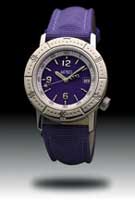
Blue Watch. The client wanted the watch floating in midair
with a visible drop shadow. Like you, I figured that digital manipulations
would look fake, so I started rigging some armature to shoot the image
on 4x5 film. After a few hours of messing around, I decided to devote
the rest of the day to “Photo-shopping” it to see what I could
do. Rather than wait for the film to come back from the lab I grabbed
a shot of the watch in a custom-made watch stand with a Leaf DCB digital
camera back. I interpolated the 2048x2048 pixel file up to about 3500
pixels square. Using Photoshop’s pen tool I painstakingly created
a path around the outside of the watch band and face. Once completed I
converted the path to a selection and deleted the background.
Now I had a watch with no background. I then added two layers with nothing
in them. On layer two I added a black to white gradient, trying different
gradients till I got one that I liked. On layer three I drew an oval selection,
filled it with black, and then deselected it. Then I applied a 30 pixel
Gaussian Blur to the oval shadow, then moved it under the watch. Once
all the elements were in place I used the blue channel of the watch layer
to create a mask, then I was able to adjust the color and saturation of
the band and watch face without altering the tone of the watchcase. Once
done I flattened the image and made a few prints. I’ve had this
shot in my portfolio for a while and clients always respond well to it.
|
|
Guy At Window.
Here is a tough assignment that I received only because I was known to
this ad agency as “The Photoshop Guy.” They didn’t even
care if I shot it on film, they just knew the look they wanted, and realized
that it had to be created in the computer.
I have found that fantasy images, like the businessman with wings and
the flying alarm clock, are easy to pull off, since you have no visual
frame of reference. Images like this that must appear real are hard. To
build this creation I started with the guy in the suit standing against
a blue background from two different angles. I then shot the steel window
frame on location, four different shots of bricks, and three different
angles of the factory floor.
Once all of the 6x7 Fuji Velvia images were drum scanned I began assembling.
The guy was easily knocked out using Cinematte from Digital Dominion,
and the edges fine-tuned with the excellent edge blender tool in Extensis
Mask Pro 2.0. The same was done for the reverse angle that would provide
the faint reflection in the “glass.” The window frame was
knocked out using a simple selection, then the bricks were composited
in a series of layers to create the three-dimensional effect. I combined
the bricks and window frame to create the body of the image, then inserted
several factory shots behind the frame. By resizing using the scale tool,
I was able to combine the shots to look like one, then convert the image
to a duotone for that dreamy sepia effect. Once I positioned the man in
front of the frame and his reflection behind the frame I could adjust
the opacity of the reflection down to 18 percent so it would really look
like a reflection. I added a few more layers of faint shadows to add depth
and that was that.
At one point this image was 13 layers deep and 110MB big, but it got the
job done.
|
|
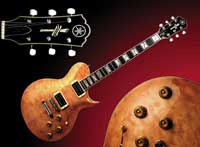
Guitar. Here
is a great example of how seamless a digital composite can be. Each of
the three main shots was captured with a Leaf Lumina scanning camera,
then they were silhouetted using Extensis Mask pro. The background gradient
was created in Photoshop, then the elements were brought into position.
I resized some of the elements to make them fit correctly, then color
corrected the entire image. There is no convenient way to do this with
film and still maintain the gradient background.
|
|
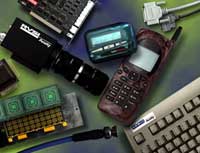
Montage. Here
is an image that was made possible by digital imaging. In the old days
I would have meticulously propped these products to match the Art Director’s
comp, shot 4x5 film, and delivered the chromes to the client. They would
then pay big bucks to have the logo added to the black camera body. Now
they can come to me and I can do the entire project.
Each product was shot individually using a Leaf DCBII camera against a
blue screen and knocked out. Each silhouetted object was assigned its
own layer, and a faint drop shadow was created. I linked the objects with
their shadow layers so the shadows would follow as I moved them around.
In cases where the shadow was to fall on another object the shadow was
actually painted away using the eraser tool where it crossed the second
object, then a new shadow layer created at a slight offset.
A job like this required tons of RAM and lots of patience. Once all of
the objects, layers, and shadows were in place, the mottled background
was created in Kai’s Power Tools (a must have). The final step was
to take the “Acuity RVSI” logo from the client’s floppy
disk and make it look correct when applied to the black camera. The client
approved the position and I fine-tuned the color and density, and that
was that.
|
|
Wine Bottle. You
can easily shoot this shot with a film camera, as I did in a previous
Shutterbug article, but it’s so easy digitally. Rather than meticulously
position the lighting, bottle, and camera and work for hours to get it
all right, I simply shot the bottle laying down against a white background
and did the rest in Photoshop.
Once the bottle shot was cleaned up I silhouetted it using the magic wand
tool to select the background. Then I created a duplicate of the bottle
layer, flipped it over (Rotate-Flip Vertical), and dialed the opacity
to 20 percent. I positioned it to look like a reflection, then added a
new layer. I filled the new layer with this smooth black to white gradient
and we were done.
The Verdict. Digital imaging has revolutionized the advertising
industry completely, and it is about to completely change every other
aspect of photography. I changed my skills and my business model to compete,
and so far so good. If you make money with a camera and you don’t
yet know your way around a digital camera or an image-editing program
like Photoshop, you’d better get busy or risk being left behind.
While I still shoot several hundred rolls of film a year, I know that
every single shot will eventually be scanned and edited digitally. By
offering these services to my clients I not only make more money, but
I retain more control of the creative process, and these are two things
that I care about deeply.
|
 |
|
 |
|
|
 |
 |
 |
|