Stereophile    ::     Home Theater    ::     Ultimate AV    ::     Audio Video Interiors    ::     Shutterbug    ::     Home Entertainment Show

Mirror/Mirror; Dupe And Flip Techniques

Scott Stulberg, June, 2007

Mirroring photos has always been one of my favorite techniques, and it is a relatively easy way to come up with some fun and creative images. Mirroring images consists of duplicating part of a photograph and flipping it around in different ways to create a mirrored effect. I use all kinds of subjects for these creations and I am constantly looking for things that would produce something new and unusual. I like using shots of architecture, landscapes, and many types of objects, large and small.

There are two main ways to mirror images in Photoshop. One is to select part of the image, flip it, and then move it to create a nice mirrored effect. The other method involves a Photoshop plug-in called Instant Mirror (available at thepluginsite.com). This is a pretty nifty little filter that makes mirroring a piece of cake. I will show you how to create your own mirrored images in Photoshop easily by selecting part of the image and working with just the selected portion.
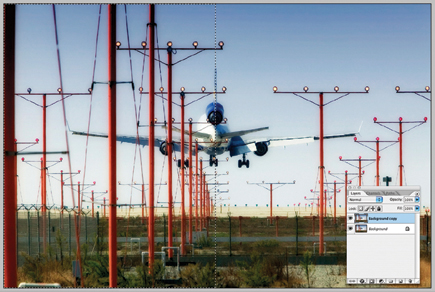
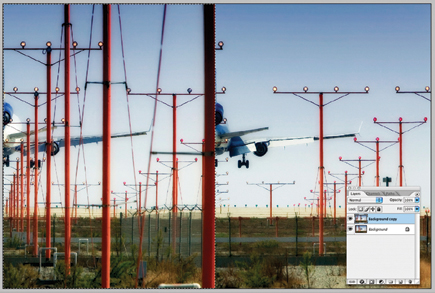
1. (Image A) Duplicate the background layer of the image you want to use. Next, using the rectangular Marquee tool, draw a selection covering half of your image, starting from whichever side you wish to mirror.
All Photos © 2007, Scott Stulberg, All Rights Reserved

2. (Image B) On the duplicate layer, select Edit>Transform>Flip Horizontal, which will flip your selection. Then using the Move tool, drag it over to the opposite side of the image until it fits nicely and makes a seamless mirrored look.

3. (Image C) Depending on which kind of image you started with, your end result can range from wild to dramatic to deranged. This final image has created a tough landing for the pilot.

>Recent Additions
>Amateur Digital SLRs
>Pro-Quality Digital SLRs
>Compact Digicams
>35mm Cameras
>Medium & Large Format Systems
>Lenses
>Scanners & Printers
>Lighting Equipment
>Accessories
>Classic & Historical Cameras
>Software & Computers
>Paper & Ink
>Pro Techniques
>Digital Darkroom
>Portraiture
>Sports/Action
>Lighting
>Outdoor/Travel
>Wildlife
>Film & Processing
>Photo Allies Blog
>Co-Op
>Forums
>Galleries
>Photo News
>Past eNewsletters
>Free Aperture Seminars
>Turn Your Hobby Into Cash
>Industry Voice
>Glossary
>Trade Shows
>Workshops
>Photo Links
>Shutterbug Radio
>Master Index
>Manufacturers/Distributors
>Contact Us
>Customer Service
>Outdoor Tips
>Travel Tips
>Portrait Tips
>Sports Tips
>Lens Tips
>Software Tips
>Family Tips
>Instant Links
>Editor's Notes
>Talking Pictures
>Picture This!
>Features
>Book Reviews
>Student Union
>Point of View
>Web Profiles
>Exhibits
>Photo Clubs
>News & Notes
>Show Reports
>Help
>Digital Help
>Business Trends
>Digital Innovations
>Globetrotter
>Master Class
>Passport
>The Darkroom
>Dealer Locator
>Catalog Showcase
>Shutterbug Shopper
>Photo Lab Showcase
>Service Directory
>Free Product Info
>Classifieds
>Photography Lighting
>Digital Photography Equipment
>Film Processing
>Lexar Media
>Camera Lenses
>Stereophile
>Home Theater
>Ultimate AV
>Audio Video Interiors
>Home Entertainment Show
Home/News | Subscribe | Give a Gift | Sub Services
Media Kit | Privacy | Terms of Use | Contact Us | RSS News, Tips & Reviews
Copyright © SOURCE INTERLINK MEDIA All rights reserved.