Get Great Studio Portraits Nine Tips To Lighting Success
Steve Bedell, October, 2003

| |
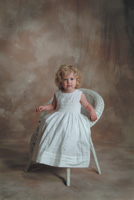
This photo of Molly Olson shows the wraparound effect
of the form fill combined with the main light. The main
light is a Photogenic Powerlight shot through a Studio
Dynamics 36” round softbox. The fill is a Bogen
Bo Lite with a white umbrella. The background light is
very subtle, adding light to the left side. Notice how
your eye goes from the light background to the dark shadows
to the highlight side of the face and then back to a darker
background. Background by David Maheu.
Photos © 2003, Steve Bedell, All Rights Reserved
|
|
My strong point has always
been natural light. When clients call me about weddings, I tell them
I am a “natural light specialist.” I love shooting outdoor
portraits and have trained myself to “see the light” in
the locations that I visit. But that does not mean I don’t shoot
in the studio. Living in northern New England, just shooting outside
would severely limit the number of sessions I could handle. Not many
people go for outdoor portraits when the temperature is below 10Þ.
I have made a concerted effort to elevate the quality of my studio portraits
over the last year. I’ve completely overhauled my lighting system
as a result of several seminars, including a three-day stint with Tim
Kelley of Orlando whom I’ve written about in these pages, and
my own practice. A big plus is the fact that I now shoot everything
except family groups digitally, allowing me instant feedback and the
ability to make rapid changes. Following are some tips that I’d
like to share.
Form Fill Light
Use a form fill light, which might just make the biggest difference
in your work. In the “old days,” which I call BD (Before
Digital), photographers would usually design their studios with a bank
of lights bouncing off a back wall to flood the studio with a non-directional
fill light. They would then adjust power to get whatever f/stop they
desired at the subject distance, and never touch it again. Most would
usually base their exposure on this setup. The thought was that even
if no other lights fired, you’d have a good, printable exposure.
But it also has the effect of evenly lighting the entire subject with
a very flat light. Trying to do profiles was an exercise in futility
without changing the fill light.
|
| |
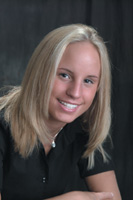
This
photo of Ashley Dubois looks like the light is flatter.
Why? Because when I want a more even look to the lighting,
I simply move my fill light to the side opposite the main
light. Since I’ve metered my lights precisely, I keep
my exposure the same but the shadows are “filled”
more.
|
|
A form fill, on the other hand,
works in concert with the main or key light to create shape to the subject.
The form fill should follow the nose. Using the profile example again,
if your subject is facing the wall to your right, the fill light should
be placed in front of the wall he or she is looking at, not behind you.
The main light will be slightly behind the subject to create the shape
you want, and the form fill will help shadow detail without destroying
the effect you’re trying to get. Even in traditional poses, with
the face toward the camera and the head turned slightly, you’ll
notice your portraits have much more “snap” by placing the
main and fill on the same side of the camera.
Meter Ratios
Meter ratios precisely. Since I’ve gone digital, I have not thrown
away my light meter like some pros. I now use it more than ever! By using
one incident meter that I know like the back of my hand I can overcome
variables such as dark and light colors and the difference between lenses
and their readings. When I set my studio up, I meter each light individually.
I start with the main light and base everything else on that. I like my
main to be f/11, and my fill to be f/8. My background light will vary
between f/8 and f/11 depending on the color of the background and how
bright I want it to be. My separation or hair light will vary between
f/8 and f/11 also, depending on the subject’s hair color. By metering
your lights first and then making final adjustments, you know you’ll
be within tight tolerances, especially for digital.
|
| |
By
feathering the main light, I create nice shape on Kate Bracco’s
face but keep it from striking the background. I also create
a soft transition from highlight to shadow areas since the
front part of my softbox acts as a fill also.
|
|
Feather The Main
Feather your main light. There are a couple of reasons for this. First,
by this point you can see that each light has its job to do and you want
them to act in harmony, as opposed to defeating each other. By feathering
the main light, you allow light to strike the subject but not the background,
which you want to control independently. (The term “feathering”
means you turn your main light toward the camera until just the front
edge of the light hits your subject.)
But there is another vital reason. By using just the front edge of the
light to strike your subject, the rest of the light is acting as a “form
fill.” The light coming from the opposite side of your main light
is helping to fill in shadows and create a smooth transition from highlight
to shadow area. How much depends on the relative size of the light in
relation to your subject. Many photographers use 6-foot long and larger
softboxes up close to their subjects. By feathering a light that size,
the one light is both the main and fill, so no additional fill light is
needed. Smaller light sources will create sharper shadows—you need
to do your own testing to see what suits your style.
|
| |
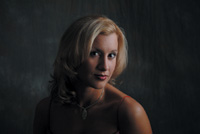
In
this portrait of Kelsey Call, I wanted to create a dramatic
effect with a dark background and dark clothing. Notice
how the separation light adds life to the hair. The hair
showing back and left would have disappeared into the background
without additional light.
|
|
Watch The Background
Keep light off the background. As you may have already surmised, each
light has a distinct purpose and interference from other lights will destroy
its mission. In addition to feathering the main light to keep it from
striking the background, you should also make sure that your hair or separation
light does not strike the background. I’ve seen many portraits ruined
because a photographer allowed his hairlight to strike the background.
Make sure it is “flagged off” properly. Do this by turning
off the room lights in your studio and checking each light one at a time
in the darkroom, noting the lighting pattern of each light.
Go For A Gobo
Use a “gobo.” Talk about a blast from the past! A look at
most photographers’ studios will find a collection of softboxes
and umbrellas of ever-increasing sizes. While we’ve all learned
that “size matters” when it comes to light modifiers, that
doesn’t mean we can just aim a huge light source at the subject
and get great light. We can be sure we’ll get a bunch of it, but
there may be areas where “less is more.” Enter the gobo, a
“go between,” in this case something placed between the light
and the subject to block light. You can also use a gobo to block light
from striking your lens.
|
| |
In
this photo of Shauna Randall, I wanted to add a little color
to the background, so I added a red gel to my background
light. If my main light was not feathered away from the
background the intensity and saturation of the red would
be lost.
|
|
While you can buy them, all
you need is a reflector or piece of cardboard placed on a light stand.
By blocking off certain areas like a bare shoulder or baldhead, our attention
is kept on the face. I suppose you could do it in Photoshop later, but
why not do it before so all the photos look good, not just the ordered
ones? I still try to shoot like Photoshop does not exist. Try it—you’ll
be a better photographer.
|
| |
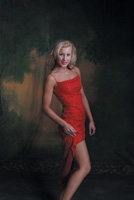
This
dramatic portrait of Shauna Randall was created by using
a form fill, main light, just a touch of light on the background,
and a gobo. By blocking the light on the shoulder, the attention
stays on the face. No separation light was used because
of the bare shoulders.
|
|
Separation Light
Use a separation light. This used to be called a hairlight, but when used
properly the term separation is a better fit. This light is placed above
and slightly behind the subject and is usually aimed at the hair. Its
purpose is to provide detail in the hair and to separate the subject from
the background, as a rim light does outside. This light should hit the
shoulders also. Pay careful attention to the intensity of this light.
Too much and it becomes distracting and can cause overexposure; too little
and it becomes unnoticed. I usually like to have mine right between the
fill and main light intensity (f/9.5 in my case) and will go to f/11 for
very dark hair and f/8 for very light hair. I turn it off for baldheads.
This may sound obvious, but I see photos all the time of baldheaded guys
with a big shiny spot on their head. Unless you’re going for a “kicker”
effect, leave it alone.
|
| |
Notice
how in this example of Shauna Randall I’ve directed
the background light to the left side and the main light
is from the right. Try to picture how the image would look
with the light to the right. Instead of a nice balance,
all the “weight” would be on the right side
of the photo with no interest in the left-hand side. Background
by David Maheu.
|
|
The Shadow Side
Light the background from the shadow side. Most photographers still use
a short background stand with a light perched on it and a half moon-type
reflector on it that shines light on the background and keeps it from
striking the subject.
Try this instead. Take your background light, put it on a stand, flag
it off so it creates a spotlight effect, and aim it at the background
from a few feet away. By creating a lighter area on the shadow side of
the portrait you create balance by using a light-dark-light pattern in
the image. The effect should be subtle, not overpowering. Start by having
the background light intensity about the same as the fill and increase
it for dark backgrounds. You’ll see it has a much more elegant look
than just smashing a light at the background.
|
| |
In
this photo of Kate Bracco, I’ve used a light-colored
background and lit it with my background light. By basing
the exposure on the highlights, I know that I’ll be
safe from overexposing the highlights in the face and the
light background. Had I based the exposure on the fill light,
which is one stop more, the image would be junk.
|
|
Highlight Bias
Base your exposure on the highlights. If you’re shooting film you
can still get away with the old method of basing the exposure on the fill
light. Try it with digital and your images will be toast. I base my exposures
on the intensity of my main light and use the fill to add detail to shadow
areas. Digital capture has an exposure latitude of close to zero, maybe
1/3 stop either way. You’ve got complete control in the studio,
so do your testing first and there should be no reason why you shouldn’t
have perfect exposures every time. I don’t bother shooting in “raw”
format. I’ve tried it and find I don’t want to change anything,
so I’ve given myself more work for no real reason. I realize some
cameras don’t give you this option.
|
| |
Here’s
what the histogram of a properly exposed gray card looks
like and this is what you should see on your LCD back on
your camera if you’ve exposed properly.
|
|
Gray Card Test
Shoot a gray card. There have been many articles on this method of obtaining
perfect exposure. Just fill your image with a gray card under your studio
lighting conditions and look at the histogram. Since it’s just that
one color and it’s a perfect medium density, your histogram should
just have one spike exactly in the center. What a great idea! There are
also cards and reflectors floating around that are divided into three
colors—pure black, gray, and pure white. Take a picture of these
and you should have three spikes lined up perfectly. (Frank Criccio is
credited with this method.) If they’re off to one side or the other,
adjust your exposure to correct.
|
|
And One For The Road
Hey, I said nine tips! For some reason, people like to have things in
nice round numbers, so here’s a little bonus. Try using a “kicker”
light for impact. A “kicker” is usually a strong light used
to accent a feature or add drama to a portrait. How about we leave that
subject for another article down the line?
Note: All images in this article were captured with a Fujifilm S2 Professional
camera. They were shot in Fine JPEG mode with no sharpening or contrast
boost (ORG settings). These are totally unretouched files taken with auto
white balance.
|
|