


- REVIEWS
Camera Reviews 
More Reviews Mobile Reviews Photography Reviews - GALLERIES
- VIDEOS
- BUYER'S GUIDES

Monochrome Plug-Ins; From Color To Black & White In A Few Steps
One of the reasons photographic purists usually refer to black and white prints as “monochrome” is that it’s a more precise descriptive term that also covers images produced in sepia and other tones. There is much more to black and white photography than simply an absence of color. Maybe we wouldn’t feel this way if the first photographs had been made in full color but that didn’t happen. Like many photographers, I grew up admiring the works of W. Eugene Smith and other photojournalists who photographed people at work, play, or just being themselves, all in glorious black and white.
 |
 |
||
|
|
One of the advantages of working with monochromatic digital photographs is the original image can come from many sources. Some digital cameras have Black and White or Sepia modes for capturing images directly in monochrome but more often than not they capture these photographs in RGB. Yup, it’s a color file without any color! You can also capture your images in color, then use any of the software that I’ll introduce you to and convert that full color photograph into a monochromatic one. As a creative medium, traditionalists may still call it “monochrome” while digital imagers may prefer the computerese “grayscale,” but, to paraphrase Billy Joel, “It’s still black and white to me.”
One of my favorite ways to convert a color file into monochrome is to use Photoshop-compatible plug-ins. You can always use the Black and White New Adjustment Layer (Layer>New Adjustment Layer>Black & White) in Adobe’s Photoshop and it’s a pretty good tool as far as it goes, but this story is about monochrome conversion plug-ins.
 |
 |
||
|
|
Monochrome Conversion
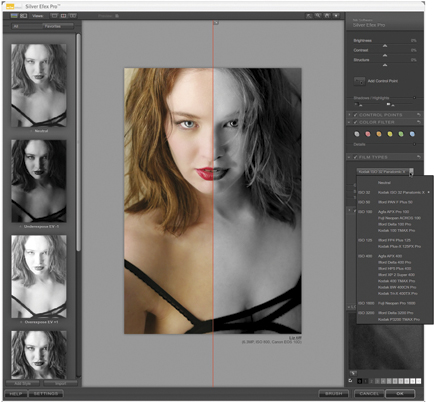
Nik Software’s (www.niksoftware.com) Silver Efex Pro is a Photoshop- and Aperture-compatible plug-in that offers emulations of 18 different black and white films from Agfa, Fuji, Ilford, and Kodak, along with a grain engine that mimics the traditional silver halide process. In the Film Types area on the right-hand side of the stunningly designed interface, you’ll also find controls for Sensitivity and Tonal Curve, allowing fine-tuning of the conversion.
The plug-in uses Nik Software’s patented and insanely cool U Point technology, borrowed from Nikon’s Capture NX software, that allows selective control of an image’s brightness, contrast, and structure, adding another level of control. By placing points on specific parts of the photo you can control how much of the effect is applied to only those areas. When making the final monochrome conversions, Silver Efex Pro uses algorithms to protect against creating unwanted artifacts. The plug-in costs $199.95, and works with 8- and 16-bit images, RGB, CMYK, and LAB color spaces, and is compatible with Photoshop’s Smart Filters feature.
 |
|
|
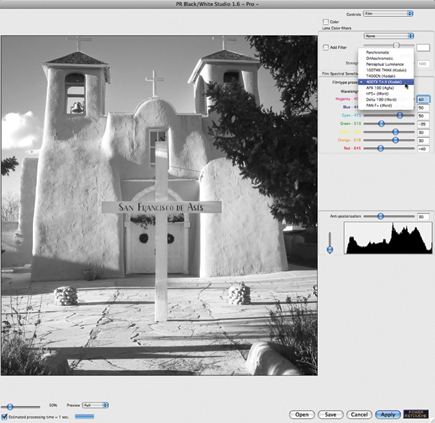
Power Retouche’s (www.powerretouche.com) Black & White Studio ($63) includes a pop-up Control menu, giving you access to three different interfaces: Film, Print, or Zones. Film lets you apply the light sensitivity of specific brands of films (Kodak’s Tri-X, T-Max, etc.) as well as types (panchromatic, orthochromatic) to make the conversion, or you can create your own sensitivity curves and save them for later use. There’s also a Perceptual Luminance option in the “Filmtype Presets” pop-up menu that does a pretty good job if none of the included Agfa, Ilford, or Kodak presets work for you. The Print controls put the darkroom back in digital darkroom by offering sliders for Multigrade (variable contrast), Exposure, Contrast, and some interesting ones such as Saturate Blacks and Black Soft Threshold. Zones may not be a direct implementation of Ansel Adams’ Zone System but it’s close enough, allowing you to assign three separate Zones to an image and apply separate contrast, brightness, and balance to each one. Power Retouche’s Black Definition plug-in ($32) makes a wonderful complement to Black & White Studio and lets you adjust black as if it were a color channel. Before you finish with an image, try Power Retouche’s Toned Photos plug-in ($32) to add sepia, van dyck, kallitype, silver gelatin, palladium, platinum, cyanotype, light cyanotype, or silver toning using presets or its controls to create your own. All three plug-ins work with 8-, 16-, 48-, and 64-bit RGB, Grayscale, Duotone, or CMYK image files.
 |
|
|
Conversion And More…
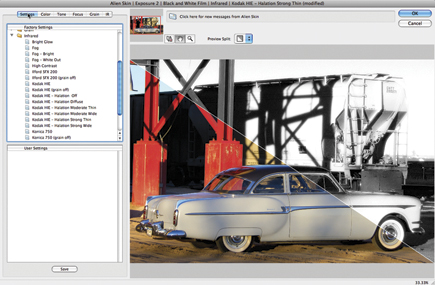
Alien Skin Software’s (www.alienskin.com) Exposure 2 contains two plug-ins: Black and White Film emulates a dozen different film stocks and Color Film not only recreates a film’s distinctive look as a more or less one-click operation but manages saturation, color temperature, dynamic range, softness, sharpness, and grain at the same time. These presets are the starting point and can be tweaked to suit a particular photograph or applied to a batch using Photoshop Actions. Exposure can add grain to an image’s shadows, mid tones, or highlights and models the size, shape, and color of
real-world grain.
The plug-in’s presets include high-level contrast and highlight and shadow controls that can be applied with just a click. Additional features reproduce studio and darkroom effects such as cross-processing, split-toning, push processing, and glamour portrait softening. Exposure even includes presets for cross-processed Lomo-style image shots with your choice of four different manufacturers’ films! In addition to a before/after button, the preview window includes an optional split preview and combines unlimited undo/redo pan and zoom using Photoshop-style keyboard shortcuts. Exposure 2 costs $249.
 |
|
|
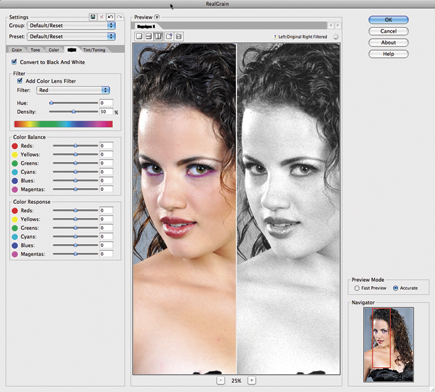
While it’s not specifically designed for monochrome conversions, Imagenomic’s (www.imagenomic.com) RealGrain Photoshop-compatible plug-in lets you perform conversions, but it does a lot more. This $99.95 Mac OS and Windows software offers methods for simulating grain pattern, color, and the tonal response of different kinds of black and white films to produce film-like image effects. RealGrain also simulates traditional toning effects such as sepia, platinum, and others, plus split-toning. The plug-in automatically adjusts grain size based on the image file’s physical dimensions and dynamically renders accurate color or black and white film grain patterns for varying file sizes.
 |
|
|
RealGrain has a library for many color and monochrome films and lets you fine-tune hue, saturation, and brightness, as well as use master saturation and hue sliders to manipulate saturation and hue levels for all color ranges. You can also control color toning for shadows and highlights, as well as for single tonal effects or to adjust the tint in color images.















 FEATURED VIDEO


Get the Latest Photo Tips, News & Reviews from Shutterbug!







| Camera Reviews Other Reviews | |
Mobile Reviews Photography Reviews Columns | |
News | |
Features | |
How-To | |
Resources |
 © 2026 Shutterbug
AVTech Media Americas Inc., USA
All rights reserved