


- REVIEWS
Camera Reviews 
More Reviews Mobile Reviews Photography Reviews - GALLERIES
- VIDEOS
- BUYER'S GUIDES

The Contax U4R: A Handy 4 Megapixel Memo Camera

The camera shoots in JPEG only, which is fine for a 4-megapixel memo camera, though purists might miss a non-compressed format such as TIFF or some sort of camera Raw format. The highest resolution, at 2272 x 1704 pixels, gets compressed at about 1:4, and opens to about an 11.1 megabyte file. Another bow to simplicity is that the camera only meters in Program AE, so you have no control over the aperture or shutter speed setting, making image effect choices limited. But you can control how the camera reads the light with three metering modes, including evaluative, center-weighted and spot. This does give you some good exposure control overall, as does the exposure compensation function. The built-in flash also helps, though because of its diminutive size it's only good to a very optimistically stated 10 ft.
If you want to get some image effects you'll have to resort to Scene modes, which includes sports (which chooses the fastest shutter speed possible, thus a wider aperture), Portrait (which pretty much does the same thing), Sunset, Night Portrait and Night view, the last in the list being a longer exposure time. You can also shoot in black and white and sepia modes, nice touches but something easily done in software as well. ISO settings go from a default of ISO 50 to ISO 400, the latter being best chosen for shots in lower light levels. If you want to dig into the menu you can also affect chroma (color saturation) and sharpness, also available in software later, though there's no contrast control, which in some cases is a good feature in bright light. If you like movie clips you can do that to at a respectable 30 frames-per-second. In continuous shooting mode you can get up to 3.3 frames per second, great for making stutter step movie effects. For a full list of specs check out the Contax web site at www.kyoceraimaging.com (the company that makes the camera.)
One of the nicest features of the camera is the LCD monitor, which takes up almost the entire back of the camera and is one of the sharpest and brightest I've worked with and really gets you excited about the images. In fact, you can only view and take pictures using the LCD, as there is no optical finder. This does pose somewhat of a dilemma in very bright light, but again this is a very good monitor and for the most part you will be pleased by the way it delivers the scene to your eye.
To shoot with the camera you can move the lens component in any number of ways, twisting it like a bottle cap, or you can keep the camera flat and use it like a waist-level camera. This is great for shooting from angles different than you might be used to and does add to the creative possibilities inherent to this design. I often held the camera quite low to the ground when shooting, and had fun twisting the lens apparatus into odd angle when shooting. This does take some getting used to, but once you get the knack it's quite an interesting way to make images.
The only problem I found was that there's an inherent tendency to get some camera shake when you shoot using an LCD finder. You have to hold the camera out in front of you when you shoot and you can't crook your elbows into your body as a steadying device when you do, something I've always found gives me a feeling of more steadiness when shooting with an optical finder I hold up to my face.
But the eminent portability of the camera more than makes up for this, I think, and taking the camera in perspective as a constant companion outweighs the occasional unsteady shot. It starts small and stays small, with no lens protruding from the camera when you work. Any quirks? A few times when I turned the camera on it seemed to have trouble booting, or whatever a digicam does to be ready to shoot. I had to open the battery compartment and pop out the battery and then close it again, which seemed to have done the trick. This might just be a quirk with the camera I had. The ISO 400 images are quite noisy, and very noisy when used in combination with any degree of digital zoom. Also, on playback, the toggle control is a bit finicky, and sometimes zoomed into the image when I wanted to move onto the next shot. This took some practice to avoid.
Overall, this is a fun camera that does instill some shooting spontaneity, or at least awakens your eye because of how easy it is to use. Price is about $450.00 at most outlets we checked. More spec info is available at www.kyoceraimaging.com.
The proof is in the pudding, I suppose, so here are some shots and notes on how the images were made. I recently worked with the U4R in Taos, New Mexico, and Las Vegas, NV.

I found this old cross hanging on a peeling paint wall on a side street of Taos.
As with most shots, I depressed the shutter release slightly to confirm focus
and exposure, got the OK beep and then completed pressure on the release. I
didn't have to switch to macro mode as the camera focuses to about 2 ft.
without it. The histogram was full and I didn't have to make any adjustments
after downloading the image to get the result here. In fact, most shots where
I properly exposed delivered full, rich color and a healthy tonal gamut.

This type of scene might give most autoexposure system fits. It was made on an old back road outside Taos, with the Sangre de Cristo Mountains in the background. I spun the lens apparatus out and shot vertically, watching so the line of the old track gave me a vanishing point into the distance. The bright snow was perfectly exposed, a good trick for even those who meter carefully.
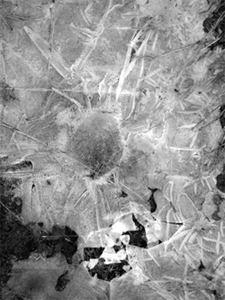
You can shoot in black and white as a menu option. I found this frozen puddle on a trail along the Rio Grande and thought it might work as a black and white. I added some contrast in Photoshop later.

The other image tone option is sepia, which I used for this shot of sage within
the snow along the Rio Grande. Each of these shots were made without any exposure
overrides or retakes, and the exposure metering system always delivered consistently
right-on exposures. Very impressive.

The design of the camera allows you to shoot from just about any angle with
ease, and you should take advantage of this unique option to have some fun.
This photo of the Sangre de Cristos was made with the camera "flat"
(the taking lens was not articulated) against the ground. The image was later
cropped in Photoshop.
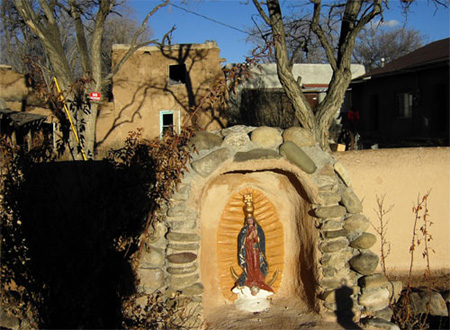
I was continually impressed with the camera's exposure system, especially
in subtle light. This statue in the churchyard in Ranchos de Taos was being
lit by late-day slanting sun, which gave the entire scene a golden glow.

If required, you can switch to spot metering for even more exposure and light control. Here, the light was reflecting quite strongly off the wall of the Ranchos de Taos church. I put the camera on spot metering mode, placed the spot on the wall, locked exposure through slight pressure on the shutter release and got just the exposure I wanted.

I found that the best way to make night scene shots was to put the camera on
ISO 400 and brace it as best as possible. The Night mode seemed to always deliver
overexposed images. This Vegas scene was made by bracing the camera against
a pillar. Yes, I know it's tilted, but so is most of the town.
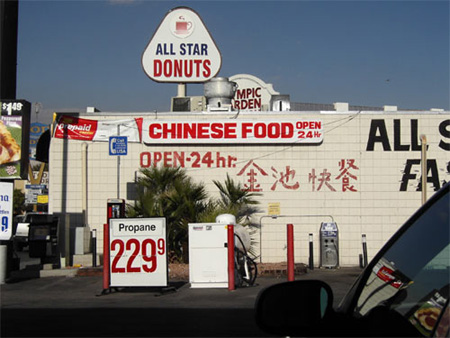
When I say that the Contax is a go-anywhere, shoot anytime camera I mean it.
I kept it in my shirt pocket for days and had a ball making pictures whenever
a scene struck my eye. In fact, I would say that the camera itself encourages
spontaneous picture taking, as a great portable camera should. I took this shot
while filling up my car's gas tank in Las Vegas!
| ||
|
||












 FEATURED VIDEO


Get the Latest Photo Tips, News & Reviews from Shutterbug!







| Camera Reviews Other Reviews | |
Mobile Reviews Photography Reviews Columns | |
News | |
Features | |
How-To | |
Resources |
 © 2026 Shutterbug
AVTech Media Americas Inc., USA
All rights reserved