Site Links
|
 |
 |
 |
Year-End Wrap-Up Photoshop Compatible Plug-Ins
By Joe Farace December, 1999
| |
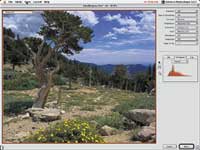
After
an image, such as this one of centuries old Bristlecone
pines, has been acquired, the author likes to enhance
the photograph using Extensis Intellihance Pro 4.0 by
adjusting contrast, brightness, saturation, sharpness
and other controls that the plug-in offers.
Photos © 1999, Joe Farace, All Rights Reserved
|
|
What does the Internet have
to do with the invention of graphics plug-ins? More than you might think
and you don’t have to be a fan of James Burke’s TV series
Connections to make the necessary connections. It starts in the mind
of computer visionary Ted Nelson who conceived “hypertext”
as a way for making computers respond in the same way that humans process
information. This was the fuel for the creation of HTML (Hyper-Text
Markup Language) that powered Tim Berners-Lee’s original concept
of the World Wide Web. HyperText was also the same engine used by Apple
Computer’s HyperCard software which allowed regular human beings,
not just computer gurus, to create customized databases. Because Hyper-Card
used XCMDs (External Commands), it was expandable allowing the application
to reach outside itself to accomplish feats it couldn’t normally
do. While working on Silicon Beach Software’s Digital Dark-room--one
of the first digital imaging programs--programmers envisioned using
XCMD-like bits of software to extend Digital Darkroom’s capabilities
to include access to flat-bed scanners and software “filters”
that could manipulate a photograph’s look. They called this concept
a “plug-in” and the name stuck.
|
| |
Instead
of merely acquiring an image using Photoshop’s Open
command, SilverFast Ai Photo CD allows you to maximize the
quality of a Photo CD image using manual or automatic controls,
as in this image of model Alicia Ericson.
|
|
One of Adobe Photoshop’s
best features is that it was originally designed with an open architecture.
This open-ended design allowed Photoshop to accommodate small software
applications --plug-ins--that could be used to extend the program’s
features. The use of plug-ins increases the functionality of off-the-shelf
graphics programs and allows the digital imager to customize their software
to match whatever kind of projects they may be working on.
Compatibility Issues. Don’t let the name fool you.
You don’t need Photoshop to use Photoshop compatible plug-ins. Adobe
Systems may have defined the standard, but compatible plug-ins can be
used with many other companies’ image-editing programs including
Ulead Systems’ Photo-Impact; MetaCreations’ Painter and Dabbler;
Apple Computer’s PhotoFlash; Pixel Resource’s Pixel-Paint
Professional; Macromedia’s xRes; MicroFrontier’s Color-It!,
Enhance, and neuvo Digital Dark-room; Corel’s PhotoPaint; and Live
Picture 2.5 or later. Even freeware image-editing programs, such as NIH
Image, support Photoshop compatible plug-ins. Other graphics programs,
such as Adobe PageMaker (after Version 6.0), Deneba’s Canvas (5.0
and later), Equilibrium’s DeBabelizer, Macromedia’s Director
and Freehand, and StrataVision 3D accept Photoshop compatible plug-ins.
|
| |
MetaCreations’
Kai’s Power Tools 5.0 is a collection of plug-in filters,
including the Blurrrr filter that lets you apply many different
kinds of Blur effects including, Camera Optics, Motion Blur,
and Spiral Weave effect, which is shown here with a photograph
of model Sandy McDougall.
|
|
Eight Kinds Of Plug-Ins.
There are eight different kinds of plug-ins, some of which you
might care about, some not, and even two that I call “secret”
plug-ins.
• Color Picker. These plug-ins provide an interface
for color picker’s that are used in addition to the host program
and system color pickers. They appear whenever a user requests a unique
or custom color.
• Import. Formerly called “Ac-quire,”
Import plug-ins open an image and interface with scanners, video frame
grabbers, digital cameras, and even other image formats--such as Kodak’s
Photo CD. Import plug-ins are accessed through Photoshop’s File/Import
menu.
• Export. These plug-ins appear in the program’s
File/Export menu and are used to output an image, including making digital
color separations. Export plug-ins also output an image to printers that
lack driver support or save images in compressed file formats.
• Filter. Special effects plug-ins usually appear
in the program’s Filters menu, which is why these plug-ins are often
called “filters.” These plug-ins are used to modify a selected
area of an existing image.
• Format. Sometimes called File or Image Format,
these plug-ins provide support for reading and writing additional image
formats that are not normally supported by the program and appear in the
Format pop-up menu in the Open, Save As, and Save A Copy dialog boxes.
• Selection. These plug-ins appear under the Selection
menu and are used to create shapes or paths--especially when used with
text.
• The Secret Plug-Ins. “Extension”
plug-ins are not accessible by the average computer users and allow implementation
of session-start and session-end features, such as when initializing devices
connected to the computer. They are only called at application execution,
application quit time, and have no user interface.
“Parser” is another plug-in whose interface is not public
and performs similarly to import and export modules, providing support
for manipulating data between bitmapped programs and other formats.
While there are eight kinds of plug-ins, I like to think there are four
major categories and the best introduced in 1999 in each category are
listed below.
|
| |
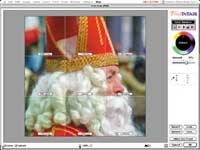
Vivid
Details’ Test Strip plug-in lets you color correct
your digital file to match the kind of output device that
you’re using, such as this photograph of Saint Nicholas
photographed in Georgetown, Colorado.
|
|
Acquiring An Image.
I think the ultimate way to acquire an image from a Photo CD disc is by
using LaserSoft’s SilverFast Ai Photo CD 4.0 plug-in. SilverFast
Ai (Artificial intelligence) is really a family of acquisition plug-ins
that support scanners plus Photo CD discs. SilverFast Ai Photo CD 4.0
allows you to acquire an image from either a standard or Pro Kodak Photo
CD disc and modify it using all of powerful tools and capabilities normally
found in scanner plug-ins. SilverFast Ai allows all of its controls to
be moved to a second monitor, permitting the image preview to be enlarged
to the full size of the main monitor. If you’re new to image acquisition,
the ScanPilot feature will automatically guide you step by step through
the process of making individual image corrections. All operations are
done in real time allowing you to immediately see the effect of any changes
you make and unwanted modifications can be undone on the fly. The plug-in
has a two-level user interface: The novice user can be guided by the way
built-in presets auto-adjust and image, while more experienced users can
work with numerical input and monitor exact values using the plug-in’s
built-in densitometer. SilverFast allows you to define and match input
and output color spaces using ICC (International Color Consortium) profiles.
Using a new feature called “embedding profiles,” applications
such as Photoshop automatically adjust imported files to the internal
working color space. The plug-in has a prescan feature which allows you
to freely rotate and resize the image before it’s acquired by Photoshop.
SilverFast Ai offers color management features such as ColorSync. 2.5
for the Mac OS and ICM 2.0 for Windows 98, and 2000. The plug-in’s
Job Management feature lets you organize a project including many different
Photo CD images scans, so you can tweak all of the images in the shortest
possible time. You can download a demo version of the Mac OS or Windows
version of the plug-in from LaserSoft’s web site at: www.lasersoftint.com.
Enhancing That Image. After you acquire an image, the
next step is to enhance it, making it look as good as it possibly can.
That’s when I reach for Extensis’ Intellihance, the one plug-in
I’d want if left stranded on a desert island. The latest version,
called Intellihance Pro 4.0, expands the capabilities of previous versions
and its redesign secures its position as an indispensable plug-in for
the serious digital imager. Sure, the new version is more expensive ($199
vs. $99), but it also does a lot more. By individually analyzing each
digital image, Intellihance Pro determines the optimal setting for enhancing
and color correcting it. The plug-in consolidates all of your imaging
options into a single, large dialog box that includes preset enhancement
settings for images produced by a scanner, Photo CD, or digital camera.
New image tweaking tools include a Clipped Pixel Display that shows which
pixels are too bright, too dark, or too saturated. A new Dust & Scratch
Removal controls finds dust specks and scratches and removes them without
blurring or destroying detail, which is too often the case with similar
tools. Digital imagers can create and save their own presets which can
apply up to 50 image adjustment steps at one time for specific projects.
The plug-in’s PowerVariations feature uses a multi-pane window in
which a single image can be split or repeated across user-defined previews.
With a maximum of five rows and columns, up to 25 variations can be simultaneously
previewed. Image adjustments can be made and previewed and a test print
can be printed on any output device. The plug-in also contains paper and
ink settings that will automatically adjust images for output to specific
devices. If you want to download a demo version, visit Extensis’
web site at: www.extensis.com.
Manipulating Your Images. Because you can always count
on them for something fresh, Andromeda Software is one of my favorite
plug-in companies. Their newest Photoshop plug-in is VariFocus and is
currently bundled with their Shadow Filter. VariFocus is built around
the concept that the human eye views parts of an image in the following
order: sharpness, brightness, and warmth. VariFocus lets you defocus--then
focus--selected parts of an image, much as you would use a lens aperture
to control a photograph’s depth of field. By adding dimensionality
to a two-dimensional image, the plug-in lets you direct attention to where
you want. Instead of the Gaussian blur technique used by many image-editing
programs, VariFocus uses a palette of contoured masks that let you shift,
distort, and scale to make that fine line between sharpness and blur a
decision you can make after the image was created. Andromeda’s Shadow
Filter uses 3D technology allowing your artwork to cast realistic shadows.
It does this by imposing a shadow of your image which is placed on a plane
which you can move all around that image. The filter has four “lights”
which can be individually selected and oriented in the space around the
image to produce multiple shadows. The plug-in has a virtual camera that
lets you pan through 3D space in front of and around the original image.
Shadow Filter has six options including drop shadows, transparent shadows,
and perspective shadows. VariFocus and Shadow Filters are compatible with
Windows 95/NT or PowerPC Mac OS computers and demo versions can be downloaded
from Andromeda’s web site at: www.andromeda.com.
|
| |
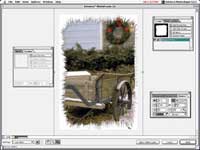
Extensis
PhotoFrame 2.0 lets you add many different kinds of edges
to your photographs and manipulate them too, such as these
holiday wreath-like edges to an image photographed in Georgetown,
Colorado.
|
|
Extensis’ PhotoFrame
2.0, which may be the first Internet-aware plug-in, offers photographers
over 1000 image frame effects to choose from, in addition to those available
for downloading from a companion web site. This site, in partnership with
Dynamic Graphics, can be reached from within PhotoFrame and provides access
to new frames and borders. You have the option of subscribing to a monthly
service offering new content as well as the ability to download additional
files from a selection of professionally designed frames. Users can build
their own custom frames and edges from scratch or by adapting existing
frames, providing for lots of versatility and creativity. PhotoFrame 2.0
lets you enhance image edges by adding a variety of special effects including
drop shadows, glows, bevels, textures, blur, noise, opacity, and blends.
The new version includes real-time preview and the new interface adds
dockable palettes to maximize usable screen area. As in Extensis Intellihance
Pro 4.0, any combination of settings can be saved, assigned a preset name,
and accessed from Photoshop’s menu bar without even launching the
plug-in. Mac OS and Windows versions of PhotoFrame 2.0 cost $199.95 and
are compatible with all versions of Photoshop starting with 4.0 and up
to 5.5. You can download a demo from www.extensis.com.
Kai’s Power Tool 5.0 includes 10 plug-ins that MetaCreations calls
“plug-in applications.” Instead of a small dialog box, KPT
takes over your entire screen much as an application would. If you’re
looking for updated tools from older versions, you’ll only find
an updated Fractal Explorer, now called FraxPlorer, along with a new spin
on Blur tools; the rest are new. The weird little Weegie Board viewer/effects
interface from KPT 3.0 is gone. Some may miss it, but I expect many won’t
notice it’s gone. Here’s a quick tour of Kai’s Power
Tool 5.0: Blurrrr is a suite of nine filters including zoom, spin, and
other blurs with real-time previews and 64-bit color. FiberOptix creates
everything from “furry” text to creeping vines, with every
strand being a true 3D object. Frax4D is designed to create “four-dimensional”
fractal sculptures and wraps them around texture maps, including gold
or silver. FraxFlame produces fractals (mathematically produced graphics)
that look like natural phenomena, such as flames. FraxPlorer features
real-time flythrough and has an “infinite” zoom tool that
has to be seen to be believed. Noize, my new favorite, includes a collection
of noise effects that can be used for textures or painting. Orb-It will
turn an image into thousands of spheres with variations in size, density,
and lighting. It will produce fields of bubbles, raindrops, and lenses
along with text effects and distortions. RadWarp warps the edge of an
image to correct or produce barrel distortion and you can also use it
to create type effects. ShapeShifter creates shapes and objects with refractive
glass edges and 3D light sources on beveled, metallic sources. To make
composting easier, the finished elements include masks. Smoothie is a
plug-in that produces smooth edges on black masks.
Outputing That Image. Genuine Fractals Print Pro encodes
CMYK, RGB, CIE-Lab, multi-channel, and gray scale images as files that
can be used to generate any kind of output while remaining small enough
to edit, store, and upload. The images have a feature called “resolution
on demand” which means you don’t have to store multiple copies
of the same file--at different resolutions--for different purposes. You
can encode an image once at medium resolution, then output it at any size
or resolution you choose. Genuine Fractals Print Pro is a heavy-duty File
Format plug-in that lets you save images in two ways: The Lossless option
produces a file that uses an (approximate) 2:1 compression and produces
the highest quality enlargements. Near Lossless encoding produces a file
with 5:1 compression on average but still lets you output an image beyond
100 percent at high quality. Maybe that’s why Epson bundles a LE
version of Genuine Fractals with their Stylus Photo 1200 printer. An original
15-20MB file can be encoded with the Lossless option and can be printed
in sizes up to the 1200’s full printable size of 12.71x44”.
For more information on Genuine Fractals Print Pro, visit the company’s
web site at: www.altimira-group.com.
Vivid Details’ Test Strip 2.0 is another useful output plug-in.
If you’ve had trouble matching what you see on the monitor to what
comes off your printer, you need Test Strip. It’s the first color
management software I’ve found that functions the way that photographers
are used to working--by producing a test strip showing varying degrees
of density and color. You can do this on screen, but printing a test proof
lets you make the comparisons of how the printer has interpreted your
on-screen image. Test Strip lets you work with color or density changes
in 1 percent increments--on RGB or CMYK images--and has “before”
and “after” screens that let you compare any changes to the
original. Vivid Details also bundles 73 photographic and 115 special effects
filters. For more information call (805) 646-0217 or visit Vivid Details’
web site at: www.vividdetails.com.
Manufacturers/Distributors
Adobe Systems
Inc.
345 Park Ave.
San Jose, CA 95110
(408) 536-6000
fax: (408) 537-6000
www.adobe.com
Andromeda Software, Inc.
699 Hampshire Rd., Ste. 109
Thousand Oaks, CA 91361
(800) 547-0055
(805) 379-4109
fax: (805) 379-5253
Extensis Corp.
1800 SW First Ave., Ste. 500
Portland, OR 97201
(800) 796-9798
(503) 274-2020
fax: (503) 274-0530
LaserSoft Int., Inc.
6529 Gulfside Rd.
Longboat Key, FL 34228
(941) 383-7496
fax: (941) 387-7574
MetaCreations Corp.
6303 Carpinteria Ave.
Carpinteria, CA 93013
(800) 846-0111
(805) 566-6200
fax: (805) 566-6385
www.metacreations.com
Vivid Details, Inc.
8228 Sulphur Mountain Rd.
Ojai, CA 93023
(805) 646-0217
fax: (805) 646-0021
|
 |
|
 |
|
|
 |
 |
 |
|