


- REVIEWS
Camera Reviews 
More Reviews Mobile Reviews Photography Reviews - GALLERIES
- VIDEOS
- BUYER'S GUIDES
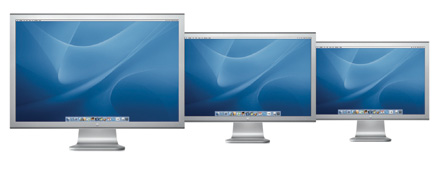
Apple’s Cinema Displays; Three LCD Sizes Designed For Professional Visual Creation
A computer system is essential to digital photography image processing and editing. Its components are a central processing unit, input devices like a keyboard and mouse, and a display/monitor. Only one of the computer's components has a significant role affecting the quality of photo images created, edited, and processed, and that is the display. To use software like Photoshop effectively it has to be displayed properly on screen. If you want to produce good quality digital photography you need the best quality display performance you can afford.
 |
|
|
Apple Computer was the first computer company to make a complete change from
traditional CRT monitors to LCD displays. Apple is also a company that has a
large and influential constituency of users who are creative professionals working
in the visual media like publishing, advertising, motion picture production,
and of course photography. So Apple designs their hardware and software to accommodate
the needs and demands of this important part of their market to provide the
best performance. The Apple Cinema Display 20, 23, and 30" LCD monitors
are designed with the creative professional user in mind, providing the characteristics
that best serve their needs, demands, and preferences.
Apple's Cinema Displays Performance And Features
Unlike LCD displays intended for the general computing market, the majority
of which prefer very high brightness and contrast to easily read text in brightly
lit office and home environments, the Apple Cinema Displays are delivered with
native contrast and color temperature factory settings which match the needs
of graphic professionals. They do, of course, provide for user adjustable brightness
levels to accommodate differing ambient light conditions. An Apple Cinema Display
out of the box may only require minimal brightness adjustments to show good
detail in both highlights and shadows in a photo image, and once calibrated
and profiled it is ready for critical use.
That advantage does not only apply to Apple Mac computer users. The Apple Cinema
Displays utilize the industry standard DVI interface connection, thus Cinema
Displays are supported for PC use if the computer's video card meets the
minimum requirements published by Apple for the particular display model. For
more information, including a list of video cards that are supported, visit
the Apple website at: www.apple.com/displays/.
Current prices listed by Apple on their website store are: $799 for the 20",
$1299 for the 23", and $2499 for the 30" display.
The Apple Cinema Displays feature a brushed aluminum finish that matches the
styling of the Apple Mac G5, and have a narrow, thin bezel framing the screen,
supported by a substantial stand with display angle adjustment. All models also
include two FireWire 400 ports and a two port, self-powered USB 2.0 hub built
into the bezel. In addition to a large color gamut for use with color-critical
applications, the Apple Cinema Displays provide wide 170Þ viewing angles
and minimal color shift. Apple found the best ratio between pixel resolution
and monitor size is 100 ppi, and pixel density is optimized for both graphics
and text display. Color reproduction is uniform across the display screen, and
LCDs are unaffected by magnetic field radiation and do not rely on phosphors,
which decay over time, thus provide consistent, predictable performance.
 |
|
|
Using The Apple Cinema Displays
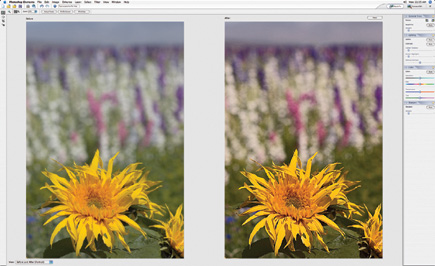
The initial setup after installation differs significantly from LCD displays
of every other make I have used and tested. After installing the Cinema Display
and opening my standard test image, I adjusted the brightness level to obtain
a good balance of detail in the photo's highlights and shadows. Then I
immediately calibrated and profiled the display with a ColorVision Spyder2PRO,
and found that I could obtain raw photo file image adjustments that would yield
a matched print. While with all other brands of LCD displays I had to make several
trial and error adjustments to both contrast and brightness to achieve a similarly
effective balance that would support effective print matching.
| |||||||||
|

| ||||||||


 FEATURED VIDEO


Get the Latest Photo Tips, News & Reviews from Shutterbug!







| Camera Reviews Other Reviews | |
Mobile Reviews Photography Reviews Columns | |
News | |
Features | |
How-To | |
Resources |
 © 2026 Shutterbug
AVTech Media Americas Inc., USA
All rights reserved