


- REVIEWS
Camera Reviews 
More Reviews Mobile Reviews Photography Reviews - GALLERIES
- VIDEOS
- BUYER'S GUIDES
Make Your “Colorblind” Computer See As You Do; Datacolor’s Spyder3Elite/Pro And Print Profiling Products
You read the headline right--that new, off-the-shelf computer you just bought is colorblind! Even though your computer sends RGB color information to its display so colors will appear on the screen, the computer does not know what colors its user is seeing. That seems like a contradiction, unless you realize that personal computing hardware and software grew like topsy through the disparate efforts of many different competing companies who had little reason to cooperate and agree to merely the barest, essential standards. In fact, it was only recently that the major players like Microsoft, Adobe, and Apple sat down together and formed the ICC (International Color Consortium) to agree on a universal digital color standard. But even with that, every device--like an LCD display, a scanner, a printer, as well as components like video cards--reproduce what is referred to as "device independent" color. And even though the same RGB data numbers are fed to each device, the color reproduced is different. That is why your computer is "blind" to the very color it reproduces.
 |
|
|
You may not realize it but you have the means to teach your computer how to see. In both Microsoft Windows and Apple operating systems, built-in software will facilitate what's known generically as "color management." The color management system is very simple. It accepts files called "profiles," which are the result of measuring the color a device like a display or printer reproduces, then comparing those measurements to the ICC color standards. The profile defines the variations from that standard so the computer knows exactly what you are seeing on screen plus what should result in prints made with a profiled printer. In this review we'll look at the new Spyder3Elite/Pro and Print products. They are the next--improved and refined--generation of the most popular profiling devices and software available.
 |
|
|
New Features
After the ICC was formed and a color standard was agreed upon, Adobe was the
first software company to make available a product that would actually "translate"
between color devices like scanners and printers. The product: Photoshop Version
5.5. Photographers had to use their visual perception to adjust a color photograph
to an ideal balance, so the monitor was the center around which the whole system
had to function, thus the monitor's color characteristics had to be known,
measured and recorded, and become a part of the translation to get predictable
color results from input through processing to output.
Today, too little recognition is given to the few small companies that came
together as ColorVision, now Datacolor, and produced the first Spyder monitor
measuring device and its easy-to-use, wizard-driven software, all at a price
individual photographers could afford. With the profiles the Spyder produced,
Adobe's Photoshop could be used to manage color with precise translation
between all profiled devices, input and output. This latest set of Spyder products
is the third generation of the technology, improved in accuracy and efficiency,
applicable to more devices from older CRTs to LCD displays, laptops, and computer-driven
digital projectors. Even easier to use for the novice while also offering many
more advanced control functions, and considering inflation in the last decade,
Spyder3 is even more affordable.
 |
|
|
With Spyder3 the range of products includes two versions of the Spyder3 screen
measuring and profiling hardware/software packages, and Spyder3Print, which
is an equally effective hardware and software package for measuring and profiling
print output. The Spyder3Studio combines both display and print profiling in
one package at a most agreeable cost for what is offered.
The Spyder3Elite is Datacolor's top-of-the-line display profiling device
and software intended for professional users. The sensor is smaller in overall
size, and more easily adaptable to its now extended uses, but with a much larger
sensor area with more efficiency and speed in reading from its exclusive seven-sensor
design. The Spyder3 now has ambient room sensor capability, which can be used
in two ways, either to continuously monitor and adjust a display for changes
in room illumination, or to provide a specific measure of ambient light to guide
a user to adjust the lighting environment if that kind of control is available.
 |
|
|
To facilitate room light monitoring as well as to measure the output of a
digital projector, the Spyder3 comes with a small separate base pedestal with
a built-in tripod socket. The actual use of the Spyder3 sensor has been made
simpler by having just one suction cup for CRT profiling and a more effective
counterweight to use with LCDs.
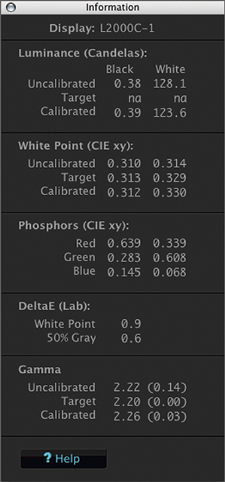
The Spyder3 wizard software is also more efficient, providing a very easy option
that requires just following and responding to brief, on-screen instructions
to automatically calibrate and profile your display. There are also more advanced
options providing more specific control--now in just a single screen window
access--for users with specific requirements and needs. To periodically
recalibrate a display once the initial calibration and profiling is done, a
new ReCAL option has been added to make periodic proofing maintenance even easier
and faster. Once a user has made a display profile there is a new SpyderProof
function with very much improved "before and after" image guides
to evaluate specific kinds of screen performance, like complexion tones or black
and white.
 |
|
|
| |||||||||
|

| ||||||||


 FEATURED VIDEO


Get the Latest Photo Tips, News & Reviews from Shutterbug!







| Camera Reviews Other Reviews | |
Mobile Reviews Photography Reviews Columns | |
News | |
Features | |
How-To | |
Resources |
 © 2026 Shutterbug
AVTech Media Americas Inc., USA
All rights reserved