


- REVIEWS
Camera Reviews 
More Reviews Mobile Reviews Photography Reviews - GALLERIES
- VIDEOS
- BUYER'S GUIDES
Microsoft’s Windows Vista; How Does It Affect Digital Photographers? Should You Upgrade?
Since it was first begun as project "Longhorn" in 2005, a lot of experts, gurus, and techno-pundits, as well as Microsoft official representatives, have written reams about Vista. But until its release in mid-February, no one in digital photography or color management has had a word to say publicly about how Windows Vista will impact digital photography with a PC computer. Yet, 90 percent of computers run on Windows. My report is based on running Vista for almost a month, as well as a few private conversations with photographic industry sources, in addition to one public commentary I'll reference later. My immediate goal has been to identify the fundamental differences a digital photographer now using Windows XP might encounter, and what might be of concern.
 |
|
|
After getting Vista running, the first thing I did was install Adobe's
Photoshop Elements 4.0, which I assume is the most typical image-editing application
somewhat serious photographers are likely to use. Then I uploaded images both
as DC raw files, TIFFs, and Photoshop format files from a flash card, CD, and
from my hard drive. Windows Vista recognizes a new "drive" immediately,
as well as photo files, and just like XP pops up a dialog with options and asks
what you want to do with the files--view them with Windows Photo Gallery
or upload them to Elements.
Of course I wanted to see what Microsoft offers for photographers without any
additional photo-editing software installed, so some of the images were uploaded
to Windows Photo Gallery. The rest were transferred to Adobe's Photoshop
Elements.
 |
|
|
Windows Photo Gallery
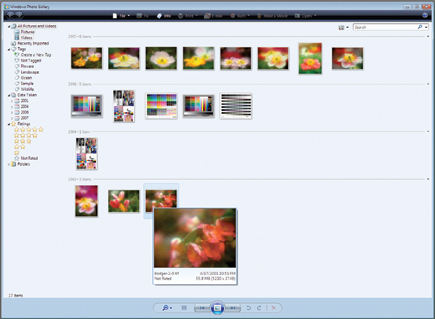
As part of the upload process Windows Photo Gallery creates thumbnails and displays
the thumbnails in chronological order. A column on the left of the screen allows
you to tag and rate each file. And then, if you want to use your own storage
and filing system, there is the option of creating linked folders into which
you can drag and drop image thumbnails. If you import a larger library of images
filling more than the area of a single screen, VCR-like back and forward tabs
at the center of the bottom of the window frame allow moving from one highlighted
image to the next. There is also a pop-up enlargement, activated by passing
the cursor over a thumbnail. This also includes the file name, date, size, and
rating, if any, in the enlarged image frame.
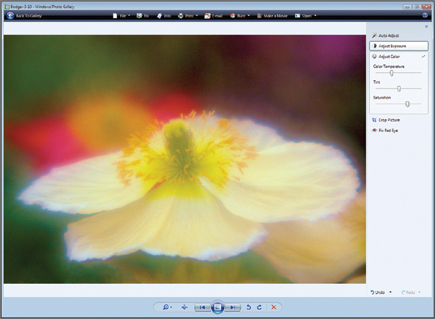
Also included in Windows Photo Gallery is a pop-up, full-screen editing dialog
to adjust exposure, color, cropping as well as fix redeye tools. Of course,
there is the ubiquitous Microsoft "make it easy" Auto Adjust, which
I find, as usual with any automated adjustment, seldom yields an ideal image
and sometimes does more harm than good. But the simple manual sliders have good
algorithms and can be used to effectively adjust an image; however, this occurs
with no feedback histogram to tell you if the image is critically optimized.
This would be all well and good, but then if a user clicks the back button to
return to the Gallery, the changes made are automatically saved. Of course,
if the file is a JPEG it will then have compression reapplied. Photographers
unaware of the hazards of this could seriously diminish the quality of their
original photo files.
 |
|
|
Using Photo Applications And Hardware With Vista
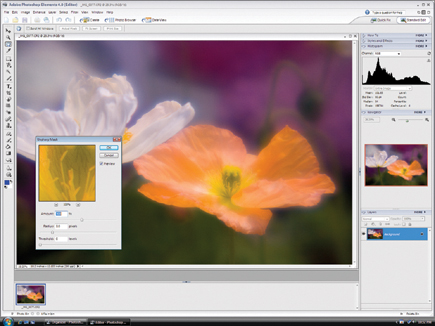
As I mentioned, I installed Adobe's Photoshop Elements 4.0 to run in Vista.
And after opening a number of images, including some raw files with Camera Raw,
and then editing and adjusting images, and applying filters, as well as using
different brushes, I have come to the conclusion that if your application is
now running on a recent version of Windows XP it will likely install and run
similarly on Vista. This also includes photo devices like scanners and printers,
assuming the drivers are the latest current versions. Take note, however, that
the hardware I used with Vista was limited to an Epson Stylus Photo R800 printer
and a Konica Minolta DiMAGE Scan Elite 5400 II 35mm scanner. My experience does
not guarantee that other printers, scanners, or other photo devices that require
the installation of drivers will be compatible, at least until the manufacturer
has a new Vista compatible driver or you happen to have a printer that is already
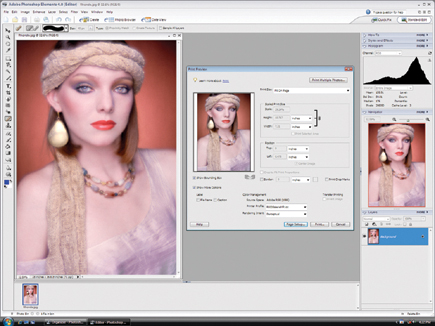
supported by Vista. With printer driver support established in Vista, the Adobe
Photoshop Elements 4.0 Print dialog window functions the same as in XP, including
using Photoshop to control color using a specified printer profile and rendering
intent selection.
 |
|
|
| |||||||||
|

| ||||||||


 FEATURED VIDEO


Get the Latest Photo Tips, News & Reviews from Shutterbug!







| Camera Reviews Other Reviews | |
Mobile Reviews Photography Reviews Columns | |
News | |
Features | |
How-To | |
Resources |
 © 2026 Shutterbug
AVTech Media Americas Inc., USA
All rights reserved