


- REVIEWS
Camera Reviews 
More Reviews Mobile Reviews Photography Reviews - GALLERIES
- VIDEOS
- BUYER'S GUIDES
Corel’s Paint Shop Pro Photo X2; Powerful, Easy, And Affordable Image-Editing Software
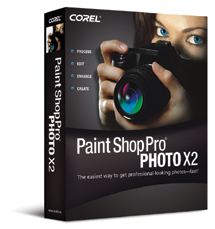 Image-editing
applications that run on a Windows PC have been available since the early 1990s.
In that decade and a half digital photography has grown and changed dramatically,
requiring new and different kinds of image-editing support. One of the applications
that has been around for most of that time is Paint Shop Pro, now under Corel's
ownership. Over the years it has undergone a metamorphosis to become quite contemporary
in features and functions, with a comprehensive toolset and menu that establish
it as a strong and effective image-editing application. In this latest version,
Paint Shop Pro Photo X2 has taken on the challenge of digital camera file processing
and image management, and also added even more powerful image adjustment and
manipulation technology.
Image-editing
applications that run on a Windows PC have been available since the early 1990s.
In that decade and a half digital photography has grown and changed dramatically,
requiring new and different kinds of image-editing support. One of the applications
that has been around for most of that time is Paint Shop Pro, now under Corel's
ownership. Over the years it has undergone a metamorphosis to become quite contemporary
in features and functions, with a comprehensive toolset and menu that establish
it as a strong and effective image-editing application. In this latest version,
Paint Shop Pro Photo X2 has taken on the challenge of digital camera file processing
and image management, and also added even more powerful image adjustment and
manipulation technology.
A Rich Mix Of Tools And Processes
When Corel took over Paint Shop Pro it was like many other Windows PC image
editors in that it did not provide support for color management. Using it was
like taking a shotgun to target practice--you would probably hit the target
but scoring a bull's-eye (reproducing accurate color fidelity predictably)
was not very likely. Now, with the Photo X2 version, full professional-level
color management support is provided, including specifying a calibrated display/monitor
profile, as well as selecting any one of the standard work space profiles like
Adobe RGB (1998). The result is that what you see is what you get in an output
file that can be reproduced exactly as intended.
 |
|
|
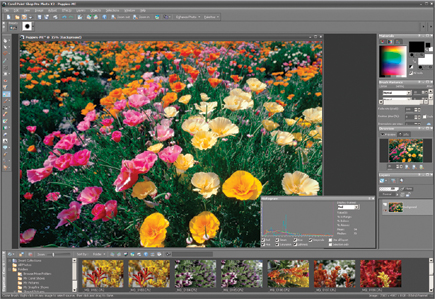
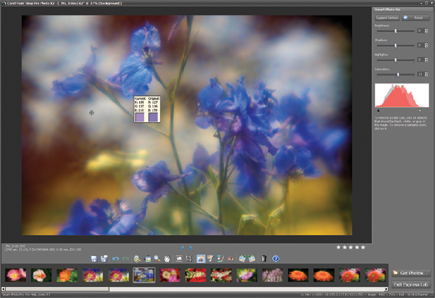
Corel's Paint Shop Pro Photo X2 provides a direct and transparent support
for processing digital camera files, whether the file is a JPEG or raw. Either
format is opened directly by the application without the need to perform any
intermediate conversion steps. A user can choose any option for color correcting
and adjusting digital camera files from the easy, all-in-one Express Lab interface.
This provides the most basic, required tools to crop, rotate, and straighten;
apply Smart Photo Fix options to remove a color cast, adjust brightness or saturation;
do a makeover with easy-to-use retouching tools; and, of course, remove redeye.
The files can also be opened in the primary work space and a full set of manual
adjustments, processes, and corrections can be applied. You can also choose
the automated Smart Fix dialog to make progressive, additive, all-in-one adjustments.
All of these new and established processes and features are now chosen and applied
in a new screen environment. This new Graphite Interface is a definite navigation
advantage, making Paint Shop Pro Photo X2 easier than its predecessors. Images
displayed stand out with less visual competition from the now subdued background
and window/palette. While an improvement, a slightly lighter, mid-tone gray
would have supported a more neutral and better environment for images displayed
on screen. The dark surroundings on screen tend to make images look brighter
and more colorful, so adjustments applied may not be as precise in terms of
how the image would appear in a print or a website screen environment.
 |
|
|
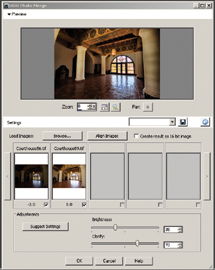
Of all the new features, HDR Photo Merge, used to expand the dynamic range of a set of bracketed images, is a real plus. Corel's Paint Shop Pro Photo X2 is the first intermediate, affordable image-editing application to offer this capability with an easy-to-use and effective process that has just two slider controls--Brightness and Clarify. In short, two or more bracketed images, with at least one with good exposure for the highlights and another with good exposure for the shadows, can both be opened in the HDR Photo Merge dialog window. The process then merges the two images into one, and by adjusting Brightness and Clarify an ideal balance of tones can be achieved.
 |
|
|
|
 |
The Clarify slider control also does double duty in the Process dialog to convert color to black and white. It enhances image brilliance and contrast by obtaining the same effect as using color filters with black and white film.
| |||||||||
|

| ||||||||


 FEATURED VIDEO


Get the Latest Photo Tips, News & Reviews from Shutterbug!







| Camera Reviews Other Reviews | |
Mobile Reviews Photography Reviews Columns | |
News | |
Features | |
How-To | |
Resources |
 © 2026 Shutterbug
AVTech Media Americas Inc., USA
All rights reserved