


- REVIEWS
Camera Reviews 
More Reviews Mobile Reviews Photography Reviews - GALLERIES
- VIDEOS
- BUYER'S GUIDES

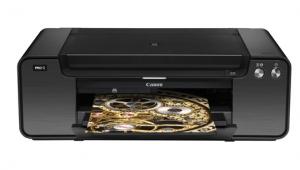
Canon’s PIXMA Pro9500; How Does Canon’s New Consumer Pigment Ink Photo Printer Perform?
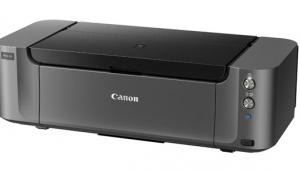
It has been well over a year since Canon announced the Canon PIXMA Pro9500. In fact, I was so impatient that I requested the opportunity to try out the professional Canon imagePROGRAF iPF5000 17" 12-color ink model (report published in the March 2007 issue of Shutterbug, and now online at www.shutterbug.com). So now the question is: does the consumer-oriented 13" Canon PIXMA Pro9500 pigment ink photo printer match up to the expectations set by the larger professional model? Why compare the two? Both the professional wide-format Canon imagePROGRAF iPF5000 and the PIXMA Pro9500 use Canon Lucia inks and the printers seem to have few other apparent similarities; inside there is some shared technology as well.
 |
|
|
As for differences, there is only a 4" difference in maximum print width, but the PIXMA is just a third the weight and overall size of the iPF5000, although a bit larger than its competitors. The Pro9500 also shares more in styling with the PIXMA Pro9000 than the iPF5000. The biggest difference is that the PIXMA Pro9500 uses 10 colors of ink and one replaceable print head while the iPF5000 uses 12 colors of ink and two interchangeable print heads. The 12 inks of the iPF5000 include a photo and matte gray as well as a blue, while the PIXMA Pro9500 does not use blue and only has one gray ink.
Inkjet Tech
It has been well over a decade since I first started printing color with inkjets, and have tested a number of new generations of photo printers. The improvement over the years has been dramatic. The improvement has come from the leading manufacturers via radical developments in ink technology combined with the refinement of the delivery system. The earliest printers had a four-ink, traditional CMYK color palette. Today the color strategy employs many more colors, with some printers like the Canon PIXMA and imagePROGRAF models offering 10 or 12 inks, often including two shades of magenta and cyan and a primary red, green, and blue, backed up with gray ink in addition to black. The logic of these large ink palettes is that color can be reproduced more accurately and vividly with less mixing of different colored ink. That makes ultimate sense, and the print results indicate it works incredibly well.
 |
|
|
The delivery system of the PIXMA Pro9500 includes a print head with 768 nozzles for each of the 10 colors (matte black, photo black, gray, cyan, magenta, yellow, photo cyan, photo magenta, red, and green), making a total of 7680 nozzles print at a maximum resolution of 4800x2400dpi with a 3 picoliter droplet size. This color palette also supports black and white printing, easily configured to produce a neutral tone with very little color ink used. Other specifications include USB 2.0 and software support for both Microsoft Windows and Apple Mac computers.
 |
|
|
Canon Bonuses
But there's also some "bonus" software that is truly beneficial with this printer--Canon's Easy-PhotoPrint and Easy-PhotoPrint Pro (particularly the latter) which are software "preview-type" plug-ins for both Adobe's Photoshop (CS3) and Canon's Digital Photo Professional raw converter and editor application, downloadable from the Canon website for free. This Easy-PhotoPrint Pro and Digital Photo Professional (3.1) is unlike most software provided by hardware manufacturers. It is truly easy to learn and use as well as being an effective and efficient way to make very fine prints, even directly from raw files.
Another exemplary Canon feature is the Canon paper sample pack, available on their eStore website and specifically configured for the PIXMA Pro9500. This Digital Art Paper Variety Pack (DAP-101) includes: five sheets each of Fine Art Paper "Museum Etching," "Photo Rag," Premium Matte, and Photo Paper Plus Semi-gloss. Two of the Canon papers are 1005 cotton rag papers made for Canon by Hahnemühle; another is a fiber-based Canon paper; and the fourth is a semigloss RC paper. All are what I would consider ideal for printing with the Pro9500.
 |
|
|
Printing With The Canon PIXMA Pro9500
As usual with my printer tests I spread the images printed across a range of subjects, from landscapes and flower close-ups to portraits. In addition to using the Canon papers I calibrated and profiled the printer for use with three independent papers, including Hahnemühle's Pearl, PremierArt's Watercolor, and Mitsubishi's Diamond Jet Matte, which is a smooth "photo matte" now sold directly by Mitsubishi's website at a very affordable price.
All of my test printing was done as in my usual manner using an Adobe Photoshop CS3 workflow, selecting to have Photoshop control color, or what we used to call a Profile to Profile workflow. After making profiles for the independent papers, and then printing my color test pattern with these new profiles as well as the Canon papers with their supplied profiles, I found the Canon profile to be very neutral and precisely gray balanced. However, the Canon profiles clipped highlights slightly more than profiles I made (I prefer as much highlight detail in prints as I can possibly reproduce). In other words, Canon opts for maximum print brilliance at the cost of a little less detail in print highlights. I could easily compensate for this by a minor tweak to my image file's highlight density before printing with the Canon papers.
 |
 |
|
|
||
From the very beginning of my tests I found out just how spoiled I had become using the Canon imagePROGRAF iPF5000, at least in terms of print speed with its dual print heads and 30,000 nozzles. Of course, a professional, commercially-used printer has to be faster because in business time is money. But the PIXMA Pro9500 is really not all that slow, and is in fact quite comparable to other 13" inkjets at maximum resolution.
| |||||||||
|

| ||||||||








 FEATURED VIDEO


Get the Latest Photo Tips, News & Reviews from Shutterbug!







| Camera Reviews Other Reviews | |
Mobile Reviews Photography Reviews Columns | |
News | |
Features | |
How-To | |
Resources |
 © 2026 Shutterbug
AVTech Media Americas Inc., USA
All rights reserved