


- REVIEWS
Camera Reviews 
More Reviews Mobile Reviews Photography Reviews - GALLERIES
- VIDEOS
- BUYER'S GUIDES
Konica Minolta’s DiMAGE Scan Elite 5400 II; The Best 35mm Scanner Gets Better And More Affordable
I must admit I was surprised that just two years after I reviewed the Konica Minolta DiMAGE Scan Elite 5400 the company would come out with an improved and substantially modified new model. As I noted in my report then, the 5400 was well ahead of the game in performance and value. So, what motivated Konica Minolta to make such a major change so soon? It is probably due to a number of factors, some of which I cannot even guess. But the fact remains, the company has in the 5400 II provided a substantially better scanner at an even more affordable price. So, who is foolish enough to look a gift horse in the mouth? Not me, you can be sure.
 |
|
|
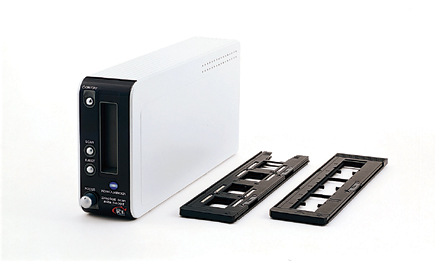
Although the new 5400 II looks like and is in many ways closely related to
its predecessor, there are significant differences. The shape is quite similar
and the film holders are almost identical, so we must assume the internal mechanics
are closely related. But, the chassis is just a few millimeters wider, so it
does not require the strange "foot" of the original to sit on a
desk upright, at least without falling over sideways too easily. The outer case
of the 5400 II is not as "pretty" to my eye nor as substantial looking
as the original, and the new model is also considerably lighter in weight.
The new 5400 II has just one kind of interface connection, USB 2.0 (1.1 compatible),
eliminating the FireWire connection available with the original model. Besides
being simpler, and in a way more convenient, many of these changes probably
contributed to a lower manufacturing cost. However, to obtain the full speed
efficiency of the new 5400 II you should have a relatively new, fast computer,
including a USB 2.0 connector or card, because using the scanner connected to
an older USB 1.1 connection slows it down to a crawl.
 |
|
|
Part of the new 5400 II's much faster speed, I am sure, is partly due
to the change in the scanning light source from a cold cathode tube to a White
LED. In other words, to make a scanner run faster requires a higher level of
exposure, thus light through the film medium. This naturally provides a shorter
exposure time for the CCD sensor to read and record the values. In the past,
Digital ICE worked more effectively with a cold cathode light source, so the
latest version, Digital ICE4, is probably improved to be more effective with
an LED light source. Quite possibly the new White LED technology also provides
the better infrared radiation that's required by the Digital ICE4 dirt
and dust sensor. Other technical performance changes include a 16-bit A/D converter
and increased CCD sensor dynamic range, now 4.8 in the new 5400 II.
Unless you worked with the original 5400 you may not notice there are very beneficial
improvements in the drive mechanism, internal processing, and setup process.
The new 5400 II is much more streamlined in operation, providing a noticeable
reduction in time getting scans done one after another.
 |
|
|
Before I get into the full test I would like to mention some plug-in and Utility
caveats. While the new Easy Scan Utility mode may be attractive to the lazy
and indifferent, before even getting into my test work I received an e-mail
from a user complaining about it. The e-mail said that the automated Easy Scan
mode arbitrarily crops into a 35mm image, eliminating often crucial portions
of the picture.
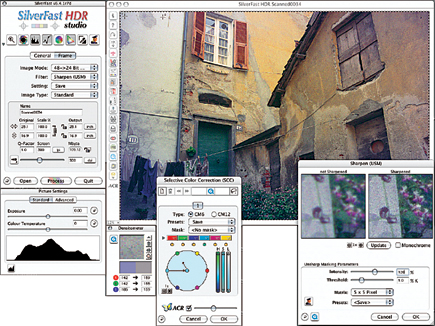
Along with Digital ICE4, the 5400 II adds three other Kodak/ASF processing features
modules, including Digital ROC, Digital SHO, and Digital GEM. Digital ICE4 is
a distinct refinement, even more thorough than past versions, providing an exceptionally
smooth result that also better preserves and protects image detail and sharpness.
Although I have found great value in Kodak/ASF plug-ins, particularly Digital
GEM Pro 2.0 which is invaluable with scans of older, grainy film that contains
lots of emulsion flaws, I did not find they work well incorporated into the
scanning process. Overall, users of Adobe's Photoshop Elements 3.0 or
LaserSoft's SilverFast will find a more convenient and easy time with
the Digital ROC and Digital SHO adjustments.
On the basis of overall features shared with the original 5400, plus all of
the improvements and upgrades I've cited, even though some may not be
useful to all users, the sum total of the new Konica Minolta DiMAGE Scan Elite
5400 II is that it provides an incredibly capable advantage to a digital darkroom.
It is a better value than the original with a much lower MSRP of $799.
 |
|
|
How Well Does It Work?
This new 5400 II presented some quite different challenges to my usual scanner
testing because of two factors. One is that the improvements are on top of the
best quality I have experienced scanning 35mm film with the original 5400, which
by the way I purchased shortly after reporting on the scanner a couple of years
ago. That experience has included making scans of 35mm film images that have
resulted in 15x20" images printed with surprising success. And two, my
original report of the 5400 also included using the scanner with LaserSoft's
SilverFast Ai 6 software, which I have also used religiously with the 5400.
With this new 5400 II LaserSoft did not have a SilverFast Ai 6 ready in time
to use as part of my testing, so I took an alternate route, as I will explain
shortly.
Considering the new 5400 II specs that affect performance will be most readily
apparent when scanning slides, I concentrated my test work on slide images that
would be more challenging, second- or third-quality cull images stored deep
in my collection. Of course I also re-scanned some images that I had previously
scanned to see if this new 5400 II could improve on those. I also scanned a
few black and white and color negative film images.
 |
|
|
I began by using the native Konica Minolta DiMAGE Scan Utility to be able
to manually adjust and correct a preview before making a final scan. Other than
some changes that reflect the new physical feature improvements and additions,
this DiMAGE Scan Utility software is little changed. To be candid, all hardware
manufacturers do not complement their products fully with very modern and effective
software. I am not singling Konica Minolta out because all scanner makers, and
for that matter many digital camera makers, apparently do not see user software
as requiring the same effort and development as hardware. The resulting manual
tools provided to adjust and correct an image are reminiscent of what we worked
with in Version 4.0 of Photoshop a decade ago.
| |||||||||
|

| ||||||||


 FEATURED VIDEO


Get the Latest Photo Tips, News & Reviews from Shutterbug!







| Camera Reviews Other Reviews | |
Mobile Reviews Photography Reviews Columns | |
News | |
Features | |
How-To | |
Resources |
 © 2026 Shutterbug
AVTech Media Americas Inc., USA
All rights reserved