


- REVIEWS
Camera Reviews 
More Reviews Mobile Reviews Photography Reviews - GALLERIES
- VIDEOS
- BUYER'S GUIDES

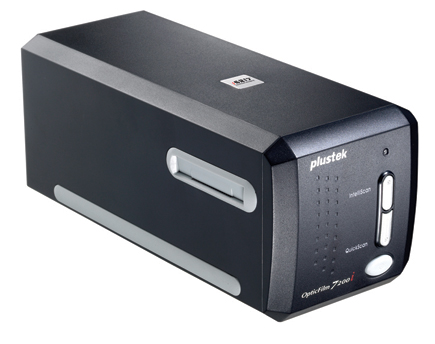
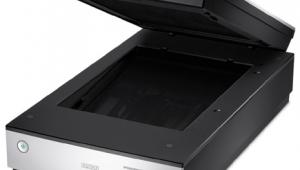
The Plustek OpticFilm 7200i 35mm Film Scanner; An Affordable, High-Resolution Scanner
Some believe film is dead, but I get as many e-mails from photographers as ever asking about film scanning. The reason is that digital cameras have brought more photographers into using a computer for photography so now they want to access the film images they have made over the years in digital format. A new, dedicated 35mm scanner model is a rarity these days; none of the established brands have offered new models lately. In fact, a used Konica Minolta DiMAGE Scan Elite 5400 II is currently bringing bids of well over $1000 on eBay. So even though film to make new photos is in serious decline, it is very much alive in the form of existing images made in the past, now being prepared for digital printing and sharing.
 |
Plustek 7200i Performance And Features
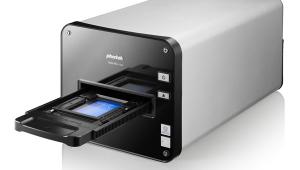
The Plustek OpticFilm 7200i is that rare breed, a new 35mm film scanner with a most interesting mix of features put into a convenient package. The shape and configuration is easy to deal with on a desktop, taking little space yet quite stable. The slide or film carrier is light and simple; it is slid into the dust-protected slots from either side of the scanner and positioned manually. The scan is accomplished by the internal movement of the sensor bar, much like a flat-bed; the film remains stationary during the process. In other words, mechanical complications found in most dedicated film scanners that have a moving film carrier have been eliminated. This should contribute to reliable operation and a long service life.
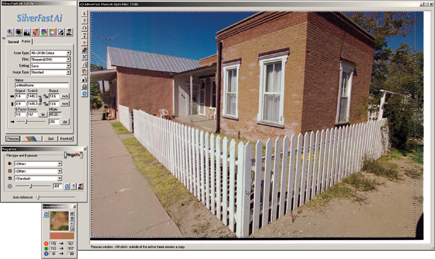
Although configured simply on a mechanical level, the Plustek 7200i includes a very high level of performance, with hardware optical resolution of 7200dpi which when applied to scanning a full 35mm film image frame produces an image file that is over 22x32" at 300 ppi. The scanning is done at 48-bit depth, which results in very large files indeed. The dynamic range specification is a 3.3 D-max, which is adequate for slide scanning, but is the only performance attribute on the modest side. It also includes a hardware-based infrared dust and scratch detection and removal feature that is supported by the LaserSoft SilverFast Ai software driver supplied with the scanner, called iSRD (infrared Smart Removal of Defect). The computer interface connection is USB 2.0. The scan speed rate is quite fast with a very quick preview scan. However, scanning at the maximum hardware resolution of 7200 ppi generates a lot of data, and if iSRD is turned on the processing of such a large amount of data does take time to accomplish.
 |
|
|
The primary software driver for the Plustek 7200i is LaserSoft's SilverFast Ai, which is augmented by a NewSoft Presto suite, including PageManager, ImageFolio, and Mr. Photo, a web page creation application. The Plustek 7200i only supports PCs with Windows (Pentium II or higher), including XP, Me, 98SE, and 2000. In addition, and after I had concluded my testing with the Plustek, LaserSoft announced that an upgrade is available to the latest full-featured SilverFast Ai 6.5 version that includes the Multi-Exposure capability. This should refine the output potential and possibly make up somewhat for the modest dynamic range of the Plustek 7200i.
Putting The Plustek 7200i To Work
I consider myself a reasonably proficient photographer, which presented a bit of a dilemma considering that the 7200 ppi Plustek used at maximum scanning resolution produces a 22x32" print image size at 300 ppi. Frankly, not all that many of my 35mm slides and negatives are really going to hold together at a 20x enlargement. So, with a high-powered loupe in hand I began going through binders of slide pages looking for likely film images to scan. After a lot of culling I had a stack of slides and mounted negatives to begin my testing. And after a couple of long days I had accumulated a fair number of rather huge image files to evaluate.
 |
|
|
But as I was doing so I began thinking, especially since scanning at 7200 ppi is rather time-consuming and boring--particularly with the automatic iSRD defect cleaning turned on--that if this were my scanner, would I scan all the images at 7200 ppi resolution? Probably not. So, I wondered, would the image quality be any the less if I scanned to a smaller final print size like 13x19" at 300 ppi? Theoretically, image quality should not be any different because smaller output does not affect the physical attributes of the scanner's CCD sensor, it just changes the output file size, and speeds things up. My theory was confirmed after making more scans and comparing the results with those scanned at 7200 ppi.
| |||||||||
|

| ||||||||








 FEATURED VIDEO


Get the Latest Photo Tips, News & Reviews from Shutterbug!







| Camera Reviews Other Reviews | |
Mobile Reviews Photography Reviews Columns | |
News | |
Features | |
How-To | |
Resources |
 © 2026 Shutterbug
AVTech Media Americas Inc., USA
All rights reserved