


- REVIEWS
Camera Reviews 
More Reviews Mobile Reviews Photography Reviews - GALLERIES
- VIDEOS
- BUYER'S GUIDES
Microtek Scanmaker 8700 Pro
Is This The Ideal All Around Scanner
The Microtek Scanmaker 8700 Pro flat-bed, dual-bed scanner provides the typical 8.5x14" reflective print scanning of a flat-bed plus Emulsion-Direct film scanning via a film drawer that accommodates all film sizes from 35mm through 8x10". For a photographer with or planning to build a digital darkroom, this Scanmaker 8700 Pro covers all of the possible bases for getting photos into a computer. Whether this full range of capabilities is ideal depends to an extent on the photographer. But I assume there are many photographers like myself who have made pictures with two or more film formats and have prints that need to be scanned. The Microtek Scanmaker 8700 Pro will handle all of those tasks. How well it does with each is the subject of this report. |
|||
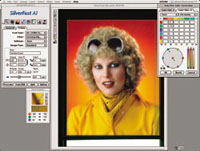
The features, specifications, and software bundle included with the Scanmaker 8700 Pro are an indication of whether the scanner is suited to an individual photographer's needs. The dual-bed design providing glassless film carriers (excepting 8x10) is an advantage anyone who has done wet darkroom enlarging will appreciate. The high optical resolution of 2400x1200dpi is sufficient to produce a good quality digital image of a 35mm film frame sufficient to produce a letter-size print (approx. 8x10" image). The 42-bit color depth for input and output scanned at a dynamic range with a 3.4 D-max provides a high level of capability to capture and reproduce the color density range of slide and transparency films. A choice of both USB and FireWire computer connection assures fast and easy image data transfer and control of the scanner's operation. All personal computer systems are supported with Microtek ScanWizard drivers for Windows and both Mac OS X and OS 9, as well as the LaserSoft SilverFast Ai 5.5 Photoshop plug-in driver. Photoshop Elements is included in the bundle. The Scanmaker 8700 Pro also includes Kodak Precision calibration software and both reflective and film IT-8 references to calibrate and profile the scanner. And, the software bundle is topped off with Genuine Fractals Print Pro so you can make poster-size or even larger prints from your scans. |
|||
Using The Microtek Scanmaker
8700 Pro |
|||
My selection of images to make my test scans was more at random than usual, and included many of varying photographic quality, as well as some that were on the money. Of course, I included slides, color negatives, and black and white film representing just about every film format there is (with the exception of my panoramic 120 6x12cm images, which are not supported by the SnapTrans holders included). The only 120 size which is part of the standard package is 6x9cm. This required a little clipping of 120 film ends to tape to smaller film frames. This was my only way to obtain full support of the smaller than 6x9cm sizes so one edge would not droop and go out of focus. Otherwise the system is efficient and effective, resulting in scans that are generally cleaner than those made with conventional flat-bed scanners. Theoretically, as there are no glass surfaces involved, the Scanmaker 8700 Pro film scans should be sharper and crisper by avoiding refractions created by glass surfaces. I found this to be the case. But I did notice that of the almost 100 high-resolution scans I made, those of transparencies seemed softer than either color negative scans or black and white film. I re-checked the transparencies I had scanned with a strong loupe, but film image sharpness was not the issue. I have no real insight into this, as it is not explained logically by any factor I can think of. |
|||
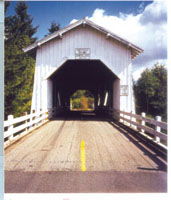
Besides facilitating scanning 8x10 film, which I suspect few but myself and some other old-timers have, the glass carrier is useful for proofing a whole roll of 120 film (6x7cm format being the usual exception, because arranging 10 frames within 8x10" always leaves one out). And for those with 6x12cm and longer panoramic film images, being careful to avoid Newton rings, the glass carrier is also useful. Once my scans were done I cleaned them up in Photoshop, which was an easier than usual task, which leads me to believe that the dual-bed glassless Emulsion-Direct system produces cleaner scans. Most prints made from the scans were done on letter-size paper. The rest of my scans were done to print on 13x19" paper at 300dpi image resolution. So, I also made a few large prints, which are much more revealing. |
|||
Evaluation & Recommendation
All of the other dimensions of quality were consistently good and very competitive in its price class. I was most impressed with the quality of scans from color and black and white film negatives, especially because LaserSoft SilverFast Ai 5.5 with NegaFix is included with the software bundle. The native Microtek ScanWizard software is quite effective, but the color adjustment tools it includes are not as easy to use or as powerful as the LaserSoft provides. About the only detraction I can think of is that the Scanmaker 8700 Pro is about the largest and heaviest scanner in its class I have worked with, so it does demand a generous space on a sturdy desk. For more information about the Scanmaker 8700 Pro and for a full list of specs, visit the Microtek web site at www.microtekusa.com. |




| ||
|
||


 FEATURED VIDEO


Get the Latest Photo Tips, News & Reviews from Shutterbug!







| Camera Reviews Other Reviews | |
Mobile Reviews Photography Reviews Columns | |
News | |
Features | |
How-To | |
Resources |
 © 2026 Shutterbug
AVTech Media Americas Inc., USA
All rights reserved