


- REVIEWS
Camera Reviews 
More Reviews Mobile Reviews Photography Reviews - GALLERIES
- VIDEOS
- BUYER'S GUIDES
HP’s Photosmart 8750; 13x19” Nine-Ink Printer
When I first reviewed an HP 7960 printer about two years back (www.shutterbug.net/test_reports/1203sb_hp/index.html) I was very impressed with the neutral black and white images it delivered. I had become increasingly frustrated with the color shifts in black and white with pigment inks, and have since been convinced that this was as much a problem with pigment inks as with any profile I could decipher to cure it. The HP 7960, albeit a dye-based printer thus, at the time, not offering an equivalent archival lifespan as pigment printers on the right paper, was about the best I had worked with in that regard. Being more interested in black and white than color, but still doing a fair share of the latter, I continued to search, aided in large part by David Brooks, whose groundbreaking articles on digital black and white printing have graced these pages (www.shutterbug.net/features/0205digitalbw/index.html).
 |
After that initial HP review I began bugging the powers that be at the company
to bring out a larger format printer for the advanced amateur market, convinced
that their technology applied to a larger print size would be a boon for printers
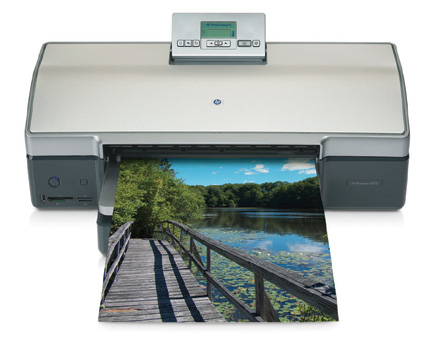
like me, and many others. Their answer is the new Photosmart 8750, a 13x19"
printer. Along with the printer comes a new inkset of inks, what HP calls Vivera,
a dye-based setup with nine inks that come in three cartridges. The inks include
cyan, light cyan, magenta, light magenta, yellow, blue, and three neutral gray/black
inks (light, medium, and dark) in what they call the Photo Gray cartridge. The
printer has a max resolution of 4800x1200dpi with two feed systems, straight
from the tray or, for heavier papers, from the back slot.
While I did all my work via computer, the printer can work from memory card
slots and directly from your camera with PictBridge capability. There's
a built-in LCD printer screen that you can use to view menus, page layout, ink
status, and so forth. Overall the printer seems well built, though some of the
components, such as the print size positioning sliders, might benefit from the
use of a more hardy plastic. I did not have any issues with any of the parts
overall, and the unit runs smoothly and quietly with a minimum of "jitter"
that some exhibit when transporting paper. With a list price of $499 it's
certainly competitively priced.
 |
|
|
One of the chief concerns for any printmaker today has to be the archival
qualities of prints made on a particular machine with various ink/paper combinations.
HP has done their homework here, or at least Henry Wilhelm has done it for them.
(See also www.shutterbug.com /columns/0305point/ for an article by Dr. Nils
Miller of HP on print longevity.) According to Wilhelm's tests, the Vivera
inks on HP's glossy paper will last over 100 years in prints displayed
under glass, over 130 years under UV glass, and over 200 years in an album or
"dark storage." These are extrapolations, of course, but Wilhelm's
methods are generally well accepted by most companies. In any case these are
more than sufficient numbers.
My tests were done on the glossy paper HP supplied as well as from other makers,
including the new Inkpress Papers (www.inkpresspaper.com) in a variety of surfaces.
I worked images in Photoshop CS on a Windows XP machine from scans and original
digital image files and connected via USB, although you can hook up a network
via the Ethernet connection. You can also use a wireless Bluetooth connection,
via the HP bt300 adapter, which I did not test, for connection to camera and,
I suppose, photo cell phone. Loading the ink carts was simple enough, as was
loading the software. In short, soon after unpacking I was ready to go.
 |
|
|
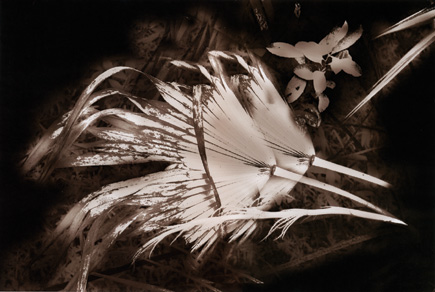
My penchant is toward black and white and toned monochrome, but to be fair
I had to give the color a workout first. Using 18MB scans from various slide
films I upsized in Photoshop to yield 11" (short side) prints at 240dpi.
I worked with the Bicubic Smoother and Bicubic Sharpener resampling modes, which
I find work as good as most specific resampling programs. Opening the Properties
dialog box allowed me to control color via the application (no color management),
although working with HP's "smart" profiling often gave me
excellent results as well.
Once I set up a set of printing parameters I was also able to save that set
and apply it to each subsequent print. In short, there's nothing oblique
or even unique about this procedure, at least when compared with comparable
printers. The profiles supplied when loading the printer driver, however, were
myriad and it wasn't always clear which ones applied to the specific paper
I was using. I stuck with the Photo Plus paper profile (gray cartridge) on both
HP's glossy stock and Inkpress' matte, and was rewarded. ICC profiles
can be downloaded as well, although this printer, being preproduction, did not
have much support from third-party paper makers or even HP online, at least
as of this writing. I did not do any custom profiling myself. My hope is that
by the time the printer gets out there that HP will make an effort to dedicate
a variety of surfaces and profiles for this printer.
 |
|
|
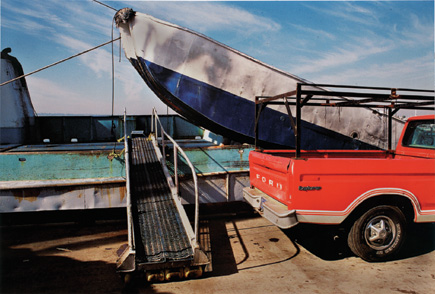
My color prints were just how I like them, although you might, and probably
have different tastes for color than me. Indeed, the first set of color prints
was very satisfying, even exciting, and reminded me of the Cibachrome look of
years back, slightly muted but very rich. That's how I set up the images,
in any case, and what I had on screen matched what came out of the printer.
One of the chief improvements, I was told, in the inksets is the addition of
the blue cartridge, and this kicked up the blue in whatever sky happened to
be in the image. Warmer colors were very satisfying, but not overly yellow,
a good balance to my eye. There is a certain sheen to colors that feels almost
metallic to the eye, but I put this down to the glossy paper HP supplied and
I used, not ever my first choice for printing but worthy of trying, at least.
Like I said, color's not my first choice for printing, but the 8750 got
me to dig into old color files and print away.
| |||||||||
|

| ||||||||


 FEATURED VIDEO


Get the Latest Photo Tips, News & Reviews from Shutterbug!







| Camera Reviews Other Reviews | |
Mobile Reviews Photography Reviews Columns | |
News | |
Features | |
How-To | |
Resources |
 © 2026 Shutterbug
AVTech Media Americas Inc., USA
All rights reserved