


- REVIEWS
Camera Reviews 
More Reviews Mobile Reviews Photography Reviews - GALLERIES
- VIDEOS
- BUYER'S GUIDES

The New Microtek ArtixScan M1 Pro; All-Format Glassless Film Scanning And Flat-Bed Print Scanning, All In One
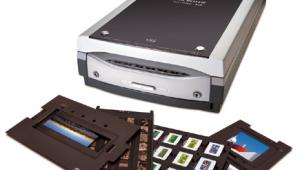
Microtek is well-known for making both consumer- and professional-level scanners. For a good part of their long history in the business their pro flat-bed scanners have offered a unique capability that combines a dedicated film scanner with legal-size, 8.5x14" flat-bed reflective scanning. The new ArtixScan M1 Pro includes a very modern 4800dpi optical Sony CCD sensor array to their unique scanner configuration, making it just about all things to all photographers who need a scanner. In addition, the M1 Pro comes with LaserSoft's SilverFast, the very best in scanner software. To top it off, the M1 Pro is much less than half the cost of the most popular dedicated multi-format film scanner.
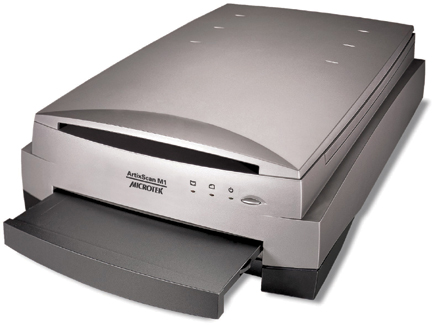 |
What makes the Microtek ArtixScan M1 different, larger, and heavier than any of its contemporary competitors is how it is designed and constructed.
It has the typical glass-lidded reflective print scanner on top with a linear bar CCD sensor below. But rather than use a similar arrangement for film scanning, the CCD bar and optics are virtually flipped over and the print illumination turned off in favor of another similar moving illumination bar below. The drawer this illuminates is where you place glassless film holders for all formats except 8x10 or "odd" format sizes, for which a glass carrier is provided.
 |
|
|
With all of these film carriers and the light source below, and the CCD sensor bar above, there is only air between the film and the CCD sensor; there is no glass (except for 8x10 carrier) on the underside so there is no distortion of the light passing from the film to the cells of the sensor CCD. There's also no glass to collect dust and dirt.
The core functional feature is the Sony CCD sensor array that scans at up to 4800dpi optical, outputting 16 bits of data per channel with a dynamic range that has a maximum density to 4.4. In addition, the ArtixScan is shipped with the ability to custom calibrate and profile the scanner. There are two software bundles depending on which model you buy. LaserSoft's SilverFast SE Plus comes with the standard M1 and SilverFast Ai Studio, including both reflective and film IT8 targets for use with SilverFast's easy automated profiling utility, is a part of the M1 Pro package.
 |
|
|
Testing And Working With The ArtixScan M1 Pro
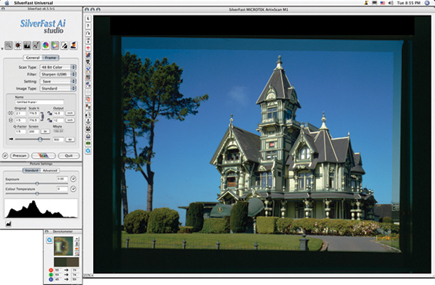
To test the M1 Pro I first selected a diverse collection of 35mm slide images, including many made on Kodachrome film. The M1 Pro carrier frame holds 12 frames, three times as many slides as most dedicated 35mm slide scanners. Once loaded, a click of the pre-scan button and a few seconds time make all 12 images appear on screen. You then draw a selection frame around one, click the enlarge button and the work space frame is filled with the raw image, providing the opportunity to adjust the range (Levels in Photoshop speak), contrast, brightness, color balance, etc. That's where you also set the size and resolution of the final scan, and its file name. You can then go ahead with the individual scan or move on to select and frame another of the 12 to get ready for final scanning, on and on until all are adjusted, and then hit the batch scan button and take a coffee break. The M1 Pro scans each one and deposits them as an image file where you have designated in your computer.
I chose a number of Kodachromes to test scan as they often represent the highest range of film densities you are likely to scan and are a particular challenge to reproduce good detail in both highlights and shadows. I was particularly impressed with the scans I was able to produce from Kodachrome, having both fine, sharp detail all across the density range, and as good a replication of the unique coloration of a Kodachrome image I have yet to reproduce in a 12x18" by 300dpi file. And although some of the very best dedicated film scanners will reproduce a slightly crisper image from Kodachrome, the M1 Pro will reproduce about as much fine detail and overall smoother tonalities.
 |
|
|
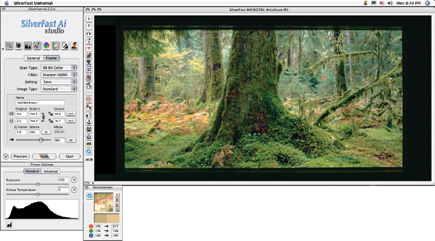
Moving on to medium format 120 film, the newly redesigned film holders do achieve their purpose of holding the film more securely and flatter than older ArtixScan flat-beds. And with smaller 120 formats you can successfully load three frames, or two for 6x7 and 6x9, but just one for my favorite and odd semi-panoramic format, 6x12cm. Of course with larger film areas and the high potential optical resolution of 4800dpi you can make scans for really huge prints, even at an image file resolution of 300dpi. I scanned 120 transparency, color negative, and silver-based black and white films in my tests and all were sharp, yet with smooth tonalities. They displayed a fully adjusted distribution of tones and fully balanced color, ready to print.
I did not expect scanning 4x5 film would be all that different except of course you begin with more information and you obtain more in a resulting scan file. However, the redesigned film holders for 4x5, although they do tend to hold the film flatter, are more difficult to use. The frame and opening are only slightly less in dimension than the film itself, and getting all sides of the 4x5 film secured under the frame is a bit tricky.
 |
|
|
The 8x10 glass support holder frame is the most interesting in terms of the different things you can do with it. For instance, it is an ideal support for fluid mounting film, which reduces dust and scratches from being scanned, and reproduces a more brilliant, smoother-toned image. The 8x10 glass frame support is also useful if you happen to have film from the past, or even glass plates, in odd sizes like 31/4x41/4", as well as 5x7, and very wide 120 panoramic film greater than 6x17. Another use is for making a single scan proof sheet of cut strips of 120 or 35mm film. Of course some formats like 6x7 don't fit all frames into an 8x10 format, but that was a problem even before digital.
| |||||||||
|

| ||||||||








 FEATURED VIDEO


Get the Latest Photo Tips, News & Reviews from Shutterbug!







| Camera Reviews Other Reviews | |
Mobile Reviews Photography Reviews Columns | |
News | |
Features | |
How-To | |
Resources |
 © 2026 Shutterbug
AVTech Media Americas Inc., USA
All rights reserved