


- REVIEWS
Camera Reviews 
More Reviews Mobile Reviews Photography Reviews - GALLERIES
- VIDEOS
- BUYER'S GUIDES

HP’s Designjet 90; Affordable Large Prints
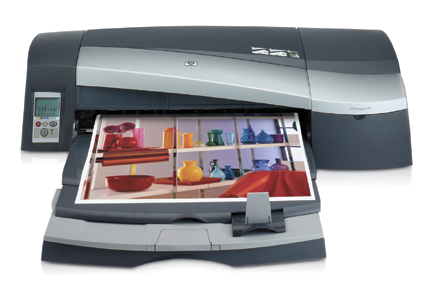
The HP Designjet series packs some powerful photo printing into a sleek and stylish format, and all at very reasonable prices. The original Designjet 130, which prints up to 24" wide, and the Designjet 30, in a more desktop friendly 13" wide size, have now been joined by the new Designjet 90 which brings 16x20" printing to the sub-$1000 price point for the first time.
Looking just like its larger and smaller family members, the Designjet 90 is able to print up to 18" wide through either manual feed or an optional roll-feed adapter. The paper tray can handle widths up to 17" and, depending on paper thickness, up to 100 sheets. Unusual for a printer of this size is the ability to print on small sizes as well as going down to post card size. All three printers in the line use the same ink cartridges and print heads, making it a logical choice for the photographer looking to upgrade from the Designjet 30. The printer uses HP's dye-based Vivera inks which have a broad color gamut and rich, saturated colors. When used with HP's Premium Plus papers the display life is rated at 82 years; very impressive for a dye ink print. The printer features 2400x1200dpi resolution and a 4-picoliter ink drop size, which all adds up to highly detailed photos.
 |
|
|
Setup And Use
Unpacking and setting up the printer was quick and relatively painless. Although it looks small compared to the Epson 4800, you'll still need to find about 3 ft of desk or floor space for the printer. The standard version with no roll feed is about 16" deep, while the Designjet 90r with roll feed is about 21" deep (there is also a 90gp model, which adds a GretagMacbeth colorimeter for monitor profiling). If you'll be printing on thick media, you'll need to allow for this when setting up. The printer has a total of four paper paths: tray, front manual, roll, and rear manual. Both the front manual and paper tray have a curved path, making them suitable for normal printing needs, but heavy stock will need to be run through the straight rear manual feed.
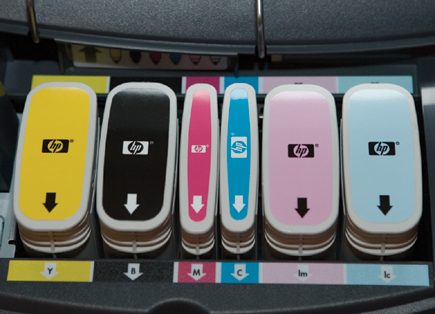
The Designjet is a six-color printer and includes separate print heads and ink. The advantage to this method is lower costs for replacement inks as well as lower repair costs should a print head need replacing. The yellow, black, light cyan, and light magenta cartridges are each 69ml, while the cyan and magenta cartridges are 28ml each. In theory you should run out of all colors at about the same time with this configuration, although despite my best efforts, I wasn't able to get beyond half empty during all of my testing. This printer truly sips ink at an amazingly low rate.
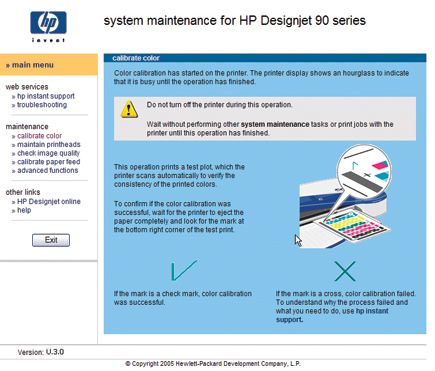
After installing print heads and ink, the printer charges all ink lines and does a diagnostic check which takes about 10 minutes. Unlike most large format printers, the control panel on the Designjet 90 is spartan with only three buttons--power, paper feed, and cancel. All maintenance features are accessed through the System Maintenance utility which is a web page with options to calibrate color and paper feed, check and clean the print heads, and perform test prints to check image quality.
 |
|
|
Color Accuracy
HP includes profiles for all of their supported paper types, including photo gloss, semigloss, matte, coated, transparency, and satin finishes, all in different quality levels, which reflect the print quality settings available in the HP driver. If you prefer to use other papers, a unique calibration system makes it easy to get good results from non-HP papers.
The Calibrate Color application launches a web-based utility to select the paper type and quality level of your new paper. Once you've selected the correct type and click the Calibrate Color button, the printer generates a test pattern and reads the values with a built-in closed loop color checker. While very handy if you only use a specific paper type, this method of calibration overrides the existing settings for that paper type and becomes the default. The web page shows which paper settings have been calibrated and the date, as well as the option to delete the profile and revert back to the original default settings.
 |
|
 |
|
|
| |||||||||
|

| ||||||||









 FEATURED VIDEO


Get the Latest Photo Tips, News & Reviews from Shutterbug!







| Camera Reviews Other Reviews | |
Mobile Reviews Photography Reviews Columns | |
News | |
Features | |
How-To | |
Resources |
 © 2026 Shutterbug
AVTech Media Americas Inc., USA
All rights reserved