


- REVIEWS
Camera Reviews 
More Reviews Mobile Reviews Photography Reviews - GALLERIES
- VIDEOS
- BUYER'S GUIDES

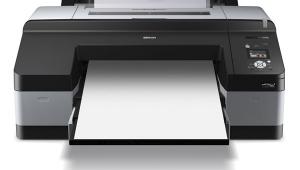
HP’s Designjet Z3100; A Large Format Pigment Ink Printer
Epson, you have company! For years, serious large format inkjet printing has been owned by Epson with the 7000- and 9000-series printers. The pigment-based printers had a huge advantage in archival life and in the media options available, making fine art printing something that the individual could finally afford to do in-house. In the past year, both Canon and HP have entered the market with their own pigment-based large format products, and the winner is us. The newest printers from HP are the Designjet Z2100 and Z3100.
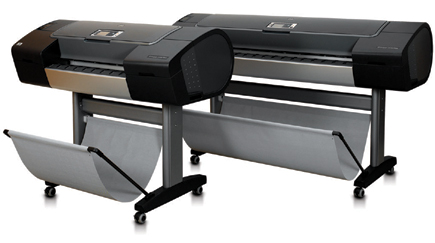 |
Both printers, available in 24" and 44" sizes, use the new Vivera pigment inks that debuted in the B-size Photosmart Pro B9180 printer. In fact, the Z2100 uses the same eight inkset as the smaller B9180 which has been reviewed elsewhere in depth. For this report, I'll focus on the Z3100 printer which is a 12 ink--11 colors and a gloss enhancer--version.
The enhancements don't stop with the additional inks though. The Z series is also the first printer that includes a built-in spectrophotometer for creating custom profiles. If you've ever dealt with profiling a printer, you'll immediately see the benefit of this. But, any printer can sound impressive when you read the feature list--after all, people go to college to learn how to make a product sound good. In this case though, the hyperbole is deserved. The output from the Z3100 is nothing less than outstanding, and in 20 years of digital printing, I have never been as happy in as short a time as I am with this printer.
 |
The Pigment Advantage
Pigment inks have two major advantages over dye-based inks. First, archival life is much greater, with most offering 70 or more years of display life before visible fading occurs. The Vivera inks in the new HP printers are rated by Wilhelm Imaging Research at 200 years for both color and black and white prints. The other primary advantage is the variety of media available. While dye ink printers are optimized to work with luster and gloss finish papers, pigments can print on almost any surface. HP has over 20 media options with many of the fine art papers being supplied by Hahnemühle.
Setting Up And Using The Z3100
If you haven't used a large format printer before, you might be a bit overwhelmed when you see the box. The 44" printer I received was on a 6-foot palette and tipped the scales at nearly 300 lbs. Needless to say, my wife was not amused when the truck dropped it off. After opening up the box, you're greeted with a large and clear quick setup guide to show you how to unpack and assemble the printer.
HP has done a fantastic job with the documentation for the Z series. In addition to the quick-start guide, there is a full color and extensive manual for the printer that clearly shows how to perform most tasks. Installation of the software also places an electronic version of the documentation on your computer where it's available at any time from the printer driver. Since this printer is likely to be used in a networked environment, that can be a big help when the printer isn't located near the user. A minor nit to pick though--the manual is too big to fit into the pocket on the back of the printer where you would expect to store it.
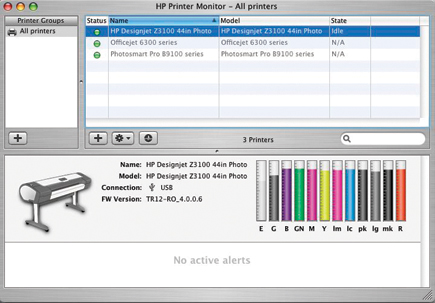
Within 30 minutes of starting I had the printer up and ready to charge the ink lines. The Z3100 uses six user-replaceable print heads, and 12 130ml ink cartridges. To the normal mix of colors, HP has added a light gray, gray, red, green, and blue. Interestingly, the normal cyan has been dropped to make room for the gloss enhancer. HP feels, and my print testing confirms, that the addition of a blue more than compensates for the cyan. Through the HP Print Monitor you can check the status and supply of all inks.
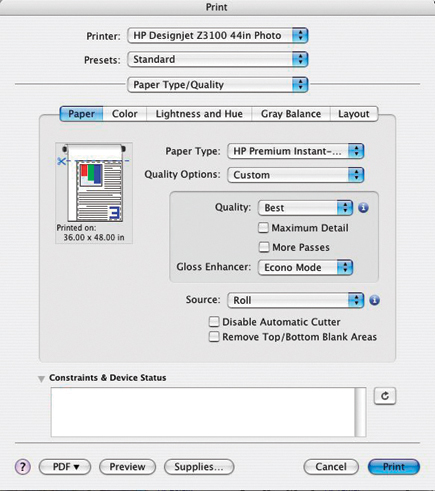 |
Unlike the Epson printers, there is no need to swap photo black and matte black inks when switching between paper types, saving time and significant amounts of ink. When printing on gloss or satin papers, matte black is not used, but the gloss enhancer is available. If you've done much printing on gloss or satin-finish paper, you've probably seen (and sworn at) gloss differential--the change in reflectance between different areas of the print. By using the gloss enhancer, a clear ink is mixed in varying amounts with the colored inks to eliminate this problem. The effect of this is much better control over color and placement than you get with a standard clear coating.
There are two options for using gloss enhancer, Econo mode, which only places the gloss enhancer on areas of the print that contain ink, leaving highlight areas where no ink is placed on the page blank, and Full mode, which covers the entire printable area of the page regardless of ink coverage. On matte finish and fine art papers the gloss enhancer isn't used at all.
The Z3100 makes it easy to use your own favorite paper types, too, thanks in large part to a built-in Gretag Eye-One spectrophotometer. To use this feature, you simply start the HP Printer Utility and select the appropriate option.
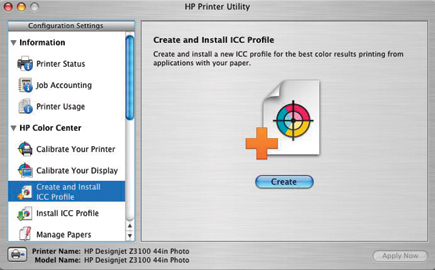 |
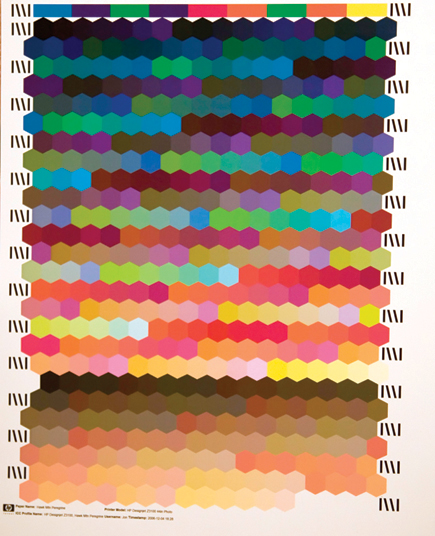
Because the printer has an on-board 40GB hard drive and embedded web server, any profile you create will be stored on the printer and available to any other user in a network setting. After clicking Create, you'll be prompted to name your paper type, which will then be available in the Custom section of the print driver. The printer will then print a color chart which is measured by the spectrophotometer, and a standard ICC profile is created and installed. These profiles are also stored on the printer's hard drive and will be automatically installed on any computer using that printer, ensuring that all users have the same output profiles available to them. There has been some question as to the quality of profiles created this way--the standard profile is about 490 patches. I compared this profile to one I made using an 1100 patch target with ProfileMaker and a stand-alone Eye-One and saw minimal differences. HP does have an Advanced Profiling Solution available as an optional package that includes monitor calibration using the included Eye-One Display 2 colorimeter, larger profile charts, CMYK profile generation, and the ability to edit profiles as well as generate profiles for different illuminants, or lighting conditions.
 |
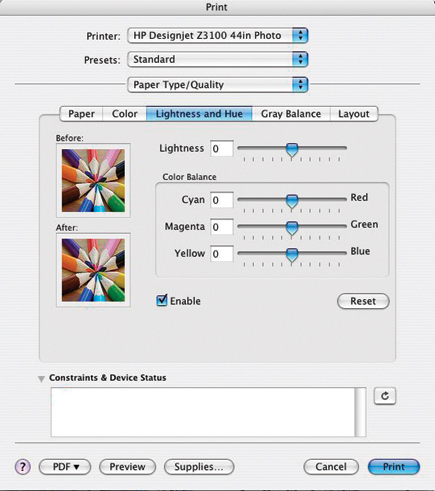
Printing with the Z3100 is much like any other printer. For best results you'll want to use the Photoshop Print with Preview feature and select the proper paper profile along with choosing "Let Photoshop Manage Color." The default in the HP driver is Application managed color, so you really only need to select the proper paper type and size before printing. If you like to tweak your settings though, you have full control over both color balance and lightness.
 |
| |||||||||
|

| ||||||||









 FEATURED VIDEO


Get the Latest Photo Tips, News & Reviews from Shutterbug!







| Camera Reviews Other Reviews | |
Mobile Reviews Photography Reviews Columns | |
News | |
Features | |
How-To | |
Resources |
 © 2026 Shutterbug
AVTech Media Americas Inc., USA
All rights reserved