


- REVIEWS
Camera Reviews 
More Reviews Mobile Reviews Photography Reviews - GALLERIES
- VIDEOS
- BUYER'S GUIDES

HP’s Photosmart Pro B8850 Inkjet Printer; A (More) Affordable Pigment-Ink Option
Every year it seems that print quality gets better while prices come down. Oh, how I wish that applied to the high-end camera market! Pigment printers in the 13x19 desktop size have become the new standard for many photographers. Capable of 11x14 (and obviously larger) prints, they're a perfect match for the needs of most people, and the size and price is within range of many photographers. Now, as a follow-up to the popular Photosmart Pro B9180 printer, HP has introduced a lower price model that will appeal to enthusiasts who don't need all of the features of the B9180 but still want the same print quality. With a list price $150 below that of the B9180, the $549 B8850 is certainly worth a look.
Setup
As usual, the packaging and documentation from HP are high quality, making unpacking and setup a painless experience. New to the B8850 is an on-screen setup guide to walk you through each step of installing the printer (#1).
 |
|
|
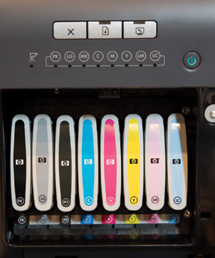
The B8850 uses the same eight individual ink tanks as the B9180: photo black, matte black, light gray, cyan, magenta, yellow, light cyan, and light magenta. These cartridges are larger than the typical desktop printer with 27ml capacity each (#2); Epson and Canon cartridges in this printer size are about 12ml each.
 |
|
|
Also in the box are four user-replaceable print heads. Although replaceable, and at a reasonable price, the heads are rated to last as long as the printer.
After the ink lines and print heads have been initialized, you'll be prompted to load an included pack of HP's Advanced Glossy Photo Paper to run a calibration. Although the B8850 includes a calibration routine, this is one of the areas that HP has made a cost savings with a less precise measurement than the one found in the B9180.
The second area of cost reduction is in the connection options. While the B9180 offers both USB and Ethernet ports, the B8850 is a USB-only device. Considering the target audience for this printer, lack of Ethernet is an appropriate feature reduction. If you do have the need to network the printer, both Windows and Macintosh systems allow for printer sharing, or you could connect the printer to a USB port on most wireless routers.
 |
|
|
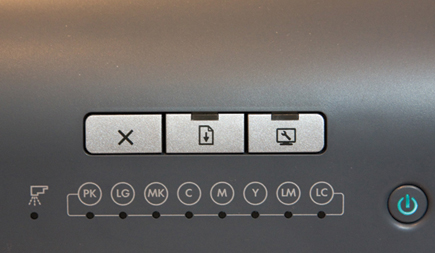
There are two other primary cost-reduction designs in the B8850. First and most obvious to anyone familiar with the B9180 is the lack of an LCD display (#3). The B8850 foregoes this in favor of status lights for the print heads and each ink tank. The reasoning here is that the printer will likely be connected directly to a nearby computer rather than on a network, making the need to see status on the printer less of an issue.
 |
|
|
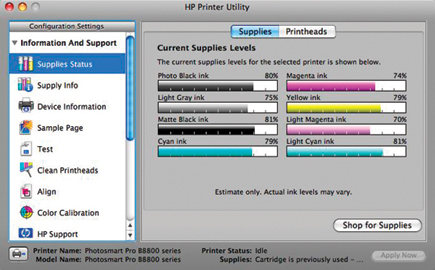
A Toolbox button will launch the HP maintenance software on your computer (#4), which is also where you'll perform maintenance and add custom paper types (#5), and finally, a print/cancel and resume button.
 |
|
|
The other difference is in the media handling. While the B9180 can feed stock as thick as 1.5mm, the B8850's maximum thickness is .7mm. At first this sounds like a major change; in fact, all HP media (and all media that I would typically use) still feeds fine. If you want to print on heavy card stock you'll want to check the weight of your media before deciding if this printer will work for you. As before, there is a tray that holds up to 200 sheets of plain paper, or about 50 sheets of photo paper up to 13x19 size, and a specialty media tray for straight through feed of heavier media. The official statement from HP is that you can print up to 13x19, but using the specialty media tray and custom page sizes, you can print panoramic. I tested up to 13x42 (#6), but I have no reason to believe that longer prints are not possible.
 |
|
|
Ease Of Use
Printing with the B8850 is exactly like using the higher priced B9180. Not surprising, given that it's using the same ink and print heads. I detected no difference in print speed between the two printers when both were using USB connections.
| |||||||||
|

| ||||||||









 FEATURED VIDEO


Get the Latest Photo Tips, News & Reviews from Shutterbug!







| Camera Reviews Other Reviews | |
Mobile Reviews Photography Reviews Columns | |
News | |
Features | |
How-To | |
Resources |
 © 2026 Shutterbug
AVTech Media Americas Inc., USA
All rights reserved