


- REVIEWS
Camera Reviews 
More Reviews Mobile Reviews Photography Reviews - GALLERIES
- VIDEOS
- BUYER'S GUIDES
The New ArtixScan 4000t
The era of beige boxes is over. The contour and coloring of a stealth fighter combined with the design of the outer shell of the new Microtek ArtixScan 4000t signifies a new generation of high-performance personal 35mm scanners. As the century has turned, my testing and review of this new scanner has also confirmed that an era of uncompromised digital darkroom performance is upon us. The high optical resolution of 4000dpi 35mm scanning the ArtixScan provides, and an interpolated boost to 8000dpi, makes real the most grandiose print sizes any photographer would want to reproduce from a 35mm image. In other words the ArtixScan 4000t is an ideal complement to the graphics computers and printers that are the core of a digital darkroom to begin the 21st century in style. |
|||
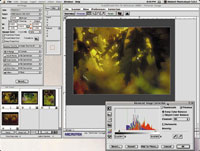
In addition to copious pixels in each scan, the ArtixScan 4000t's features and specifications are, in all respects, up to the task. The 4000t scans at a full 36-bit color depth and supports 8-bit and 12-bit per channel image file output. The ArtixScan also handles film images with a density range up to 3.4 Dmax. Batch slide and film strip holders support loading either four mounted slides or a strip of six frames of film at a time. The new Microtek ScanWizard Pro TX software also supports these batch holders to adjust easily each frame based on an overview of all or a preview of each, then either scanning each individually or selecting hands-off batch scanning of either all four or six images. This new ScanWizard Pro TX software supports either the Macintosh or Windows operating systems, providing a plug-in for the Mac and a stand-alone scan module with TWAIN driver for Windows. Scanner calibration and custom profiling is also supported with the provision of Kodak Digital Science color man-agement software, as well as a Kodak Ektachrome IT-8 reference slide. For Mac users this color management facility includes the full support of Colorsync. |
|||
Over the past 10 years I have
used a large number of different scanners, many of them 35mm. That experience
has impressed upon me the fact that the scanner's software is as
important if not more critical to obtaining good scans than is the hardware.
In fact there are many scanners which have good physical performance,
but few that have equally good software. The ArtixScan 4000t's Microtek
ScanWizard Pro TX is definitely a good match for the hardware. This is
due in part to the fact the user has several options available as to how
to use it. You can choose fully or partially automated scan adjustments,
with dimension of image auto adjustment readily variable in terms of the
kind of results required. Second, it is just as easy to manually adjust
each dimension of image quality separately, or from within a single window
dialog. And, finally you can choose to output the entire 36-bit scan data
and save it as an archived file, or transfer the full 12-bit per channel
data to another application like Photoshop to do the color correction
editing. |
|||
Using The ArtixScan 4000t.
I began my test work with the 4000t installing it on a modest Windows
PC. After a quick and faultless install, I was delighted to find the PC
version of ScanWizard Pro TX is a stand-alone application as well as a
TWAIN driver that can be accessed from within any TWAIN compliant application.
The stand-alone really makes the 4000t batch scanning combined with scanning
at 36-bit output for archiving, easy and efficient. Before getting into
any serious scanning I ran the Kodak Digital Science profiling software
to calibrate the software, and any easy wizard-driven function. |
|||
I then installed ScanWizard Pro TX on my Mac G3. Using the ScanWizard plug-in from within Photoshop, once the Colorsync profiles were selected, I had a slightly better set of results scanning slides and color negatives. I assess this entirely to the fact my Mac's monitor is more precisely calibrated and Colorsync is a more effective color management environment in which to do scanning. I believe this is mostly due to the fact there is a better match between what is perceived in the ScanWizard Pro TX preview and how the image appeared once scanned and opened in Photoshop's workspace. The only frustration I had in this entire scanning experience was related to the fact there is not a film term supplied by Microtek that matches my favorite color negative film, Fuji Reala. This required applying a fair amount of work tweaking the color in Photoshop after scanning. |
|||
Evaluation And Recommendation. The standout feature of the ArtixScan 4000t is its much higher optical resolution. Of course this supports making much larger prints than the 2700/ 2800dpi optical resolution that was tops for affordable desktop scanner not long ago. I found it has even more benefits, however. For almost 20 years I have preferred shooting color negative film over slides, so I have quite a bit of experience scanning negatives, and with a lot of frustration. Very often the results seem excessively grainy, a problem many other photographers have related in Internet forums in discussions of scanning. Scanning these same negatives at 4000dpi with the ArtixScan that excessive graininess is noticeably reduced. So, apparently at 2700/2800dpi there is a relationship between the pixel size and grain size which becomes exaggerated, possibly only in negatives because density range of the film image is often close to just half that of a slide image. A less pronounced, but still valuable advantage of 4000dpi scanning applies to slides, and even if I'm only going to make a letter-size print, the 4000dpi images produce generally smoother print tones. |
|||
Obviously these very favorable results set the Microtek ArtixScan 4000t high in my estimation. Add to that the fact the software is flexible, and efficiently effective whether you want to choose manual, automatic, or a mix of both, you can even output 36-bit raw data, it works that well. The scanning process is also quite rapid considering at 4000dpi it is producing 50 some megabyte file sizes in 24-bit RGB and well over a 100MB in 36-bit mode. The ArtixScan 4000t is a very strong scanning package in hardware and software, particularly at the suggested retail price of $1795. For more information contact Microtek, Inc., 195 Baypointe Parkway, San Jose, CA 95134; (408) 955-9355, fax (408) 955-9360; www.artix.com. Technical Specifications |
|||
Bit Depth: 36-bit/24-bit
color, 12-bit/8-bit gray scale |




| ||
|
||


 FEATURED VIDEO


Get the Latest Photo Tips, News & Reviews from Shutterbug!







| Camera Reviews Other Reviews | |
Mobile Reviews Photography Reviews Columns | |
News | |
Features | |
How-To | |
Resources |
 © 2026 Shutterbug
AVTech Media Americas Inc., USA
All rights reserved