


- REVIEWS
Camera Reviews 
More Reviews Mobile Reviews Photography Reviews - GALLERIES
- VIDEOS
- BUYER'S GUIDES

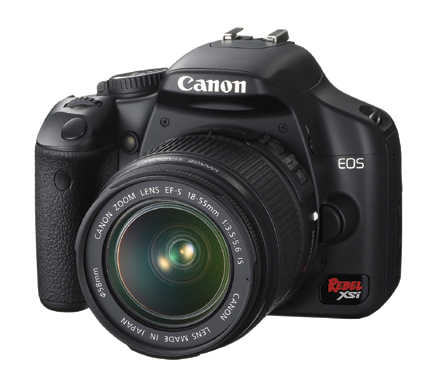
Canon’s EOS Rebel XSi (EOS 450D); Lightweight And Easy 12.2Mp D-SLR
The Canon Digital Rebel series draws on a long tradition of Rebel cameras, going back to the 35mm SLR days, with cameras that were always companionable, easy to use, lightweight, and "simplified" for the general user. That simplification does not mean unsophisticated; to get simple to work there has to be lots of tech in the background. That was true with the Rebel film cameras and has become more so with the Digital Rebel series. The XSi sports a 12.2-megapixel (effective) sensor and DIGIC III processor, which allows for some new tricks up the Rebel's sleeve.
 |
 |
In a number of ways the Rebel is sort of a junior EOS 40D (for a complete review of the 40D see our December 2007 issue or online by typing Canon 40D in the Search box at www.shutterbug.com). The 40D, oddly enough, drew some inspiration from the previous Rebel and its pro siblings; now the circle becomes complete with the new Rebel model. This circular migration of technology benefits buyers of lower-priced models (the XSi runs about $899 with kit lens and $799 body only) and sometimes the borders between the advanced and amateur models get fuzzy. But in the end, it shouldn't matter what niche the camera gets placed in by marketers; what really matters is how it performs in the field.
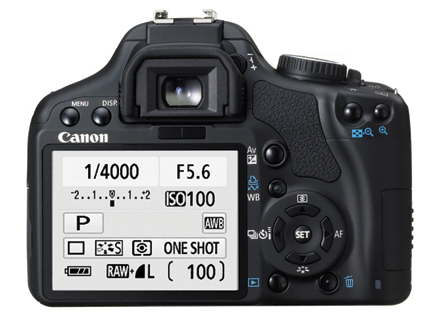
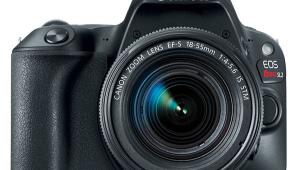
The first thing that strikes you about the XSi is the weight, or should I say lack of it. At 16.8 oz without lens and an additional 7.1 oz with the kit EF-S 18-55mm f/3.5-5.6 IS lens, it hardly gets in the way. It is also wonderfully "packable," something that will become more and more appreciated as airlines get more stringent about carryons. The XSi is the first Rebel to use SD cards, it being compatible with the higher capacity SDHC format, plus there's a new battery (and charger form) that adds to the shooting time and capacity over the previous model. The charger does not use a cord and plugs right into a wall socket, another plus for packing efficiency. One of the most noticeable changes is the 3" LCD screen, which is nicely set flush to the left-hand side of the body, thus buttons and toggles are not cramped as they sometimes can be when the screen is set dead center. Other items of note are a depth of field preview button placed nicely on the front lower left; a well marked mode dial atop the camera (no LED read-out screen); and a set of buttons that bring you right to the menus on a very well lit LCD screen. And there is Live View, with numerous options.
 |
|
|
This may sound a bit nerdy, but I have to say that this is one of the most well designed set of controls and interfaces on a camera I have seen. I will not use the "e" word, but it is an excellent combination of hand/eye controls that is both intuitive and highly accessible (and quickly "learnable") in the field. When you look at the display on the camera and search for the button to control it on the camera (such as ISO) it is almost as if the graphic notation of the control on the LCD is placed in the same hand/finger control "grid" on the camera. For example, the ISO setting is in the upper right of the LCD, and the ISO button on the camera is in the upper right quadrant of your hand control. The White Balance (WB) notice is in the middle of the LCD, and the WB button that opens the WB menu is in the middle of the camera back. And so on for all the controls and options you expect from a D-SLR.
While I suspect that buyers of this camera will work mostly with Program or Scene modes at first, they might well be tempted to try out many of the other creative options. The design makes it easy to do so, and many of those creative controls are reminiscent of those available on the more advanced 40D, such as spot metering (with easy access exposure compensation); a self-timer with more than one shot at the end of the countdown (up to 10, a sort of poor man's intervalometer); a tonal curve adjustment (dubbed Highlight Tone Priority and an Auto Lighting Optimizer, courtesy of the DIGIC III processor); advanced noise reduction (and up to ISO 1600 speed); and easy access to the Picture Styles, where you can create any "look" desired for image processing. There's also manual, shutter- and aperture-priority and 1/4000 sec shutter speed and a sufficient nine-point autofocusing setup. There's even an option for color space, being sRGB and Adobe RGB. In fact, the options here might make some buyers consider a toss-up between the 40D and the XSi for their camera dollar.
 |
|
|
Custom Functions (CF) are clearly explained when accessed on the Menu, a sort of Help menu that goes along with the item itself. These CFs can be used to have the Set button bring up one Menu option or another; set the functioning of the shutter release and exposure lock buttons for AF or AE or any combination thereof; set AF during Live View; and set Noise Reduction and Highlight Tone Priority, among others.
Another bonus is the information display during playback. Press the Display button on the camera and you get all the shooting information plus a histogram and a small screen displaying "blinkies," as they have affectionately become known, in highlight areas. I would very much like to see the blinkies available right after the shot on the instant review or simply as an option on playback without having to go through the Display button and options. Like almost every camera the playback on the raw+JPEG is the JPEG image, but I don't think you should make judgments based on screen playback alone anyway. Speaking of the screen it is quite good in playback in the field; more importantly the graphics and options read very well even in bright daylight. There's a "sensible" font and the aforementioned excellent coordination between graphic and body control configurations.
 |
|
|
| |||||||||
|

| ||||||||










 FEATURED VIDEO


Get the Latest Photo Tips, News & Reviews from Shutterbug!







| Camera Reviews Other Reviews | |
Mobile Reviews Photography Reviews Columns | |
News | |
Features | |
How-To | |
Resources |
 © 2026 Shutterbug
AVTech Media Americas Inc., USA
All rights reserved