


- REVIEWS
Camera Reviews 
More Reviews Mobile Reviews Photography Reviews - GALLERIES
- VIDEOS
- BUYER'S GUIDES
Canon’s EOS 30D; In Camera Image Control, Par Excellence
It's getting to the point where cameras are truly microprocessors with lenses. For those who have shot film in the past, today's digital SLRs give access to the look and feel of every film ever made at every speed with every color, contrast, and grain nuance you could imagine. While film builders create a combination of image attributes fixed in a micro-thin emulsion on a piece of acetate, today's digital SLRs emulate their art with the turn of a few dials and the push of a button or two. In addition, the image-processing program inside the digital SLR offers a whole kit bag full of filter effects, including options for those who enjoy black and white photography. Indeed, combined with the latest pigment ink printers and fine art paper surfaces, the latest digital SLRs have spawned a renaissance in black and white, digital style.
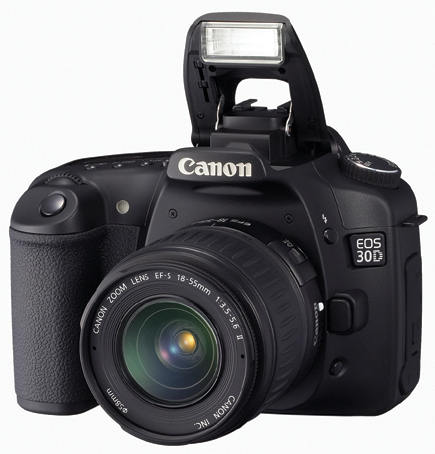 |
One camera that gives you near complete control over image effects of all
types, in addition to the aperture and shutter speed variations, metering patterns,
and flash control options is the new Canon EOS 30D. Priced at about $1399 (body
only), this
8.2-megapixel digital SLR is in the semi-pro and pro range, although avid digital
photographers ready to upgrade will find it attractive as well.
In many respects the 30D is an upgrade from the Canon EOS 20D combined with
features from the upper-end of the Canon digital SLR line. Being an upgrade,
the 30D has quite a few items in common with the 20D, which we won't go
into here. (If you want to check out the 20D specs go online to www.shutterbug.com
and type Canon 20D into the Search box.)
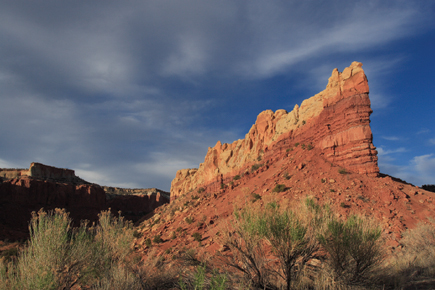
Landscape Mode |
|
 |
|
|
Some of the noticeable differences from the 20D are a larger LCD monitor (2.5")
that while larger is still a tough read in direct sunlight; Picture Style menus
for image effects that to this writer are much more straightforward than the
Parameters on the 20D; auto noise reduction, which should be used for long exposures
and at ISO 800 and beyond; and enhanced print and share functions. Some of these
changes have been wrought in recent Canon "pro" models more recent
than the 20D, such as the EOS 5D and EOS-1D Mark II N, also reviewed in these
pages and available online at www.shutterbug.com.
Perhaps the most rewarding part of the camera, at least with the Canon EF 16-35mm
f/2.8L USM lens I tested it with, is the incredibly sharp and rich image quality.
When shooting in Raw mode at 16 bit the 8+ megapixel sensor yielded near 48MB
files, which had incredible depth and clarity. I especially liked what happened
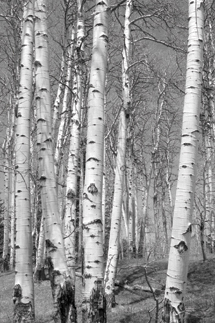
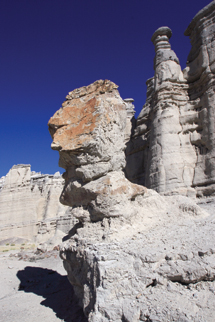
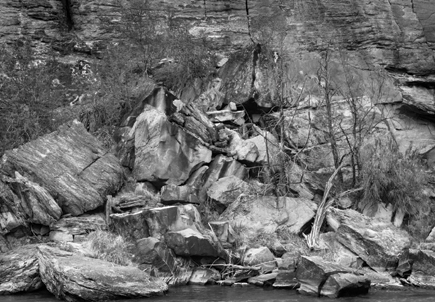
in black and white (Monochrome mode in menu). Shooting with various programmable
filter effects I was able to get "zone-like" quality in my black
and white images and prints. When I first opened them on my Apple 23"
Cinema Display all I could say was "Wow!," and I'm not usually
given to such exuberance while testing.
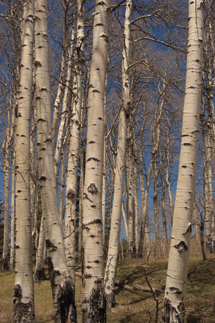
Monochrome Or Color |
||
 |
 |
|
|
||
Another appealing aspect of this camera is body build and durability. It has
a much more solid feel and grip than amateur-oriented models with an enhanced
pro-style shutter mechanism, claimed by the company to deliver 100,000 cycles.
To help you get up to that number faster the 30D allows for a 30-frame Large/Fine
JPEG burst and an 11-frame raw burst, both at the top speed of 5 fps (frames
per second).
Those who have used a Canon digital SLR recently will have little trouble navigating
this well-built body. Those who have worked with other digital SLRs or with
Canons before the 20D, 5D, and Mark II N will find that getting around the functions
and features are a quick instruction book-read away, and quite intuitive even
without it.
No More Polarizers? |
|
 |
|
|
Picture Styles And Raw
One of the key features of this camera is the amazing range of image effect
controls. This includes many variations on white balance, color tone, color
space, and preset color rendition options, from landscape to portrait and more.
The 30D also offers a host of raw+ options (raw + JPEG shooting at many JPEG
resolution and compression settings) or raw by its lonesome. This begs the question:
Why bother with what Canon dubs Picture Styles when you're shooting in
raw format? Indeed, why have any camera controls over image effects other than
depth of field and motion depiction, or even image resolution, when using the
ultimately malleable raw format? Most raw converters today (such as the included
Version 12.0 of the Canon software) can deliver many options, and probably more
nuance than any Picture Style menu. Just get the exposure right, make sure depth
of field is where you want it and keep it steady and raw processing can do the
rest, with your help, of course.
Red Filter |
|
 |
|
|
The answer for me is that the 30D, like other similarly priced digital SLRs we've tested of late, blurs the distinction between pro- and advanced amateur-oriented cameras. To eliminate image effects, such as Picture Styles, and to rely strictly on raw format, is to limit the camera's appeal and market, even though it makes perfect sense from a convenience and quality standpoint. Indeed, raw only might be what a future "stripped down to basics" pro digital SLR could offer.
| |||||||||
|

| ||||||||


 FEATURED VIDEO


Get the Latest Photo Tips, News & Reviews from Shutterbug!







| Camera Reviews Other Reviews | |
Mobile Reviews Photography Reviews Columns | |
News | |
Features | |
How-To | |
Resources |
 © 2026 Shutterbug
AVTech Media Americas Inc., USA
All rights reserved