


- REVIEWS
Camera Reviews 
More Reviews Mobile Reviews Photography Reviews - GALLERIES
- VIDEOS
- BUYER'S GUIDES
HP Photosmart R707; Can In Camera Features Improve Your Images?
HP Photosmart R707
Quick Look
· 5.1 Megapixel
· 1.5" LCD Monitor
· $329 street price
· Lens: 35mm equiv.
Further Information
HP Photosmart R707
http://www.hp.com
Because most current digicam cameras incorporate "intelligent" technology, it should be difficult to take a technically "bad" picture. And yet, many images made in a camera's default modes are far from perfect, as I can confirm after testing dozens of models. Granted, most problems are easy to solve with a bit of expertise in post-processing using the bundled image-editing software. However, a lot of camera owners simply want great pictures without the extra effort and some want to print direct from their memory cards without downloading the images to a computer.
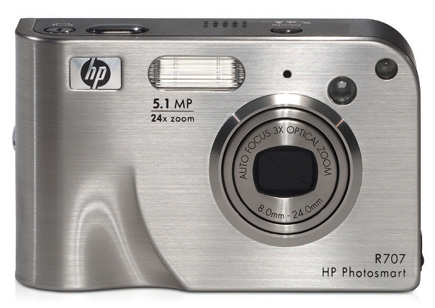
Each new series of cameras seem to get better and better in this respect. The
new Photosmart R707, an affordable 5-megapixel HP model, is particularly important,
because it points the way to the future with highly sophisticated automation.
This is the first Hewlett-Packard camera to incorporate a powerful digital signal
processor from Texas Instruments with the latest imaging algorithms designed
to deliver accurate focus, exposure, and color. The camera also includes innovations
not available previously: automatic redeye removal, an incredibly useful panorama
mode and HP Image Advice: tips in the LCD monitor for taking technically better
photos based on an analysis of previously made images.
The technology is certainly fascinating, but how well does it perform in the
real world? During extensive testing, I discovered that the new features are
great for problem-solving. They should help both snapshooters and experienced
photographers make technically better images.
 |
|
|
 |
Moderating Excessive Contrast
Many outdoor scenes on sunny days exhibit very high contrast. Images made under
such conditions may include extremely bright highlight areas and dark murky
areas without much detail. Most digicams' light metering systems will
underexpose a contrasty scene to minimize blown-out (excessively bright) highlight
areas, but that creates another problem. Even lightly shaded areas are often
rendered as black (or close to it) obliterating subject detail.
| |||||||||
|

| ||||||||


 FEATURED VIDEO


Get the Latest Photo Tips, News & Reviews from Shutterbug!







| Camera Reviews Other Reviews | |
Mobile Reviews Photography Reviews Columns | |
News | |
Features | |
How-To | |
Resources |
 © 2026 Shutterbug
AVTech Media Americas Inc., USA
All rights reserved