


- REVIEWS
Camera Reviews 
More Reviews Mobile Reviews Photography Reviews - GALLERIES
- VIDEOS
- BUYER'S GUIDES
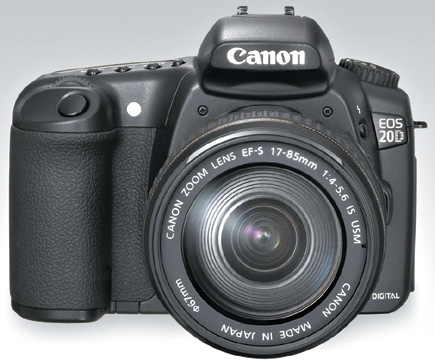
Canon EOS 20D
The Canon Digital SLR Continues To Evolve
All Photos © 2004, George Schaub, All Rights Reserved
One of the main benefits of SLR photography is that it allows you to make quick decisions and respond to what's happening in front of you with your heart, mind, and guts without fumbling around. It allows you to apply what you've learned about making pictures immediately, and is an instinctive response to the light and scene that grabs your eye. In short, the machine gets out of the way and lets you concentrate on your photography.
Recently we've seen film SLR cameras that borrow from technology developed
in the digital SLR realm, but of course digital SLRs borrow the best from their
film ancestors. What's changed is that we no longer have film itself to
contend with, which with digital means that we can choose any film personality
and any film speed for every frame we shoot. Need to switch from ISO 100 to
800 for low-light handheld work? No need any longer to carry two camera bodies
or rewind and swap film as you go. Just play with a dial and you're ready
for the new lighting conditions. Want to check exposure on a critical shot?
Forget about bracketing film, as you can now shoot and review as you go and
ensure that you've nailed the scene in the way you want. Want to consider
a shot in both color and black and white, or want to change the color balance
or contrast of a rendition? Just shoot in raw and deal with it all later.
 |
|
|
It is, now, in the way you can do all these things with ease in the field
that we will begin to judge digital SLRs. Those that make you dig into a menu
and scroll around while the light changes will no longer pass the test. Those
that allow you to work instinctively, as you would with film, without any fuss,
and to get the shot how you want when you want are those that reveal why digital
adds to rather than hinders your photographic trip.
All this brings us to the new Canon EOS 20D, an 8-megapixel digital SLR. When
Canon introduced the EOS Digital Rebel, at under $1000 with lens, many folks
thought that the floodgates would open on lower and lower priced digital SLRs.
Some even speculated that many manufacturers, including Canon, would go for
even more mass-market appeal with a $500-$750 model. That's to come (and
may be here by the time you read this, but after press time) but not with this,
the latest model in Canon's continuing quest for the hearts and minds
of digital SLR fans.
 |
The EOS 20D, at about $1500 body only, replaces the EOS 10D, and actually draws upon some of the accomplishments and technology of the higher-priced EOS-1D Mark II, recently reviewed in Shutterbug (August 2004, available on our website at www.shutterbug.com through our Search engine), which goes for $3000 more. The EOS 20D has an 8-megapixel sensor, which Canon describes now as the "absolute baseline for professional wedding photography and magazine portraiture," which tells you where they might be heading in the marketing department. But perhaps the new EOS-1Ds Mark II is better suited for those tasks, the 16+ megapixel digital SLR introduced at the recent photokina show. This leaves the EOS 20D as a fine mid-range digital SLR that in our experience is an excellent traveling companion.
What's New
New to the EOS 20D is a Canon-produced 8.2-megapixel APS-sized CMOS sensor,
which means we still have the lens multiplication factor. There's also
a new four-channel data reading and write processing setup that is performed
in parallel while shooting, a clear advantage to moving images into and through
the buffer while you're at work recording more images. With data transfer
said to be 11 times faster than the EOS 10D (thanks to the USB 2.0 interface
compatibility) you can get a 5 frame-per-second rate for a 23 image burst for
JPEG/Fine and six continuous frames in raw or raw+JPEG. The on-chip noise reduction
circuit is said to reduce noise even better than the EOS 10D for higher ISO
images, and Canon claims that the noise level of the EOS 20D at ISO 1600 is
equivalent to that of the EOS 10D at ISO 400. Sort of like what happened with
film.
We shot quite a few test images at ISO 800, especially in low light when required,
and can attest to its fine performance. But we wouldn't recommend doing
so in bright light outdoors, even if you need an extra stop for depth of field.
The higher ISO, like film, adds contrast and "grain" that precludes
its use in any kind of bright lighting condition.
 |
|
|
Another improvement over the EOS 10D is in the autofocus operation and precision,
claimed improved focusing performance in low light, and what Canon claims is
an improved focusing point layout, a nine-point CMOS autofocus sensor. As you
work you can watch the little red lights acquire their targets, or you can toggle
around and set the focusing target yourself. It seems to work with closest subject
focus priority, which of course you can override with the point selection of
focus lock.
We did find some lagging and sometimes outright refusal to focus in low light.
This occurred in pre-dawn shots when admittedly there was very low contrast
for the autofocus acquisition. But it also occurred when the autofocus assist
beam came on, which seemed an anomaly, but the subject might have been beyond
the range of the beam (it was about 20 ft away). And when you're working
in single autofocus mode lack of acquisition locks the shutter release.
Autofocus points can be selected with the Multi-Controller, now with an eight-direction
toggle. Just move the controller in the direction of the desired target and
it will respond. It takes a few seconds to get it right, feeling like a spin
dial more than a toggle. Focus is fast; Canon claims that in one of the three
focusing modes--Predictive AF--the autofocus can track a subject approaching
at a speed of 186 mph up to about 66 ft away (using their EF300mm f/2.8L IS
USM lens). If it's coming right at you remember to duck after you press
the shutter release.
 |
|
|
One of the borrowed items from the Mark II is an algorithm from the new E-TTL II autoflash control. This setup does not assume that the autofocus point covers the main subject and aids exposure by actually measuring the ambient light before the pre-flash fires; the setup then compares the pre-flash with the ambient light and makes exposure judgments accordingly. For example, say there's a big difference between the ambient and pre-flash readings--this might suggest a highly reflective subject, which is then eliminated from exposure calculations. Into this mix is distance information from a D-type lens, all of which adds up to some pretty smart flash exposures. And, the built-in flash on the EOS 20D has been extended another 18.6mm (0.73"), which Canon says should reduce redeye and overpass some of the lens barrel blocking problems. Field coverage has been extended to 17mm (27mm in 35mm terms), although the Guide Number remains the same as the EOS 10D (average of about 43 at ISO 100, in feet). We found that the flash exposure was dead-on, even when working close-up, and that fill flash worked like a charm.
 |
 |
|
|
||
| |||||||||
|

| ||||||||


 FEATURED VIDEO


Get the Latest Photo Tips, News & Reviews from Shutterbug!







| Camera Reviews Other Reviews | |
Mobile Reviews Photography Reviews Columns | |
News | |
Features | |
How-To | |
Resources |
 © 2026 Shutterbug
AVTech Media Americas Inc., USA
All rights reserved