


- REVIEWS
Camera Reviews 
More Reviews Mobile Reviews Photography Reviews - GALLERIES
- VIDEOS
- BUYER'S GUIDES

Making It Picture Or Portrait Perfect; Pro Gear Portrait Imaging Software
"I was going to have cosmetic surgery until I noticed that the doctor's office was full of portraits by Picasso."--Rita Rudner
I n more than 50 years of making images, I've never photographed a resolution
chart. I have always judged a lens or camera's performance by how much
I liked using it and how the photographs looked. I care about how much fun I
had capturing the images and if they didn't look great this time, I'd
try to do better next time. That's how I feel about portraits, too. When
Mary and I owned our studio, she was the people photographer, but in the past
15 years I've enjoyed photographing people more and more. Cameras, lenses,
and lighting gear are only some of the tools I use; software is part of my toolkit
as well, and that's what I'm featuring for this month's Pro
Gear issue.
Face-Off
Anthropics Technology's (www.pprof.com)
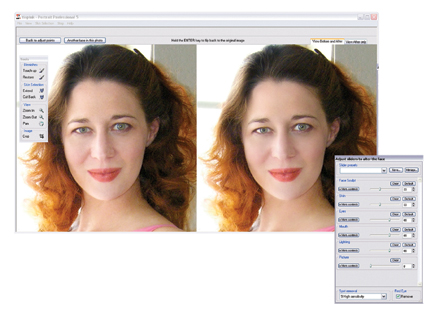
Portrait Professional is intelligent retouching software that, according to
the company's CEO, has been "trained in human beauty." It
fixes blemishes, reduces and removes wrinkles, and automatically removes redeye.
Portrait Professional also removes shiny skin highlights, whitens teeth and
eyes, and adjusts the lighting on the face to make it more flattering. What's
more, it subtly reshapes the face to make it more attractive, smoothing it as
I've been doing with Photoshop's Liquify tool as one of my retouching
secrets.
 |
|
|
The currently Windows-only program lets you improve your photos by moving
sliders, but there's more to it than that because before you get to that
step you interactively define the facial parameters such as the shape of the
eye, mouth, and nose, which is not only easy to do but fun. Then the program
does the rest. You only use sliders if you want to tweak the retouching.
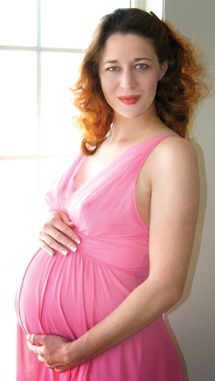
I gave it the ultimate test and used Portrait Professional on an image that
I had already retouched and was amazed at the improvements it made. At $49.95
it's a bargain and you can download a free trial version to prove it to
yourself. If you're looking for 16-bit and raw file support, Portrait
Professional 5 Max sells for $89 at launch. Because all of the image processing
is done on their server, Anthropics Technology is talking about offering a Mac
OS version. I'll keep you posted about it.
 |
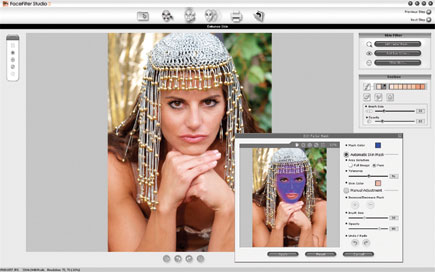
Reallusion's (www.reallusion.com) Windows-only FaceFilter Studio 2 is a relatively inexpensive ($59.95) retouching solution that auto-detects human face and skin color to produce better looking photographs from imperfectly lit images, including over or underexposed shots that were made at low resolutions. The program features automatic one-click redeye reduction and the function can simultaneously fix multiple red eyes on multiple faces in your photos! While you're at it, it's easy to use FaceFilter Studio to change eye color. It supports extreme makeovers such as reshaping and toning faces for automatic thinning and removal of wrinkles and other aging signs. You can even put a little color in a subject's cheeks or even give your subject a tan. No smiles? No worries? You can browse different expressions from a Facial Expressions Library for quick preview and apply them from numerous facial expression options and can select and edit multiple faces from portraits, candids, and group photos. The program works with low-res photos but supports high-resolution file rendering up to 12-megapixel images from professional digital cameras. This seems like something wedding photographers will love for optimizing large group photographs.
 |
| |||||||||
|

| ||||||||




































 FEATURED VIDEO


Get the Latest Photo Tips, News & Reviews from Shutterbug!







| Camera Reviews Other Reviews | |
Mobile Reviews Photography Reviews Columns | |
News | |
Features | |
How-To | |
Resources |
 © 2025 Shutterbug
AVTech Media Americas Inc., USA
All rights reserved