


- REVIEWS
Camera Reviews 
More Reviews Mobile Reviews Photography Reviews - GALLERIES
- VIDEOS
- BUYER'S GUIDES
Noise Ninja 2.0
Can Software Cure High ISO Digital Files?
All Photos © 2004, Peter K. Burian, All Rights Reserved
Although most digital cameras produce clean images at low ISO settings, digital noise often degrades images made at higher ISO levels. Resembling colored specks that are visible especially in shadow areas, noise can be prominent in ISO 800 and higher images made with a digital SLR. It's even more problematic with many of the high megapixel cameras that use smaller sensors. Because their light-gathering photosites are miniscule, the sensors are less sensitive to light; hence, even ISO 400 images can exhibit objectionable noise.
 |
|
|
That may not be relevant if you typically use ISO 50-200, but the higher ISO
options are useful whenever fast shutter speeds are required in low light. Whether
you need to shoot without a tripod, or want to "freeze" action subjects,
it's great to be able to use ISO 400, 800, or even 1600. Run a test with
your own camera, making some high ISO images; inspect them at 100 percent magnification
on a monitor. If random colored specks are visible--and especially if they
degrade image quality--you may be a candidate for noise reduction software,
such as Noise Ninja 2.0.
The original Noise Ninja was one of the top-rated programs of this type but
it was a bit complicated to use, somewhat slow, and available only for Windows
operating systems. The new Version 2.0 addresses all three issues and also boasts
more sophisticated "automatic profiling," explained later. After
using Noise Ninja 2.0 for a month, I can highly recommend this new program.
If some of your own images are "noisy," download the free trial
version from the www.picturecode.com
website.
Do note that the trial version will watermark your images, as it's intended
only for experimentation.
 A |
||
 B |
 C |
|
 D |
||
|
||
Basic Operation
After completing the download and installation, launch Noise Ninja 2.0 and open
a JPEG or an uncompressed TIFF file that has not been extensively processed
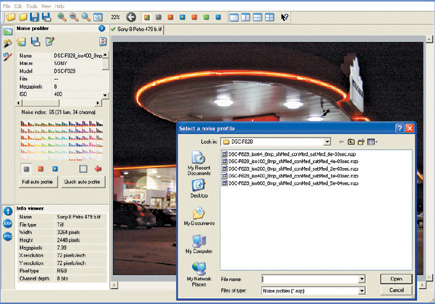
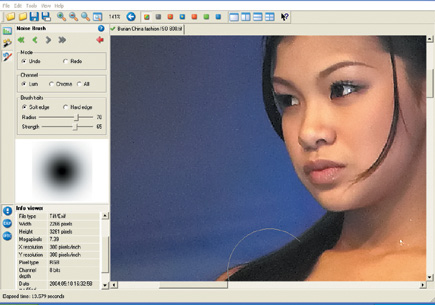
in Photoshop or other software. Select the Noise Profiler icon, resembling a
bar graph. Click on the "Quick Auto Profile" icon to allow Noise
Ninja to analyze the image to determine the amount of noise present in different
colors and brightness levels. This detailed "profiling" is important,
because the noise characteristics are different for every camera and for each
ISO level. The process is useful for scanned images, too, because film scanners
can introduce noise especially in dark areas and in the blue channel.
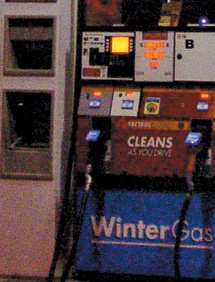
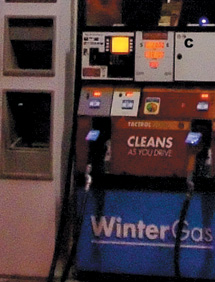
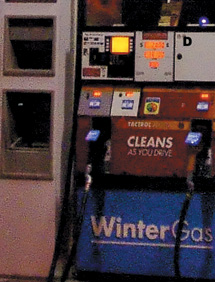
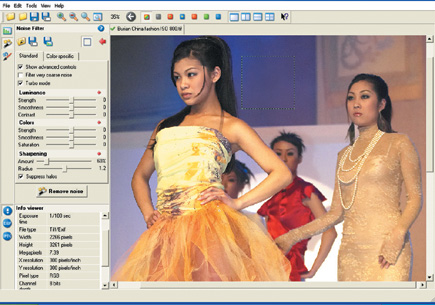
After that's finished, access the "Noise Filter" screen with
the pertinent icon and click on the "Remove Noise" button. In about
10 seconds, the software will process the image, filtering (removing) noise
at a predetermined level. The image will now appear noticeably smoother, exhibiting
substantially less digital noise. The colored specks that remain will also be
less saturated, and hence, less noticeable.
 |
|
|
Evaluation: The automatic noise analysis and filtering process is certainly simple and quick; it's also quite effective with some images. The system is most successful when it can sample large areas without detail, preferably mid tones. With images that include vast expanses of shadow areas, or a great deal of detail, the filtration can be excessive, producing an overly smooth, "plastic," effect. Although Noise Ninja 2.0 also offers a feature that allows the user to select the image areas to be sampled, that process is a bit tedious and relies on some guesswork.
Advanced Operation
Instead of using profiling to analyze each image, take advantage of the noise
profiles available at: www.picturecode.com. Download the files for your camera
(or film scanner). Use the correct profile--designed for images produced
by a specific camera at a specific ISO level--and you'll get more
satisfactory noise reduction with a broader range of image types. If you forget
the ISO you set, open the Exif file data and the specs will be shown.
 |
|
|
| |||||||||
|

| ||||||||
- Log in or register to post comments
















 FEATURED VIDEO



Get the Latest Photo Tips, News & Reviews from Shutterbug!







| Camera Reviews Other Reviews | |
Mobile Reviews Photography Reviews Columns | |
News | |
Features | |
How-To | |
Resources |
 © 2024 Shutterbug
AVTech Media Americas Inc., USA
All rights reserved