


- REVIEWS
Camera Reviews 
More Reviews Mobile Reviews Photography Reviews - GALLERIES
- VIDEOS
- BUYER'S GUIDES
Epsons Stylus Pro 5500
Is This The Ultimate Ink Jet Photo Printer
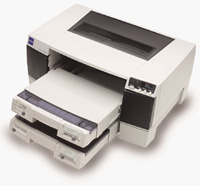
In one sense ink jet photo printers are very much like 35mm SLR cameras. There are a number of mass-produced, relatively inexpensive models that target the amateur and enthusiast photographers, and then there is a high-performance model specifically designed and produced to meet the demands of professionals. The Epson Stylus Pro 5500 ink jet printer, as the Pro in the name implies, is Epson's top of the line ink jet in the 13" wide print format. And like a pro camera, it offers precision engineering and construction, top performance in both quality and speed of operation, as well as the ruggedness and durability to produce high quality results over a long period of time. It is most closely related to Epson's first "archival" ink jet printer, the Stylus Photo 2000P, as the 5500 also uses pigment inks, but a next generation of more refined ink and an advanced print head with an even finer jet size for smoother, sharper print images. So who should be interested in the new Epson Stylus Pro 5500? Any photographer who wants the best printer and can afford the best. Plus, any photographer who makes a lot of prints for sale or exhibition, because you can't afford not to choose the Pro 5500. In addition to being more refined, with pigment inks that are milled finer and a print head to match, with more and finer jets, the 5500's superior quality is achieved with a printing speed that takes as little as a 1/4 of the time to output, compared to a 2000P. This is in part due to the new ink's faster drying attributes, but also because the print head is not encumbered by the weight of ink cartridges. In the 5500, the cartridges are stored in the front of the printer's chassis, so the print head speed of movement can be much faster. The ink cartridges for the Epson Stylus Pro 5500 are several times larger than typical in consumer printers, and there are four of them--one black, one yellow, and a two-chambered cartridge holding both the light and standard magenta and cyan inks. Although the cost of a full set of four cartridges may be shockingly high to some, the ink cost per print produced is a fraction of what it costs in a 2000P. That's why, along with its speed, you can't afford not to use the 5500 if you sell prints or make a lot of them. |
|||
Metamerism Be Gone This may seem to be an exaggerated claim, but there is another Epson paper available for use with the 5500 called Professional Glossy. Intended for CMYK proof printing, it supports 130 percent ink application (black ink only at 2880dpi) when the paper is selected in the driver. When black and white images are printed on archival 100 percent fiber (cotton) matte papers, all of the ink colors can be used by converting a gray scale to RGB, and adding just a bit (20-30 percent transparency) of cool brown from the Photoshop Swatch Palette. This produces a warm black monochrome print that has a comparable or greater density range than a "wet" silver-based black and white matte print. In other words, besides providing high quality archival color printing at a high print speed, the Epson Stylus Pro is equally well suited to reproducing top quality black and white prints on either fiber or RC papers stocks. |
|||
Bigger Footprint Printing With The Epson
Stylus Pro 5500 |
|||
For instance, for some fine arts and commercial illustration printing, use the Profile To Profile Photoshop workflow. This uses the Adobe color management engine, an ideal choice. It would not be so for a portrait and wedding photographer, as the printed skin tones would likely be too florid, and the print contrast too strong. For high quantity retail print sales, choose a more forgiving option and one that requires less precise attention. There are a couple of potential options. One is to select the Auto adjust setting and the Gamma: 1.5, 1.8, or 2.2. Another is to select PhotoEnhance 4 in the driver and the sub selection of "standard" or "people." The latter "people" option, under PhotoEnhance 4, may be ideal for wedding pictures, as it renders tones that are softer and lighter. In Auto, the 1.8 Gamma setting, or the "standard" option for PhotoEnhance 4, would be appropriate for general portraiture. Among the PhotoEnhance 4 options, you can even select a Sepia option (useful to anyone who is doing photo restoration and then apply it to an antique black and white print scan), as well as an option that makes a driver compensation suited to printing from digital camera files. Another variable that involved some learning was how the driver settings relate to particular paper selections, whether one of the Epson papers or third-party fine arts papers. The Epson Stylus Pro 5500 inks are unique in the way they respond to different paper characteristics. The 5500 inks absorb into matte fiber-based papers more than the 2000P pigment ink, but not as much as a dye ink. The two Epson fiber papers, Archival Matte and Watercolor Radiant White, are both neutral toned and have a fairly absorbent coating, providing good print response for a wide range of subjects. Some independent papers, like Concord Rag, which is a paper with a hard finish and very warm tone, will accept more ink and can be printed using the Epson Premium Semi-Gloss setting to reproduce unusually deep blacks. |
|||
Over the two months I was printing with the Epson Stylus Pro 5500 I made close to 300 13x19" prints and about 100 letter-sized prints. Looking through these, the ones made last had definitely better image qualities due to what I learned along the way. I also realized that the ink cost per print is much less than it is printing with the 2000P or even a 1280 printer, and by a significant factor. Many of the print images I was most satisfied with were also made on a quite economical paper. I estimated the print cost for both paper and ink was just over $3 for a 13x19" size. This paper is DOTworks private label Fiber Heavy Weight Matte with the designation FHM. This DOTworks heavyweight matte paper is carried by many professional photo supply stores. To obtain the name of a store near you visit the DOTworks web site at: www.dotworks.com and click on the "Shutterbug Reader" label to take you to the store listing page. In addition, the DOTworks site has free downloadable printer profiles for their papers for most popular printers. Evaluation And Recommendation |
|||
For any photographer who is producing photographs to be sold as prints, the Epson Stylus Pro 5500 has at least two and likely more advantages over the traditional practice of having printing done by an outside lab. The first and most obvious is the cost efficiency of the 5500, providing a potentially higher margin of gross profit from the sales through reduced reproduction costs and lower lab bills. The second factor is the print life advantage of pigment ink prints, claimed to be up to 200 years on archival fiber papers. The quality and choice of the papers in this category is ever increasing, and many offer greater print life than conventional silver prints on similar RC papers. And there is one other advantage you can't put a number to--you have control over image interpretation and quality, so you do not have to depend on others "to get it right." My experience is that the Epson Stylus Pro 5500 will provide the best performance and quality print output, regardless of paper media and whether the image is color or black and white. I would also recommend the accessory FireWire interface card. Although a RIP (Raster Image Processor) is offered, in fact in two models, it is not recommended for photographers who are printing from gray scale or RGB color image files. The RIPs are only required for CMYK output for proofing, which emulates an offset press. Full speed and efficiency is supported with the printer driven by either an Apple Mac or PC Windows computer (see Technical Specifications for minimum requirements). To obtain the greatest efficiency in workflow when the Stylus Pro 5500 is used with a two or more computer network, allow the 5500 to be driven by a relatively modest computer (even an iMac that's much less costly than a RIP) using the FireWire interface with the computer networked to your main workstation, using the 5500 driver set as a shared printer. As soon as the image is opened on your workstation, and sent to the shared 5500, the computer that is the host for the 5500 does all of the print processing and drives the printer, freeing up the primary workstation immediately. I found this works great--it's efficient and productive on the highest possible quality level. For more information about the Epson Stylus Pro 5500 ink jet archival printer call (800) 463-7766, or visit the Epson web site at: www.epson.com. |
|||
|


| ||
|
||


 FEATURED VIDEO


Get the Latest Photo Tips, News & Reviews from Shutterbug!







| Camera Reviews Other Reviews | |
Mobile Reviews Photography Reviews Columns | |
News | |
Features | |
How-To | |
Resources |
 © 2026 Shutterbug
AVTech Media Americas Inc., USA
All rights reserved