Site Links
|
 |
 |
 |
Epson Stylus C82 A Sensible And Affordable Choice For Photographers
By David B. Brooks May, 2003
Epson Stylus C82
With digital cameras and
scanners getting both better and more affordable the ability to print
photo images with a home computer is an increasingly popular option.
In fact, if you have a home computer its utility is rather limited without
a printer, so why not get one that also prints photos as well? If you
want your printer to print a letter, a term paper, or a web page, in
addition to photo images, shouldn’t you want it to do all with
equally superior quality? And finally, if you were to make photos of
“Junior” to send to the grandparents, wouldn’t you
want the pictures when framed and on the fireplace mantel to remain
fade-resistant as well? These were the considerations and questions
I had in mind when I tested and worked with Epson’s new Stylus
C82 ink jet printer.
|
| |
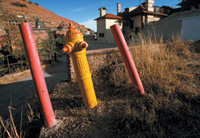
Landscapes
and similar photographs with a full range of tones and
colors reproduce quite comparably to many dye-ink photo
printers when coated fiber papers like Epson Heavyweight
Matte are used.
Photos © 2002, David B. Brooks, All Rights Reserved
|
|
Stylus C82 Features
Epson calls the new Stylus C82 “their flagship, all-purpose ink
jet printer.” It is designed to reproduce exceptional results with
everyday document printing as well as photos, even when used with plain
paper. One of the outstanding features is the DuraBrite ink, with light
resistance up to 80 years on specialty papers and 70 years on plain paper.
These inks, that are also water-resistant, are provided in separate cartridges
for each of the C82’s four colors providing high page output as
well as cost savings. These new DuraBrite inks are pigment-based, which
contributes to the print longevity. An added benefit is that they reduce
the bleeding that can occur with dye inks. The crisp, sharp prints are
also due to a variable ink droplet size as small as 3 picoliters combined
with a maximum printer resolution of up to 5760x 1440dpi. The C82 is also
fast, producing 22 pages per minute of black text and up to 11 pages per
minute in color mode.
|
|
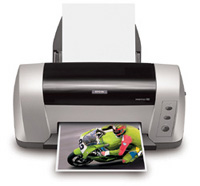
The new Epson Stylus C82 is
an attractive contemporary design that requires a minimum of desk space
for a letter-size printer. Its $149 estimated street price adds to the
attractiveness. But what kind of photo printer is it really, and is there
any downside to offset so many strong features? That’s exactly what
I wanted to find out by using the printer myself, and will be the focus
of the remainder of my report.
Using The Epson Stylus
C82
Unpacking, setting up, and installing the C82 is a clean and easy task
if you follow the numbered instructions on the big guide sheet supplied
with the printer. I christened the C82 by printing a number of pages of
text and graphics documents using sheets of letter-size Bright White paper
supplied by Epson for my use. The text, even small 6 and 8 point sizes
were a strong, clean black against the paper and clearly legible, while
the graphics were smooth, crisp edged, and vividly colored. With the C82,
and for the first time, the claim of laser-like quality text printing
has been met in an ink jet printer. Text document printing is definitely
fast, quite equal to many black ink only affordable laser printers. In
the noise department it’s a mixed bag, making a resounding clunk
when a sheet of paper is loaded, while being moderately quiet while printing—you’ll
not have any problem talking on the phone at your desk with the C82 at
work.
|
| |
|
People pictures
often demand a little less punch and saturation to make
a pleasing photographic print. Using both Epson Matte and
several other fiber matte papers I found I obtained very
pleasing portrait prints with the C82 driver set at Color
Controls Gamma 1.8 with the Photorealistic Mode. |
|
Making those first initial
prints I noticed the list of supported papers was quite extensive, but
with a few noticeable exceptions including Premium Glossy and Premium
Luster. So, I had my work cut out for me to find out how the C82 performs
with the different supported Epson papers, and, to satisfy my curiosity,
with some independent brands including a few fine arts samples provided
by Digital Art Supplies. Epson Photo Paper is my usual day-to-day paper
to proof images and make contact scan pages using dye-ink Photo model
printers, so I tried that first.
Although the resulting prints were acceptable, they weren’t exceptional.
A significant improvement was achieved by making one simple driver option
Mode change from Photorealistic to Vivid. For most photographic image
printing with the C82 this became a confirmed choice. This choice was
reinforced when I tried my next print with a paper I use frequently, double-sided
matte. Although I don’t consider double-sided matte a premium paper,
the images the C82 made on the paper were everything I found missing in
quality in the Photo Paper prints.
|
| |
The Epson Stylus C82 print driver provides a large selection
of supported media. With most of the choices users can
obtain exemplary reproduction of both documents and photographs,
especially considering the versatility and economy of
this printer choice.
|
|
As I was advised by Epson,
this new printer and ink produces the best image quality with fiber-based
papers, providing optimized results with plain papers and its full potential
with media like Epson Heavyweight Matte, and including the art paper known
as Enhanced Matte. Further trials with those papers confirmed the C82
does produce excellent photographic reproduction qualities printing a
variety of different subjects, and tests with RC-type papers like Premium
Semigloss were less satisfactory, at about the same level as Photo Paper.
To complete my tests there were two sets of prints I still needed to make.
First of all I wanted to see how the Stylus C82 would do printing black
and white (gray scale) images. So, using all of the papers recommended
for use with the C82 I made prints from a selection of images including
landscapes and portraits. These print results were consistent with the
color print tests, with the fiber-based coated matte papers like Heavyweight
Matte and Enhanced Matte yielding quite superior prints.
|
| |
Using the Stylus C82 driver options, selecting Color Controls
and a Gamma of 1.8 and Vivid Mode produced the richest
color and greatest print tone range.
|
|
There are two choices that
also can be considered in choosing how to print black and white—whether
to use all colors of ink or black ink only, and what quality setting,
Photo or Best Photo (resolution), to make. For letter-size images from
color photographs the Photo Quality setting produces excellent images,
and going up to Best Photo only seems to be a noticeable advantage when
you are making smaller 5x7 and 4x6 prints, as they are viewed from a closer
distance. My tests show that printing black and white selecting black
ink only produces a more neutral black, and a superior print tone range
is achieved by selecting the Best Photo quality mode.
I then worked with a wide selection of third-party photo and fine arts
papers including Dotworks Matte and Fiber Heavy Matte, Schoellershammer
Velvet, Hahnemuhle Photo Rag, and Crane Museo from Digital Art Supplies.
The modest cost Dotworks Matte papers reproduced photographic images quite
comparable to their Epson counterparts. I found that there was little
difference in color values when using the Epson paper profiles for Heavyweight
Matte and Enhanced Matte.
|
| |
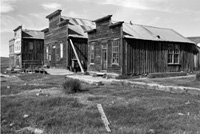
Black
and white (gray scale) photographic images are reproduced
exceptionally well by the Epson Stylus C82. Although you
can obtain quite fine print results using the default
setting and all ink colors, I found even on Epson Heavyweight
Matte paper the print tone was too much like a selenium-toned
wet darkroom print. So, my preferred C82 print driver
setting was to select black ink only and the Best Photo
Quality option, which reproduced very sharp, crisply detailed
images with a full range of neutral tones.
|
|
The more refined, finer paper
quality in the fine arts selection provided by Digital Art Supplies closely
matched the image on screen. These prints really sang, as the DuraBrite
inks are well suited to these fine papers, reproducing a great density
range and rich colors enhanced by the refined paper texture and their
rich, tactile properties.
Evaluation And Recommendation
From all of the e-mail my Digital Help department generates it is evident
that many Shutterbug readers would be best served by a printer that reproduces
both documents and photographs with fine quality, and also makes prints
which will last a couple of generations. From the results of using a rather
thick stack of paper when testing the Epson Stylus C82, I believe that
many of you would be well served by this printer. The quality of its output
and the modesty of its initial cost make it an excellent choice.
|
|
The only qualification is that
to obtain the best performance with the C82 you are limited to fiber-based,
non-RC-coated papers, and for photo printing you need to select driver
settings specifically matched to particular images, be they portraits,
landscapes, or black and white. Being limited to fiber-based paper, particularly
Epson Heavyweight Matte, to obtain the best print image performance is
not really a negative. To also obtain the maximum longevity the DuraBrite
inks will provide, it is also essential that you choose a paper that has
an equal longevity potential. And, glossy/luster papers all rely on some
form of resin coating to achieve their shiny surface, an attribute that
imposes a much shorter life expectancy. For more information call Epson
at (800) 463-7766, or visit their web site at www.epson.com.
|
 |
|
 |
|
|
 |
 |
 |
|