Site Links
|
 |
 |
 |
ArtixScan 4000tf SilverFast Ai 6.0 Microtek And LaserSoft Offer The Latest Advances In Film Scanning
By David B. Brooks March, 2003
| |
|
The Microtek ArtixScan 4000tf 35mm and APS film scanner.
|
|
All I need do is look at my
oldest archive files from 35mm scans going back over a decade to realize
how much scanners and their software drivers have progressed. The first
35mm film scanner I tested cost as much as a new car, was half the resolution
of today’s, and was slow. The software was bare and basic with just
a few crude slider controls. But for this report I will refer back not
to those early days but to the original Microtek ArtixScan 4000t and LaserSoft
SilverFast Ai 5.0 I have been using ever since December, 1999. That combination
was highlighted by a new resolution plateau of 4000dpi, sufficient motivation
for me to begin re-scanning much of my 35mm film library. Today, with
this latest ArtixScan 4000tf and SilverFast 6.0, I am compelled by the
improvements in scan quality to begin to re-scan many of my film images
yet again.
|
| |
Until
a short while ago my most frequently used film was Fuji
Reala 100. My enthusiasm fading for the film was not
due to its qualities, which remain excellent, but I
found it to be difficult to scan and the advantages
of the film were diminished by mediocre scan results.
Now SilverFast’s NegFix has literally fixed that
problem with a very effective profile. This time I obtained
scans equal in superiority to the analog results which
first attracted me to Fuji Reala.
Photos © 2002, David B. Brooks, All Rights Reserved
|
|
New Microtek ArtixScan
4000tf Features
Although the appearance of the ArtixScan 4000tf is little changed from
the original 4000t, some key elements are new. Most significant is the
5300 pixel Sony trilinear CCD, which now captures at a color depth of
14 bits per RGB channel (42 bit) and has an optical density range of
4.3, plus outputs through its A/D converter either 24 bit or user selectable
48-bit RGB. Equally significant, in a different way, is that the 4000tf
provides two easy, fast connection interface options: FireWire (IEEE
1394), and USB. Besides enhancing the efficiency of data transfer to
the host computer, the scanner can be connected and turned on without
having to reboot your computer.
The software support provided with the scanner is now diverse and comprehensive,
including Microtek’s own ScanWizard Pro TX, LaserSoft’s
SilverFast Ai 6.0, Kodak/Microtek Scanner Profiler, including a Kodak
slide Q60 target, LizardTech Genuine Fractals, and Adobe Photoshop Elements.
|
| |
|
Even less common films like Ferrania/3M are supported with
profiles in SilverFast 6.0. This shot of the ancient Castillo
in Milan, Italy, with its subtle range of earth tones is
advantaged producing a scan that preserves the neutral values
cleanly and renders variations in similar values with acute
separation and richness of hue. |
|
New LaserSoft SilverFast
Ai 6.0 Features
There are three entirely new functions that are the leading features in
LaserSoft’s upgrade of SilverFast to Version 6.0. The first of these
is SRD (Smart Removal of Defects) that offers dust and scratch removal
from a scan as part of the scan process. ACR (Adaptive Color Restoration)
is a part of the Selective Color Correction function, and is intended
to provide recovery of color intensity in faded film originals. And GANE
(Grain And Noise Elimination) is a variable “filter,” before
and after perceptual control to remove a grain or a noise pattern as part
of the scan process. Another entirely new capability included with Version
6.0 is an “applet” facility to run SilverFast as a stand-alone
application in addition to running it as a Photoshop plug-in or TWAIN
driver from within an image-editing application. This is a potential advantage
if a user is running a large application such as Quark XPress concurrently,
as the stand-alone requires little RAM and outputs scans directly to file.
|
| |
|
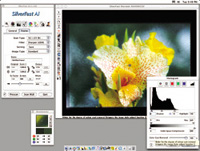
I had attempted scanning this series of flower images on
a preproduction sample of Kodak Royal Gold previously and
obtained very strange crossover color casts. With the 4000tf
and SilverFast
6.0 I tried again using NegaFix and the Royal Gold profile.
What a difference! Now I have excellent digital files with
the colors that look just like the flowers appeared originally
when I photographed them. |
|
In addition to the new features,
many of SilverFast’s functions have been added to and refined. The
performance of NegaFix has been enhanced by added and more refined “profiles”
for color negative and black and white films. The Selective Color adjustment
capability has been extended by the addition of multi-layers and multi-masking
capabilities, supporting the individual adjustment of similar, as well
as different color areas within an image. Converting or scanning color
to result in gray scale is a unique new feature that makes it possible
to control gray tone separations of different colors in the original.
SilverFast’s already powerful color cast removal has been enhanced
to accommodate correction of casts resulting from mixed light or other
differentiated casts within an image by being able to select up to four
points that can be edited in a special dialog box.
|
| |
|
Although I did
not expect much improvement from previous scans of my first
tests of Kodak’s Supra 100 color negative films, I
was pleasantly surprised. First of all with the 4000tf and
SilverFast 6.0, the Supra negatives were easier to adjust
for an accurate color reproduction of the subjects, resulting
in cleaner, more brilliant scanned images. The use of SRD
defect removal functioned quite effectively eliminating
more than half the dirt and scratches requiring little post-scan
use of the Rubber Stamp tool in Photoshop.
|
|
Scanning With The ArtixScan
4000tf And SilverFast 6.0
With the scanner unpacked and the software installed, if you’ve
experienced older 35mm scanners, you’ll notice and appreciate the
FireWire/USB interface for being a no hassle, direct access to your scanner
by just turning it on and starting the driver. This was the case after
installing the software on a Sony Vaio Digital Studio PC and a Mac G4,
including putting SilverFast in both the OS 10.2 and Classic 9.2 operating
systems. And, of course, I had to try running SilverFast 6.0 as a stand-alone
as well. After just a short time I had the ArtixScan running on both a
PC and a Mac G4, using both the Microtek ScanWizard driver and LaserSoft
SilverFast 6.0 both as a plug-in from Photoshop and a stand-alone, also
running SilverFast in both OS 10.2 and Classic OS 9.2.
As I intimated up front, it was logical for the purpose of evaluation
to re-scan images I had scanned with the original ArtixScan 4000t and
earlier versions of SilverFast for comparison. There were, of course,
a lot of images I could choose from, but I narrowed the selection to films
that were difficult to scan in the past, like several color negative and
black and white films, in addition to some challenging images on Kodachrome.
The latter choice was in part to test SRD dust and scratch removal, as
well as to evaluate the advantages, if any, of the 4000tf’s greater
dynamic range and color depth. And, I also must admit a personal interest
in these choices because much of my earlier work was on Kodachrome and
black and white (both of which cannot be scanned with Digital ICE dust
and scratch removal), while a lot of my more recent photography has been
done with color negative films that have not been easy to scan or have
not provided entirely satisfying results.
|
| |
|
LaserSoft SilverFast
6.0 supports all versions of Microsoft Windows and both
Apple Macintosh operating systems. Here it is shown running
as a stand-alone application on the Mac OS 10.2 system. |
|
Dust And Scratch Removal
Right at the outset I tried LaserSoft’s new SRD feature. The SRD
dust and scratch removal is purely software, unlike Digital ICE, and will
function with all films and even reflective scans. It will also work with
all scanners supported by LaserSoft in addition to the 4000tf. It is similar
in one respect to Digital ICE because it involves a means of recognizing
defects and distinguishing them from the underlying image information.
SRD is also different beyond being a purely software solution by providing
user interaction with a visual identification of what it is recognizing.
These functions can be adjusted via three dimensions of control with sliders:
Detection, Defect Size, and Intensity. This allows you to adjust the SRD
function so that it selects what you can see as defects in an enlarged
view of the pre-scan image and ignores everything else. The advantage
of this over any other software dust and scratch removal methods is that
it does not soften the overall image. I found that it works sufficiently
well with most film images to substantially reduce manual cleanup with
the Rubber Stamp tool in Photoshop. However, with grainier films, SRD
is less adept at distinguishing between dust and grain, and its advantage
is lessened.
|
| |
|
One of the most
valuable new features of SilverFast 6.0 is SRD (Smart Removal
of Defects) dust and scratch elimination providing user
interaction to control the selection of defects to be removed
(red) and leaving those non-defects and the remainder of
the image area unaffected by the process. This keeps detail
and grain as sharply defined as a normal scan. SRD also
has the advantage of functioning with all kinds of film
images including Kodachrome and silver-based black and white. |
|
Color Restoration
Although applicable to a much smaller portion of images that may be scanned,
ACR (Adaptive Color Restoration) can be an effective tool used sparingly
on more than just faded slides. As an example, I made a sizable collection
of colorful water reflection photos over time, and in hindsight I should
have used a polarizing filter to reduce the overhead influence of the
sky to enhance the intensity of the subject being reflected, but did not.
ACR produced a result that is quite like the effect of using a polarizing
filter with a camera.
Grain And Noise Elimination
Because I have always had a penchant for grainy pictures made on very
high-speed films, I first tried GANE (Grain And Noise Elimination) with
some of those images. Sorry LaserSoft, but it just turns really grainy
images into mushy images. However, with finer grained films, GANE can
virtually eliminate grain, which in some kinds of photography, like commercial
illustration of products, can be a distinct advantage. It provides very
pristine-looking results, particularly when small format-size cameras
like 35mm are used for this work.
|
| |
|
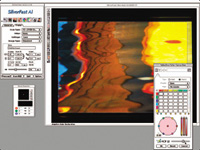
Another useful
new feature in SilverFast 6.0 is ACR (Adaptive Color Restoration)
which can be used to both restore colors in faded film images,
but can also be used to advantage with images with poor
color due to atmospheric conditions, flare, flat lighting,
and surface reflections, as in this example of a shot of
water reflections. |
|
NegaFix For Color And B&W
Negs
The most significant advantage I found with SilverFast 6.0, however, were
the improvements in NegaFix with more and better profiles for color negative
and black and white films. Even with what I have come to consider definitely
the best color negative film for scanning, Kodak Supra 100, NegaFix in
SilverFast 6.0 provided just about the best overall scan results I have
obtained from any film. Possibly of more value overall, the results I
obtained with SilverFast 6.0’s NegaFix with previously difficult
films to scan, like Fuji Reala 100, Agfa Optima, and even Ferrania/3M,
as well as significant improvements scanning Kodak Royal Gold for instance,
really boosted my enthusiasm to see what gems I’d previously passed
over in my film archives.
|
| |
|
This Kodachrome
image made in a daylight studio I had years ago was published
several times in the days of analog color separations. So
besides having a long range of tones from the pure white
walls of my studio to the black of Marianne’s blouse,
it had a lot of dirt and flaws acquired from handling, making
it a real test of both the 4000tf and SilverFast and its
SRD defect removal feature. The results were more than I
could hope for. The scan produced a clean, sharp image with
brilliant and accurate colors, and it’s the best the
image has ever looked. |
|
In the past the inability of
any scanner software to do a good job of interpreting silver-based black
and white prompted me to write a recently published article on scanning
black and white manually for the best results. With SilverFast Version
6.0 I found I obtained very good results and in some cases ideal scans
with NegaFix. However, this was only after trying profiles for films not
related to the actual film I was scanning until, by the process of elimination
of the entire black and white profile choice, I discovered the one that
worked best. This worked well with a number of film/developer combinations
I have used, with one exception: slow speed, fine-grain films like Kodak
Panatomic-X, Agfapan 25, and Ilford Pan-F. LaserSoft needs to develop
a profile for these films that accommodate the contrast buildup produced
by the scanner’s optics, which from my experience is like going
from a diffusion to a condenser enlarger in wet darkroom printing.
All of these tests of the functions
of SilverFast also revealed the practical advantages provided by the physical
improvements in the ArtixScan 4000tf over the previous model. Most dramatic
in what I obtained were scans with superior detail in highlights and shadows
from slides, particularly Kodachromes. I am sure that some of the quality
improvements in scans from color negative film—including smooth
tone transitions, better detail definition and separation of tones were
due to the scanner’s increased capabilities. And I should mention
that better success with scanning black and white is also somewhat attributable
to factors like the 4000tf’s greater dynamic range and color depth
specifications.
|
| |
|
Silver-based black
and white film scanning has been the forgotten stepchild
of the scanning industry, that is until now with SilverFast
6.0 and NegaFix. Now you can find a black and white film
profile that will provide an effective translation of the
image without any posterization, highlight blocking, or
dropped out shadow detail, at least with medium speed, (ISO
100-400) finer grained films. SilverFast 6.0 SRD dust and
scratch removal also functions quite well with most images
to reduce the amount of “spotting” that must
be done with a clone brush in post-scan editing. However,
LaserSoft has yet to provide a profile I could find that
will function effectively with slow-speed, very fine-grained
films. Maybe in the next upgrade it will be added. |
|
Evaluation And Recommendation
Both of the upgrades in the specifications for the ArtixScan 4000tf from
the previous model and of SilverFast from 5.5 to 6.0 may not seem dramatic
compared to some of the progress recently shown in digital cameras. But
on closer inspection, considering the very definite refinement in performance
of both hardware and software, the upgrades are more than worthwhile.
Looking at the Microtek ArtixScan 4000tf from a first-time buyer’s
perspective and considering that the software bundle now includes LaserSoft
SilverFast Ai 6.0, the advertised price (on the web) of from $1066 to
$916 offers a lot of scanning power and quality at a very modest cost.
Compare those prices to the original 4000t price, which did not include
the cost of the SilverFast software, at just under $1800, and you’ll
understand why this is a substantial gain for photographers.
For more information visit
the Microtek web site at www.microtekusa.com,
and LaserSoft at www.silverfast.com.
|
 |
|
 |
|
|
 |
 |
 |
|