Site Links
|
 |
 |
 |
The Nikon D2H A New Digital SLR For Action Photography
By Uwe Steinmueller July, 2004
| |
Photos
© 2004, Uwe Steinmueller, All Rights Reserved
|
|
The Nikon D2H has replaced
the Nikon D1H; it has also been targeted against the competition camera
Canon EOS-1D. The Nikon D2H is capable of 8 fps which matches the Canon
EOS-1D in terms of frames per second. There is no other camera in this
league on the market right now.
The D2H is an all-new camera and not an upgrade from the D1H. We consider
the D2H to be a statement on technology by Nikon to all professional
photographers (with the main market being photojournalists).
The D2H sports many new features that include many that are a first
for Nikon and for digital SLRs in general. First off, the body feels
quite light but is still 100 percent professional. It has much larger
magnification—in fact, you see 100 percent of the image in the
viewfinder. Its 2.5” LCD is one of the largest available and it
has a new 11-point autofocus system. The power system is matched to
the camera’s intended usage. The light yet amazingly long lasting
batteries are said to deliver about 2000 shots on one charge—we
made 900 shots and the battery was more than half full when we were
done! And even though Nikon’s flash systems are among the best
in the business, the D2H has an improved setup that allows cordless
synchronization of multiple slaves.
|
|
This camera is built for speed
and action, with an 8 fps burst rate. Its buffer can hold up to 40 JPEGs
or 24 raws (NEF, or Nikon Electronic Files) if noise reduction is off.
Once you switch the camera on there is virtually zero wait to make your
first image and I found virtually no shutter lag time. And for those who
can’t even wait to download their images there’s support for
wireless image transfer using the optional WT-1A transmitter.
D2H Image Quality
During our shooting tests we did not find anything we did not like about
the camera body or handling of the Nikon D2H. This means it all boils
down to image quality. Some might wonder about image quality from a 4-megapixel
sensor, especially with higher resolution sensors available. Keep in mind
that the D2H is designed for speed and that is why the resolution is limited
to 4 megapixels. But even the D1H served journalists well at 2.7 megapixels.
The 4 megapixels of the D2H, in our opinion, match the resolution of the
Canon EOS-1D. And 4 megapixels seem to be enough for most journalistic
work. There is always a tradeoff between speed and resolution.
|
|
All the images we made were
converted using Nikon’s Capture 4 software. The only other application
right now that can handle D2H files is Adobe’s (www.adobe.com)
Camera Raw 2 in Photoshop CS. But Camera Raw 2 did not get a final and
official calibration for the Nikon D2H. That is why we only recommend
using Capture 4 for raw files from the D2H at this point in time.
When we first heard that the D2H would produce higher saturation images
we were very skeptical. There are two types of saturation, the classic
saturation produced by film and digitally enhanced saturation that, to
us, is not really natural and often seems over the top. We’re happy
to report that the D2H produces saturation that is much more like film.
In our subjective opinion the D2H colors are excellent, yielding some
of the best colors we have seen from any pro camera without a lot of work
in Photoshop and straight from the raw converter, Nikon Capture 4.
|
| |
Comparison
of the Canon EOS-1D and the Nikon D2H.
|
|
D2H Noise Levels
So far we’ve explored the camera and image quality in terms of color,
but performance at higher ISO settings is also critical to potential users
of this camera. Comparing noise in different digital cameras is tricky
and we do not think that measurements tell the whole story. We are used
to film grain at higher ISOs, but digital noise can look less random and,
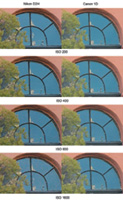
in some cases, more disturbing. For this report we compared the noise
appearance at various ISO settings between the new Nikon and the Canon
EOS-1D. Of course, the raw converter is very important here. We used Capture
One DSLR Pro for the Canon EOS-1D files (Phase One’s (www.phaseone.com)
Capture One is known to do a great job on removing color noise). For the
Nikon D2H we used Nikon’s Capture 4. We should note that we did
not inspect the noise you will get in deep shadows, as we tested using
a well-lit scene.
We used the Nikon AF-S 28-70mm f/2.8 on the D2H and the Canon 24-70mm
f/2.8 on the EOS-1D, both of which are both excellent zooms. The Canon
EOS-1D shots came out a bit brighter and the Nikon D2H shots had more
contrast. Sharpening was done in both cases with PhotoKit Sharpener (only
basic Capture Sharpening).
|
| |
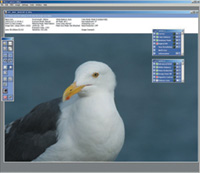
Nikon’s
Capture 4 software.
|
|
|
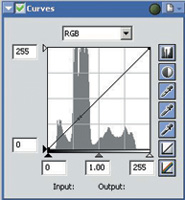
Nikon’s
Capture 4 Curves control.
|
|
 |
|
The Canon EOS-1D has a slight
edge at ISO 800 and 1600. But overall we think the Nikon D2H performed
quite well. The noise with the Nikon D2H has to be seen more critically
as Nikon has made a lot of claims about the low noise levels of their
new LBCAST sensor. To us, the D2H has not redefined the state of the art
in terms of noise. (Again, one main factor in this test is that Capture
One software may simply show the EOS-1D in a better light.)
Nikon’s View
6 And Capture 4
Version 3 of Nikon’s Capture was a solid raw converter and Capture
4 improves on it.
Capture 4 uses Nikon’s View 6 as its image browser. View 6 is a
nice image browser with large thumbnails. You can launch images into Capture
4 from View. This is all that matters for us in View, as we use ThumbsPlus
6 or Photoshop CS as our main image browsers.
Capture 4 is a very powerful and feature rich application and has to be
bought separately (there is a 30-day free trial with the camera). Actually
we think that Capture 4 is one of the best raw converters ever developed
by a camera manufacturer. It’s clear from the work done on the software
that Nikon takes Capture and the raw (NEF) format very seriously.
The Capture 4 Curves control shows a histogram that we always wanted to
see in Photoshop Curves. Although Capture 4 can also show the channel
histograms we would like to have an option to view the three channels
at the same time.
Digital DEE
One of the more interesting features in Capture 4 is “DEE,”
which helps correct for underexposure in backlit subjects or shaded areas
and for overexposure in brightly lit areas. We would like to see this
kind of tool in all raw converters. Actually, there are now equivalent
solutions in Photoshop CS’s Shadow/Highlight tool and Kodak’s
SHO Pro, which, as far as we know, is the basis for DEE. However, the
Kodak version works only in 8 bit. The downside of DEE in Capture 4 is
that it does not work in real-time. Whenever you change a value you have
to wait a couple of seconds for processing. But even then this is a very
useful and needed tool. This also demonstrates Nikon’s dedication
to deliver a first-class raw converter.
|
|
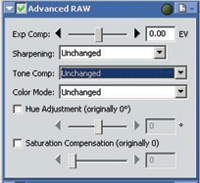
Advanced Raw
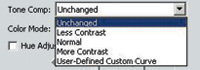
Advanced Raw is essential to correct exposure, sharpening, tone compensation,
and color mode (we set it to Adobe RGB in the camera). Tone compensation,
for example, allows you to select a tone curve for best contrast:
Most of the time “Normal” works for us but there are times
where “Less Contrast” can be helpful to open up shadows and
high contrast scenes. Actually you can do the same using DEE. You can
also use Advanced Raw processing for sharpening. Our preference was to
set sharpening to “Low” or even “Off” and perform
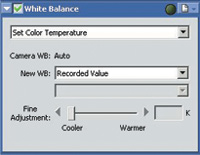
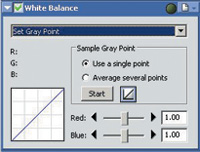
sharpening later in Photoshop. The White Balance tool in Capture 4 is
very powerful and works fine, but we would prefer that it work with fewer
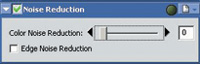
mouse clicks. We do not find the noise reduction in Capture 4 very helpful
as it also tends to blur details. For higher ISO images we recommend tools
like Noise Ninja (www.picturecode.com)
and Neat Image (www.neatimage.com).
We did not try Image Dust Off, a new feature for the latest Nikon cameras
like the D2H, so cannot say how well it works. In theory you take a dust
reference file with the camera and Capture 4 helps to remove dust spots.
For the last years we have used the Photoshop Healing Brush with great
success yet hope to find some hardware solutions that prevent dust spots
in the first place. But still, this feature is a neat idea and shows again
that Nikon takes user problems seriously. Dust on sensors is one of the
main problems digital photographers face.
Last but not least, Nikon has a new AF DX Fisheye 10.5mm f/2.8 G. Inside
Capture 4 is a new “Fisheye Lens” filter that can correct
the perspective of these shots. It is fun to use this new lens and the
“Fisheye Lens” filter makes it even more useable.
Workflow
How about workflow? We find that Nikon’s View 6 and Capture 4 are
well integrated, but do not find the workflow to be as smooth as when
we used Capture One DSLR and Photoshop CS with other digital SLRs. In
general, however, we had no problems working with Capture 4 and, for the
Nikon D2H, it’s the only game in town. We expect third-party raw
converters for the D2H in the near future, but don’t let that stop
you, as Capture 4 is a very solid solution.
Nikon has produced an amazing new camera. The D2H’s functionality
is an example of great engineering with excellent color quality and the
resolution that maximizes the 4-megapixel sensor. While noise in the D2H
does not define a new state of the art, it still delivers very acceptable
results. If you are looking for a fast action camera and own mainly Nikon
lenses, the Nikon D2H should clearly be your choice.
For more information, contact Nikon Inc. by calling (631) 547-8588 or
visiting their website at: www.nikonusa.com.
Uwe Steinmueller is publisher
of www.outbackphoto.com
and of numerous e-books on digital photography workflow.
Technical Specifications
Camera, Sensor: 4.1 megapixel digital SLR with LBCAST
(23.1x15.5mm) sensor
Lens Mount: Nikon F mount
Autofocus: 11 point
Metering: 3D color matrix, center-weighted, spot
Sensitivity: ISO 200-1600 (3200, 6400 with custom setting)
Shutter Speeds: 30 secs - 1/8000 sec, bulb
Burst Speed: 8 fps
Viewfinder: Approx. 100 percent coverage
LCD Monitor: 2.5” with 210,000 pixels
Reflex Mirror: Minimum blackout
Flash: Synchronization 1/250
File Formats: NEF (raw), JPEG
Weight: About 1070 g without battery
List Price: $3999, street price about $3400
|
 |
|
 |
|
|
 |
 |
 |
|