Site Links
|
 |
 |
 |
Leica Digilux 1 A Full Featured Digicam With A Big View
By Joe Farace September, 2002
| |
|
The Digilux 1 is the perfect companion for a stroll through
historic Olde Arvada; this image of a garden next to a dress
shop provides lots of color and details that show the camera's
ability to capture high-resolution images at its maximum
2240x1680 resolution setting.
Photos
© 2002, Joe Farace, All Rights Reserved
|
|
Produced in cooperation with
Panasonic, Leica's 4-megapixel Digilux 1 digital camera has a die-cast
magnesium body and a form factor that echoes their traditional rangefinder
cameras. When I first heard the Leica Digilux 1 would take styling cues
taken from the company's classic cameras, I envisioned an M3 with an LCD
screen on back. That notion was dispelled at PMA 2002 when I saw the actual
camera, which due to its blocky black shape, some wags have compared to
an Argus C3. Leica fans hold your e-mail flames; I like the Digilux's
styling but wished it were just a bit slimmer and lighter.
What It's Really Like?
Overall the ergonomics of the Digilux 1 feel comfortable and all controls
are easy to get to and use. Unlike many digital point-and-shoots, this
one has real manual focus; just flick the AF, MF, macro lever located
to the left of the lens into manual mode and grab the slim focusing ring
around the 33-100mm (equivalent) zoom lens and have at it. Bear in mind
that there's no focusing aid in the viewfinder, but an "in focus" beep
lets you know when you're right in focus. The camera's autofocus function
is so fast, convenient, and accurate that I never used manual focus after
first trying it. The Digilux 1 also beeps letting you know you're in focus
in AF mode. Leica offers a 2x digital zoom function but serious photographers
interested in getting the maximum quality from the imaging chip will seldom
use it.
|
| |
|
In its highest resolution JPEG mode, the Digilux 1 produces
a high quality image that's 7.467x5.6" at 300dpi. You can
easily scale it up to 9.333x7" at 240dpi using Photoshop's
Image Size control. This reverse Hail Mary low-angle shot
was made by placing the camera on the ground, with the zoom
lens at its widest setting. Color was superb right off the
SD memory card. |
|
Exposure Controls
Exposure controls include automatic, program, aperture priority, shutter
speed priority, manual, along with bracketing capability. To help you
fine-tune images, you can apply exposure compensation over a plus and
minus two-stop range in .25 EV steps. There are three exposure modes corresponding
to what most people would call evaluative, spot, and averaging and when
used under all kinds of lighting conditions each of these modes produced
perfectly exposed digital files. While you can control the aperture settings
in manual and aperture preferred modes, the minimum aperture is, like
most point-and-shoot digital cameras, f/8.0. Some of the photographers
at the Taos Shutterbug Digital Workshop were surprised to learn that this
setting is common in most digicams, but while this camera may be expensive
for a point-and-shoot camera (heck, a Leica Minilux Zoom 35mm camera is
only $50 less), it is still a point-and-shoot camera. I never once found
the f/8 aperture setting to be limiting when capturing images. In all
of the exposure modes and capture options, the images coming off the Secure
Digital (SD) card were near flawless; only a tweak-freak like myself would
want to adjust much of anything.
|
| |
|
Under low and mixed lighting conditions, like this auto
show with Mary Farace behind the wheel of an Audi TT roadster,
the Digilux 1's automatic White Balance produced acceptable
results under most difficult color temperature conditions,
but with the camera at ISO 400 noise levels, while acceptable,
became borderline. As I discovered with many other digicams,
while working under low light it's always a good idea to
use the slowest ISO equivalent that produces hand holdable
shutter speeds--or use a tripod. |
|
Exposure settings are controlled
by a knob that also has a setting for recording video clips mit sound
and the length of these mini-movies is limited only by the capacity of
the SD memory card. Below this knob is a rotating lever that lets you
choose capture, burst mode, and playback. To keep you from going through
menu hell, Leica has thoughtfully used many manual knobs and levers with
the Digilux l, although menus on the LCD preview screen area are used
to set white balance, resolution, and image quality. The most important
omission in physical controls is the lack of a trash can button for erasing
the missed opportunities accidentally captured on the SD card. This takes
a three-step menu chase to accomplish, but once learned goes quickly.
Access to the SD card and USB/Video
connections are through clever sliding doors that are flush with the Digilux's
sides. These doors add to the smooth shape of the camera and protect access
to these fragile connections. I really appreciated not having to pop open
flimsy rubber covers to get to the USB connection.
In The Field
At just under 13 oz without battery, it's a hefty digicam and was provided
to me without a neck strap--although one will be packed with the camera
when it ships--making it a bit awkward to carry. Placing it in a Lowepro
fanny pack proved to be an excellent temporary solution. Out of the case,
I was able to work quickly with the Digilux 1: All controls are easy to
get to and the built-in viewfinder diopter corrections mean I can leave
my eyeglasses in the car. At the highest JPEG quality, images can be captured
at (almost) four frames a second which can be increased to eight frames
in 2 seconds by using higher image compression. More than that, the Digilux
1 is just fun and easy to use and captures the essence of point-and-shoot
photography at its best.
|
| |
|
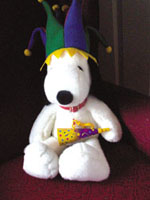
In this series of unretouched JPEG files made at 2240x1680
resolution, the image noise at ISO 100 in a low-light photograph
of this lovable test subject is negligible. |
|
The 2.5" LCD preview screen
is the Digilux's crown jewel. Not only is it big, but the color and contrast
are the best I've seen on any digital camera regardless of price. That
big screen invites glare so Leica has taken the extra step of including
a removable pop-open hood that bears an uncanny resemblance to a Hasselblad's
focusing hood. Does it work? Kinda. It can help in many lighting conditions,
but in the bright glare of the high altitudes of Colorado and New Mexico,
I found myself stepping into the shade to review images.
The built-in flash has lots
of modes including redeye reduction, slow sync, and second curtain sync
and the hot shoe on top is compatible with Leica-brand external flash
units, which would be a useful option if you plan on doing lots of paparazzi-style
flash photography. The only failing under tricky available light situations
was the amount of noise generated at higher ISO equivalent settings. I
recommend that you shoot a test under low-light settings with the ISO
at 100, 200, and 400 and critically evaluate the results. My own tests
showed little if any noise at ISO 100, some noise at 200, and lots at
400, but keep in mind what concerns me might not bother you and a noisy
photograph is always better than no photograph at all. You can always
tweak the image file with software tools such as Visual Infinity's (www.visinf.com)
Grain Surgery, a plug-in that's compatible with Adobe Photoshop Elements
bundled with the camera.
|
| |
|
At ISO 400, you can't miss the noise. Is it too much? Only
your own sensibilities will decide, and there is software
available that can mitigate image noise. (See text for details.)
|
|
If you can resist constantly
admiring the images on the big LCD screen, you'll find that power consumption
is modest and Leica claims the camera can be used for about three hours
with the display switched off or two hours when using the preview screen.
I found that to be true. The proprietary, built-in lithium ion battery
can be fully recharged in two hours and a battery charger is supplied
with the camera.
In The Digital Darkroom
Leica provides a USB cable that lets you connect the camera directly to
your computer. With most recent Mac OS and Windows computers, the Digilux
1 shows up on the desktop as a hard drive, making copying the image files
to your hard disk a simple drag and copy operation. You can transfer images
to your computer with card reader compatible SD cards, and more and more
6-in-1 readers are available that support this format. No additional software
required, although Leica includes Adobe Photoshop Elements 1.0 and ACDSee
to help manipulate and manage your captured images. Once on your hard
drive, you'll find that image quality is superb. At 2240x1680 resolution
you can produce acceptable prints up to 11x17 and stunning 8x10 and smaller
output on photo quality printers such as the Epson Stylus Photo 1280 that
I use.
|
| |
|
At ISO 200, the noise becomes obvious but not objectionable.
|
|
The camera supports Mac OS
9, Mac OS X, Microsoft Windows 98, Me, 2000, XP, as well as Windows NT
without USB support. It also supports Epson Print Image System (PIM) and
the Digital Print Order Format (DPOF).
Is this the M3 of digicams?
I leave this to the Leica cognoscenti to debate but what I do know is
that the Digilux 1 combines state of the art electronics with legendary
Leica optics to make this one of the best point-and-shoot digital cameras
I've tested.
For more information, contact
Leica Camera, Inc. by calling (201) 767-7500 or by visiting their web
site, www.leica-camera.com.
|
|
Image Resolution: 2240x1680,
1600x1200, 1120x840 and 640x480/320x240 for video clips
File Formats: TIFF,
JPEG (low compression FINE and high compression STANDARD), Motion-JPEG
Storage Media: Secure
Digital (64MB card supplied) or MultiMediaCard
Preview Screen: 2.5"
color TFT LCD
Viewfinder: Optical
image with zoom function and diopter compensation
Imaging Sensor: 1/1.76"
CCD sensor with 3.9 (effective) megapixels
ISO Equivalents: Auto/100/200/400
Lens: Leica DC Vario-Summicron
f/2-2.5 (33-100mm equivalent)
Near Focus: 11.81";
2.36" in macro mode with wide angle setting; 7.87" with telephoto setting
Digital Zoom: 2x (variable)
Exposure Control: Automatic,
program, aperture priority, shutter speed priority, manual (bracketing
capability)
Shutter Speeds: 8
- 1/1000 sec
Metering Modes: Multi-field,
integral, selective
Exposure Compensation:
+/-2 EV
Flash: Automatic; on;
off; pre-flash for redeye reduction; slow synchronization; synchronization
at the second curtain; hot shoe for use with Leica external flash units
White Balance: Automatic,
manual, presettings (daylight, overcast sky, incandescent light, fluorescent
light, flash)
Connections: USB 1.1;
DC in; A/V output PAL/NTSC selectable
Compatibility: Epson
Print Image System (PIM), Digital Print Order Format (DPOF), Mac OS 9,
Mac OS X, Windows 98/Me/2000/XP, Windows NT and Windows 95 without USB
support. Software includes Adobe Photoshop Elements and ACDSee.
Power Supply: Lithium
ion rechargeable battery
Dimensions: 5x3.28x2.65"
Weight: 12.87 oz (without
battery)
|
 |
|
 |
|
|
 |
 |
 |
|